
# idea
- 2023.1.6是最后一个支持windows7的版本了
- 2023.2以后不再支持windows7
| 🐉 Idea集成其他环境、工具(JIRA、SSH等) | 🐉 快捷键 |
|---|---|
| 设置 | 插件推荐 |
| IDEA WEB项目部署 | IDEA Git |
| idea各种问题 | 小诀窍 |
| 主题推荐 | what's new |
| jetbra码 | 调试技巧 |
# idea集成的各种工具
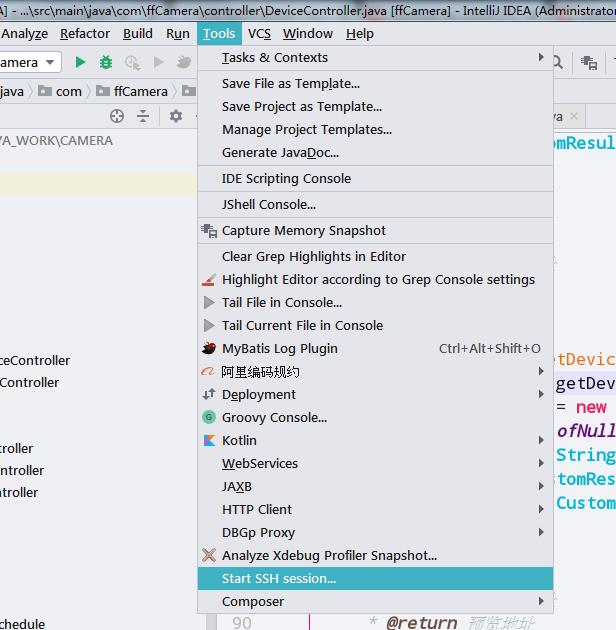
# SSH集成
如果有中文乱码问题,可以在Settings里调整编码为utf-8
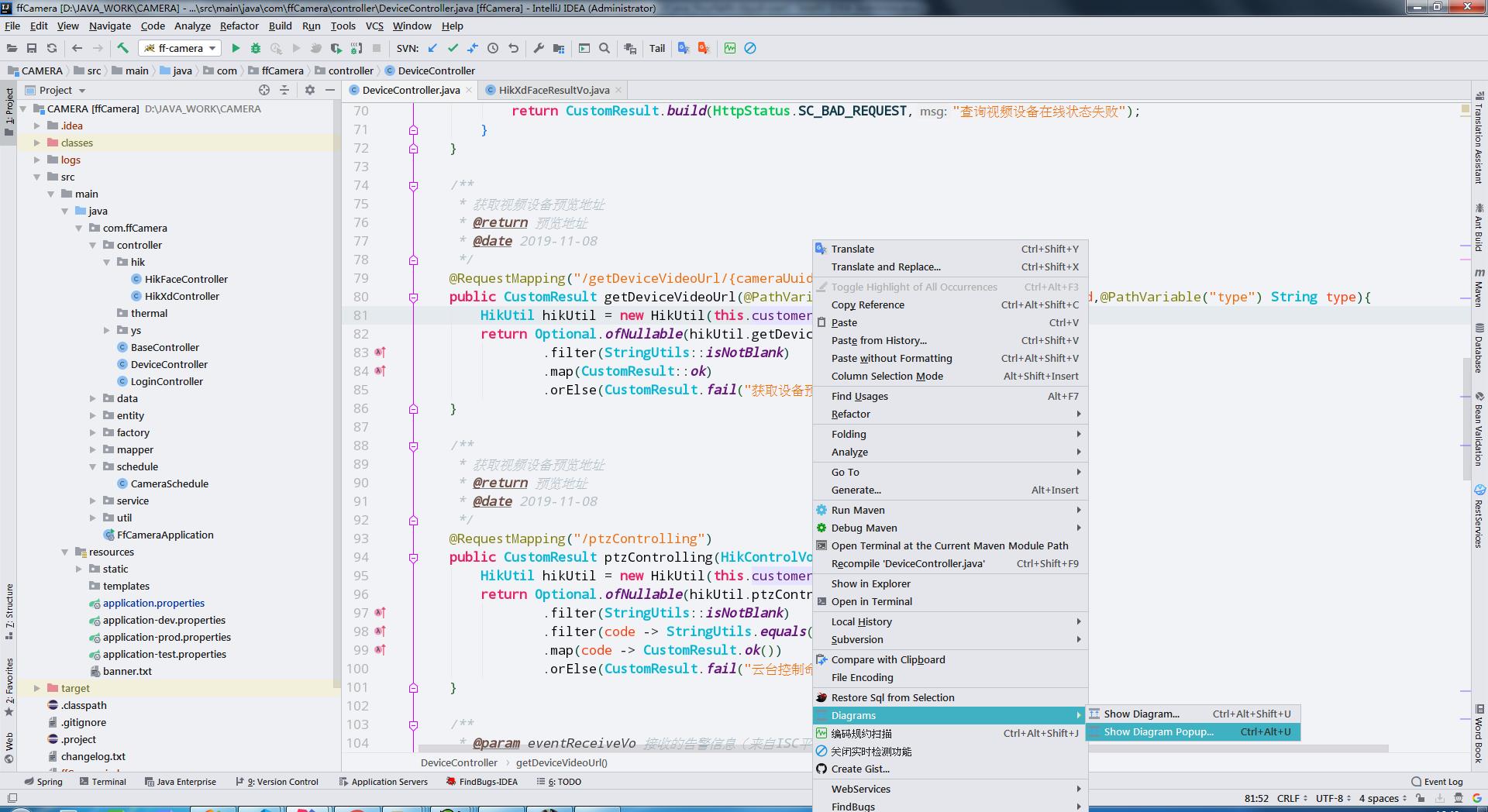
# UML类图插件
TIP
idea已经集成了该功能,只是默认没打开。类中单击右键->Diagram
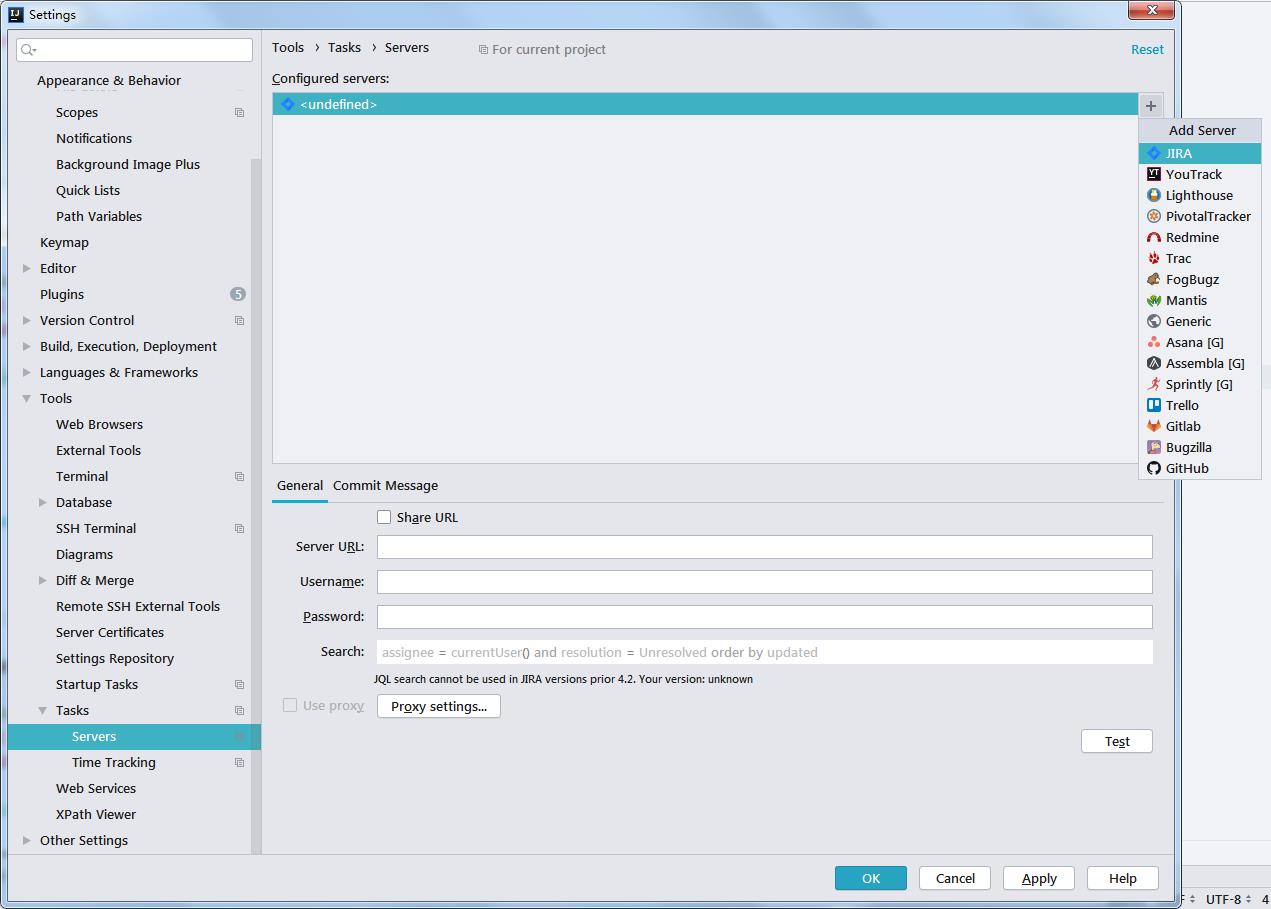
# 与JIRA集成
TIP
File -> Settings ->Tools -> Task -> Servers 点击右侧上面的+号,选择JIRA,然后输入JIRA的Server地址,用户名、密码即可
# IDEA默认配置文件修改
# Use ${idea.home.path} macro to specify location relative to IDE installation home.
# Use ${xxx} where xxx is any Java property (including defined in previous lines of this file) to refer to its value.
# Note for Windows users: please make sure you're using forward slashes (e.g. c:/idea/system).

#---------------------------------------------------------------------
# Uncomment this option if you want to customize path to IDE config folder. Make sure you're using forward slashes.
#---------------------------------------------------------------------
# idea.config.path=${user.home}/.IntelliJIdea/config
idea.config.path=${idea.home.path}/bin/IdeaConfig/config

#---------------------------------------------------------------------
# Uncomment this option if you want to customize path to IDE system folder. Make sure you're using forward slashes.
#---------------------------------------------------------------------
# idea.system.path=${user.home}/.IntelliJIdea/system
idea.system.path=${idea.home.path}/bin/IdeaConfig/system

#---------------------------------------------------------------------
# Uncomment this option if you want to customize path to user installed plugins folder. Make sure you're using forward slashes.
#---------------------------------------------------------------------
# idea.plugins.path=${idea.config.path}/plugins
idea.plugins.path=${idea.config.path}/plugins

#---------------------------------------------------------------------
# Uncomment this option if you want to customize path to IDE logs folder. Make sure you're using forward slashes.
#---------------------------------------------------------------------
# idea.log.path=${idea.system.path}/log
idea.system.path=${idea.home.path}/bin/IdeaConfig/system/log
1
2
3
4
5
6
7
8
9
10
11
12
13
14
15
16
17
18
19
20
21
22
23
24
25
26
27
2
3
4
5
6
7
8
9
10
11
12
13
14
15
16
17
18
19
20
21
22
23
24
25
26
27
# 数据库驱动程序jdbc-drivers
# 各版本封面设计



# 激活服务器找寻
访问https://www.shodan.io/search?query=Location%3A+https%3A%2F%2Faccount.jetbrains.com%2Ffls-auth
# 2022-10-27
http://83.138.85.194:8081/
http://43.153.35.11/
http://20.117.154.102:8080/
http://81.68.111.137:8000/
http://178.157.25.163:8080/
http://147.228.63.4:8080/
http://216.118.207.58:8181/
http://178.157.24.202:8080/
1
2
3
4
5
6
7
8
2
3
4
5
6
7
8
# 2022-08-29
http://157.143.254.66:8080/
http://134.53.225.196/
http://178.157.25.78:8080/
http://3.82.174.124/
http://212.73.75.141/
http://134.68.246.32/
http://200.13.89.3:8080/
http://52.137.14.60/
http://165.22.249.172:8080/
1
2
3
4
5
6
7
8
9
2
3
4
5
6
7
8
9
# 2022-06-01
http://213.183.100.136:8080/
http://193.242.170.12:8080/
http://193.2.42.18:8080/
http://5.2.198.177:8001/
http://184.168.126.173/
http://195.208.239.74/
https://154.31.170.80/
http://82.195.231.133:8181/
https://188.210.42.106/
https://153.106.195.23/
http://51.140.137.126:8080/
http://147.102.58.185:8888/
http://185.76.145.167:8080/
http://34.193.37.243:8080/
http://3.73.159.219:8080/
http://109.123.155.186:8080/
http://203.23.253.45:8081/
http://195.19.32.121:8787/
http://150.254.118.138:8080/
http://185.76.145.167:8080/
http://85.143.112.153/
http://94.100.93.228:8080/
http://195.208.237.215:8181/

// 中国
http://101.43.29.156:8282/
http://43.138.69.54:8080/

// 失效
https://35.188.104.230/
http://186.211.99.100/
http://200.17.85.220/
https://[2600:9000:20a6:c200:5:6d5b:8840:93a1]/
1
2
3
4
5
6
7
8
9
10
11
12
13
14
15
16
17
18
19
20
21
22
23
24
25
26
27
28
29
30
31
32
33
2
3
4
5
6
7
8
9
10
11
12
13
14
15
16
17
18
19
20
21
22
23
24
25
26
27
28
29
30
31
32
33
# idea无法启动原因
- idea64.exe.vmoptions中某文件可能不存在
C:\Users\htring\AppData\Roaming\JetBrains\IntelliJIdea2022.2