
# HashMap
| 如果你这么去理解HashMap就会发现它真的很简单 | 全网把Map中的hash()分析的最透彻的文章,别无二家。 |
|---|---|
| Java HashMap 常用方法详解 | HashMap和HashTable到底哪不同? |
| Java中各种Map及排序问题 |
HashMap
HashSet是依赖于HashMap的,HashSet集合就是HashMap的key所组成的集合。
默认的初始容量为 16,默认的加载因子为 0.75。
    /**
     * The default initial capacity - MUST be a power of two.
     */
    static final int DEFAULT_INITIAL_CAPACITY = 1 << 4; // aka 16
    /**
     * The maximum capacity, used if a higher value is implicitly specified
     * by either of the constructors with arguments.
     * MUST be a power of two <= 1<<30.
     */
    static final int MAXIMUM_CAPACITY = 1 << 30;
2
3
4
5
6
7
8
9
10
# 初始化map的一些方法
// 普通青年
HashMap<String, String> map = new HashMap<String, String>();
map.put("Name", "June");
map.put("QQ", "2572073701");


// 文艺青年——此方法不建议使用,存在性能问题
HashMap<String, String> map = new HashMap<String, String>() {
    {
        put("Name", "June");
        put("QQ", "2572073701");
    }
};
2
3
4
5
6
7
8
9
10
11
12
13
工具类org.assertj.core.util.Maps
Map<String, String> bizMap = Maps.newHashMap("itemsName",bo.getName());
推而广之
List<String> names = new ArrayList<String>() {
    {
        for (int i = 0; i < 10; i++) {
            add("A" + i);
        }
    }
};
2
3
4
5
6
7
# JDK1.8新增的Map方法
public interface Map<K,V> {
    // 如果key存在,则忽略put操作
    default V putIfAbsent(K key, V value) {
        V v = get(key);
        if (v == null) {
            v = put(key, value);
        }

        return v;
    }

    // 循环
    public void forEach(BiConsumer<? super K, ? super V> action){...}

    // 如果存在则计算:先判断key是否存在,如果key存在,将BiFunction计算的结果作为key的新值重新put进去
    public V computeIfPresent(K key, BiFunction<? super K, ? super V, ? extends V> remappingFunction) {}

    // 如果key不存在则将计算的结果put进去
    public V computeIfAbsent(K key, Function<? super K, ? extends V> mappingFunction) {}

    // 只有key-value同时满足条件时才会删除
    public boolean remove(Object key, Object value){}

    // 如果key不存在,则返回默认值
    public V getOrDefault(Object key, V defaultValue) {}

    // 合并:将BiFunction的结果作为key的新值
    public V merge(K key, V value, BiFunction<? super V, ? super V, ? extends V> remappingFunction) {}
2
3
4
5
6
7
8
9
10
11
12
13
14
15
16
17
18
19
20
21
22
23
24
25
26
27
28
示例
@Test
public void putIfAbsent() {
    Map<String, String> map = new HashMap<>();
    map.putIfAbsent("key", "oldValue");
    // 如果key存在,则忽略put操作
    map.putIfAbsent("key", "newValue");
    String value = map.get("key");
    System.out.println(value);
}

@Test
public void forEach() {
    Map<String, String> map = new HashMap<>();
    map.putIfAbsent("key1", "value1");
    map.putIfAbsent("key2", "value1");
    map.putIfAbsent("key3", "value1");

    map.forEach((key, value) -> System.out.println(key + ":" + value));
}

@Test
public void computeIfPresent() {
    Map<String, String> map = new HashMap<>();
    map.putIfAbsent("key1", "value1");

    // 如果存在则计算:先判断key是否存在,如果key存在,将BiFunction计算的结果作为key的新值重新put进去
    map.computeIfPresent("key1", (key, value) -> key + "=" + value);
    String value = map.get("key1");
    System.out.println(value);

    // 如果计算的结果为null,相当于从map中移除
    map.computeIfPresent("key1", (k, v) -> null);
    boolean contain = map.containsKey("key1");
    System.out.println(contain);
}

@Test
public void computeIfAbsent() {
    // 如果key不存在则将计算的结果put进去
    Map<String, String> map = new HashMap<>();
    map.computeIfAbsent("key2", v -> "value2");
    boolean contain = map.containsKey("key2");
    System.out.println(contain);
}

@Test
public void remove(){
    Map<String, String> map = new HashMap<>();
    map.putIfAbsent("key1", "value1");
    boolean result = map.remove("key1", "value2");
    System.out.println(result);
}

@Test
public void getOrDefault(){
    Map<String, String> map = new HashMap<>();
    String value = map.getOrDefault("key1", "default value");
    System.out.println(value);
}

@Test
public void merge(){
    Map<String, String> map = new HashMap<>();
    map.put("key1", "value1");

    map.merge("key1", "newValue", (value, newValue) -> value + "-" + newValue);
    String value = map.get("key1");
    // value1-newValue
    System.out.println(value);
}
2
3
4
5
6
7
8
9
10
11
12
13
14
15
16
17
18
19
20
21
22
23
24
25
26
27
28
29
30
31
32
33
34
35
36
37
38
39
40
41
42
43
44
45
46
47
48
49
50
51
52
53
54
55
56
57
58
59
60
61
62
63
64
65
66
67
68
69
70
# 初始容量
如果初始给的不是2的幂,则自动为转换为临近的2的幂
/**
     * Returns a power of two size for the given target capacity.
     */
    static final int tableSizeFor(int cap) {
        int n = cap - 1;
        n |= n >>> 1;
        n |= n >>> 2;
        n |= n >>> 4;
        n |= n >>> 8;
        n |= n >>> 16;
        return (n < 0) ? 1 : (n >= MAXIMUM_CAPACITY) ? MAXIMUM_CAPACITY : n + 1;
    }
2
3
4
5
6
7
8
9
10
11
12
# 加载因子
加载因子和 HashMap 的扩容机制有着非常重要的联系,它可以决定在什么时候才进行扩容。HashMap 是通过一个阀值来确定是否扩容,当容量超过这个阀值的时候就会进行扩容,而加载因子正是参与计算阀值的一个重要属性,阀值的计算公式是 容量 * 加载因子。如果通过默认构造方法创建 HashMap ,则阀值为 16 * 0.75 = 12 ,就是说当 HashMap 的容量超过12的时候就会进行扩容
/**
     * The next size value at which to resize (capacity * load factor).
     *
     * @serial
     */
    // (The javadoc description is true upon serialization.
    // Additionally, if the table array has not been allocated, this
    // field holds the initial array capacity, or zero signifying
    // DEFAULT_INITIAL_CAPACITY.)
    int threshold;
2
3
4
5
6
7
8
9
10
加载因子
加载因子在一般情况下都最好不要去更改它,默认的0.75是一个非常科学的值,它是经过大量实践得出来的一个经验值。
当加载因子设置的比较小的时候,阀值就会相应的变小,扩容次数就会变多,这就会导致 HashMap 的容量使用不充分,还没添加几个值进去就开始进行了扩容,浪费内存,扩容效率还很低;
当加载因子设置的又比较大的时候呢,结果又很相反,阀值变大了,扩容次数少了,容量使用率又提高了,看上去是很不错,实际上还是有问题,因为容量使用的越多,Hash 冲突的概率就会越大。
所以,选择一个合适的加载因子是非常重要的。
# HashMap中傻傻分不清楚的那些概念
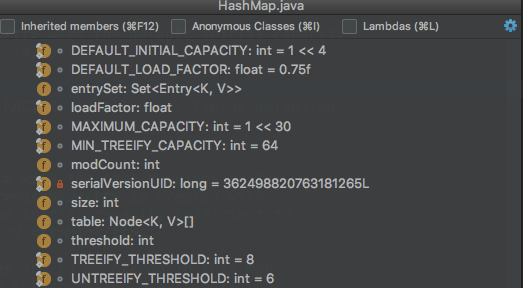
上面是一张HashMap中主要的成员变量的图,其中有一个是我们本文主要关注的: size、loadFactor、threshold、DEFAULT_LOAD_FACTOR和DEFAULT_INITIAL_CAPACITY。
- transient int size;
- 记录了Map中KV对的个数
- loadFactor
- 装载印子,用来衡量HashMap满的程度。loadFactor的默认值为0.75f(static final float DEFAULT_LOAD_FACTOR = 0.75f;)。
- int threshold;
- 临界值,当实际KV个数超过threshold时,HashMap会将容量扩容,threshold=容量*加载因子
- 除了以上这些重要成员变量外,HashMap中还有一个和他们紧密相关的概念:capacity
- 容量,如果不指定,默认容量是16(static final int DEFAULT_INITIAL_CAPACITY = 1 << 4;)
size和capacity之间有啥关系?为啥要定义这两个变量。loadFactor和threshold又是干啥的?
# size和capacity
HashMap中的size和capacity之间的区别其实解释起来也挺简单的。我们知道,HashMap就像一个“桶”,那么capacity就是这个桶“当前”最多可以装多少元素,而size表示这个桶已经装了多少元素。来看下以下代码:
    Map<String, String> map = new HashMap<String, String>();
    map.put("hollis", "hollischuang");

    Class<?> mapType = map.getClass();
    Method capacity = mapType.getDeclaredMethod("capacity");
    capacity.setAccessible(true);
    System.out.println("capacity : " + capacity.invoke(map));

    Field size = mapType.getDeclaredField("size");
    size.setAccessible(true);
    System.out.println("size : " + size.get(map));
2
3
4
5
6
7
8
9
10
11
我们定义了一个新的HashMap,并想其中put了一个元素,然后通过反射的方式打印capacity和size。输出结果为:capacity : 16、size : 1
默认情况下,一个HashMap的容量(capacity)是16,设计成16的好处我在《全网把Map中的hash()分析的最透彻的文章,别无二家。》中也简单介绍过,主要是可以使用按位与替代取模来提升hash的效率。
为什么我刚刚说capacity就是这个桶“当前”最多可以装多少元素呢?当前怎么理解呢。其实,HashMap是具有扩容机制的。在一个HashMap第一次初始化的时候,默认情况下他的容量是16,当达到扩容条件的时候,就需要进行扩容了,会从16扩容成32。
我们知道,HashMap的重载的构造函数中,有一个是支持传入initialCapacity的,那么我们尝试着设置一下,看结果如何。
    Map<String, String> map = new HashMap<String, String>(1);

    Class<?> mapType = map.getClass();
    Method capacity = mapType.getDeclaredMethod("capacity");
    capacity.setAccessible(true);
    System.out.println("capacity : " + capacity.invoke(map));

    Map<String, String> map = new HashMap<String, String>(7);

    Class<?> mapType = map.getClass();
    Method capacity = mapType.getDeclaredMethod("capacity");
    capacity.setAccessible(true);
    System.out.println("capacity : " + capacity.invoke(map));


    Map<String, String> map = new HashMap<String, String>(9);

    Class<?> mapType = map.getClass();
    Method capacity = mapType.getDeclaredMethod("capacity");
    capacity.setAccessible(true);
    System.out.println("capacity : " + capacity.invoke(map));
2
3
4
5
6
7
8
9
10
11
12
13
14
15
16
17
18
19
20
21
分别执行以上3段代码,分别输出:capacity : 2、capacity : 8、capacity : 16。
也就是说,默认情况下HashMap的容量是16,但是,如果用户通过构造函数指定了一个数字作为容量,那么Hash会选择大于该数字的第一个2的幂作为容量。(1->2、7->8、9->16)
这里有一个小建议:在初始化HashMap的时候,应该尽量指定其大小。尤其是当你已知map中存放的元素个数时。(《阿里巴巴Java开发规约》)
# loadFactor和threshold
前面我们提到过,HashMap有扩容机制,就是当达到扩容条件时会进行扩容,从16扩容到32、64、128…
那么,这个扩容条件指的是什么呢?
其实,HashMap的扩容条件就是当HashMap中的元素个数(size)超过临界值(threshold)时就会自动扩容。
在HashMap中,threshold = loadFactor * capacity。
loadFactor是装载因子,表示HashMap满的程度,默认值为0.75f,设置成0.75有一个好处,那就是0.75正好是3/4,而capacity又是2的幂。所以,两个数的乘积都是整数。
对于一个默认的HashMap来说,默认情况下,当其size大于12(16*0.75)时就会触发扩容。
验证代码如下:
    Map<String, String> map = new HashMap<>();
    map.put("hollis1", "hollischuang");
    map.put("hollis2", "hollischuang");
    map.put("hollis3", "hollischuang");
    map.put("hollis4", "hollischuang");
    map.put("hollis5", "hollischuang");
    map.put("hollis6", "hollischuang");
    map.put("hollis7", "hollischuang");
    map.put("hollis8", "hollischuang");
    map.put("hollis9", "hollischuang");
    map.put("hollis10", "hollischuang");
    map.put("hollis11", "hollischuang");
    map.put("hollis12", "hollischuang");
    Class<?> mapType = map.getClass();

    Method capacity = mapType.getDeclaredMethod("capacity");
    capacity.setAccessible(true);
    System.out.println("capacity : " + capacity.invoke(map));

    Field size = mapType.getDeclaredField("size");
    size.setAccessible(true);
    System.out.println("size : " + size.get(map));

    Field threshold = mapType.getDeclaredField("threshold");
    threshold.setAccessible(true);
    System.out.println("threshold : " + threshold.get(map));

    Field loadFactor = mapType.getDeclaredField("loadFactor");
    loadFactor.setAccessible(true);
    System.out.println("loadFactor : " + loadFactor.get(map));

    map.put("hollis13", "hollischuang");
    Method capacity = mapType.getDeclaredMethod("capacity");
    capacity.setAccessible(true);
    System.out.println("capacity : " + capacity.invoke(map));

    Field size = mapType.getDeclaredField("size");
    size.setAccessible(true);
    System.out.println("size : " + size.get(map));

    Field threshold = mapType.getDeclaredField("threshold");
    threshold.setAccessible(true);
    System.out.println("threshold : " + threshold.get(map));

    Field loadFactor = mapType.getDeclaredField("loadFactor");
    loadFactor.setAccessible(true);
    System.out.println("loadFactor : " + loadFactor.get(map));
2
3
4
5
6
7
8
9
10
11
12
13
14
15
16
17
18
19
20
21
22
23
24
25
26
27
28
29
30
31
32
33
34
35
36
37
38
39
40
41
42
43
44
45
46
47
输出结果:

capacity : 16
size : 12
threshold : 12
loadFactor : 0.75

capacity : 32
size : 13
threshold : 24
loadFactor : 0.75
2
3
4
5
6
7
8
9
10
11
当HashMap中的元素个数达到13的时候,capacity就从16扩容到32了。
HashMap中还提供了一个支持传入initialCapacity,loadFactor两个参数的方法,来初始化容量和装载因子。不过,一般不建议修改loadFactor的值。
# 总结
HashMap中size表示当前共有多少个KV对,capacity表示当前HashMap的容量是多少,默认值是16,每次扩容都是成倍的。loadFactor是装载因子,当Map中元素个数超过loadFactor* capacity的值时,会触发扩容。loadFactor* capacity可以用threshold表示。
# 在 Java 中遍历 HashMap 的5种最佳方式
# 1. 使用 Iterator 遍历 HashMap EntrySet
Iterator < Entry < Integer, String >> iterator = coursesMap.entrySet().iterator();
    while (iterator.hasNext()) {
        Entry < Integer, String > entry = iterator.next();
        System.out.println(entry.getKey());
        System.out.println(entry.getValue());
    }
2
3
4
5
6
# 2. 使用 Iterator 遍历 HashMap KeySet
Iterator < Integer > iterator = coursesMap.keySet().iterator();
    while (iterator.hasNext()) {
        Integer key = iterator.next();
        System.out.println(key);
        System.out.println(coursesMap.get(key));
    }
2
3
4
5
6
# 3. 使用 For-each 循环遍历 HashMap
for (Map.Entry < Integer, String > entry: coursesMap.entrySet()) {
    System.out.println(entry.getKey());
    System.out.println(entry.getValue());
}
2
3
4
# 4. 使用 Lambda 表达式遍历 HashMap
coursesMap.forEach((key, value) -> {
    System.out.println(key);
    System.out.println(value);
});
2
3
4
# 5. 使用 Stream API 遍历 HashMap
coursesMap.entrySet().stream().forEach((entry) - > {
    System.out.println(entry.getKey());
    System.out.println(entry.getValue());
});
2
3
4