
# 全文搜索引擎ElasticSearch
注意java的es默认连接端口是9300,9200是http端口,这两个在使用中应注意区分。
| 🐉 查询与聚合 | springboot整合 |
|---|---|
| 错误整理 | 官网权威指南 |
| 分词 | 拼音插件 |
# 1.安装
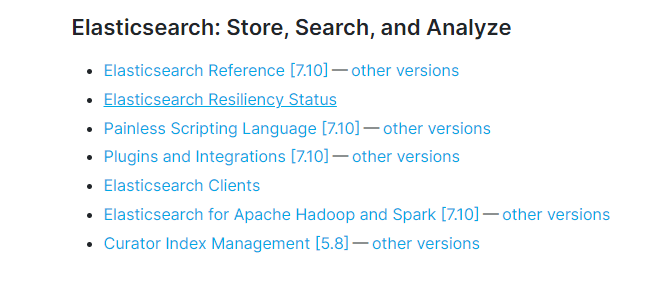
解压缩,并运行命令
C:\Green\elasticsearch-7.10.0\bin> .\elasticsearch
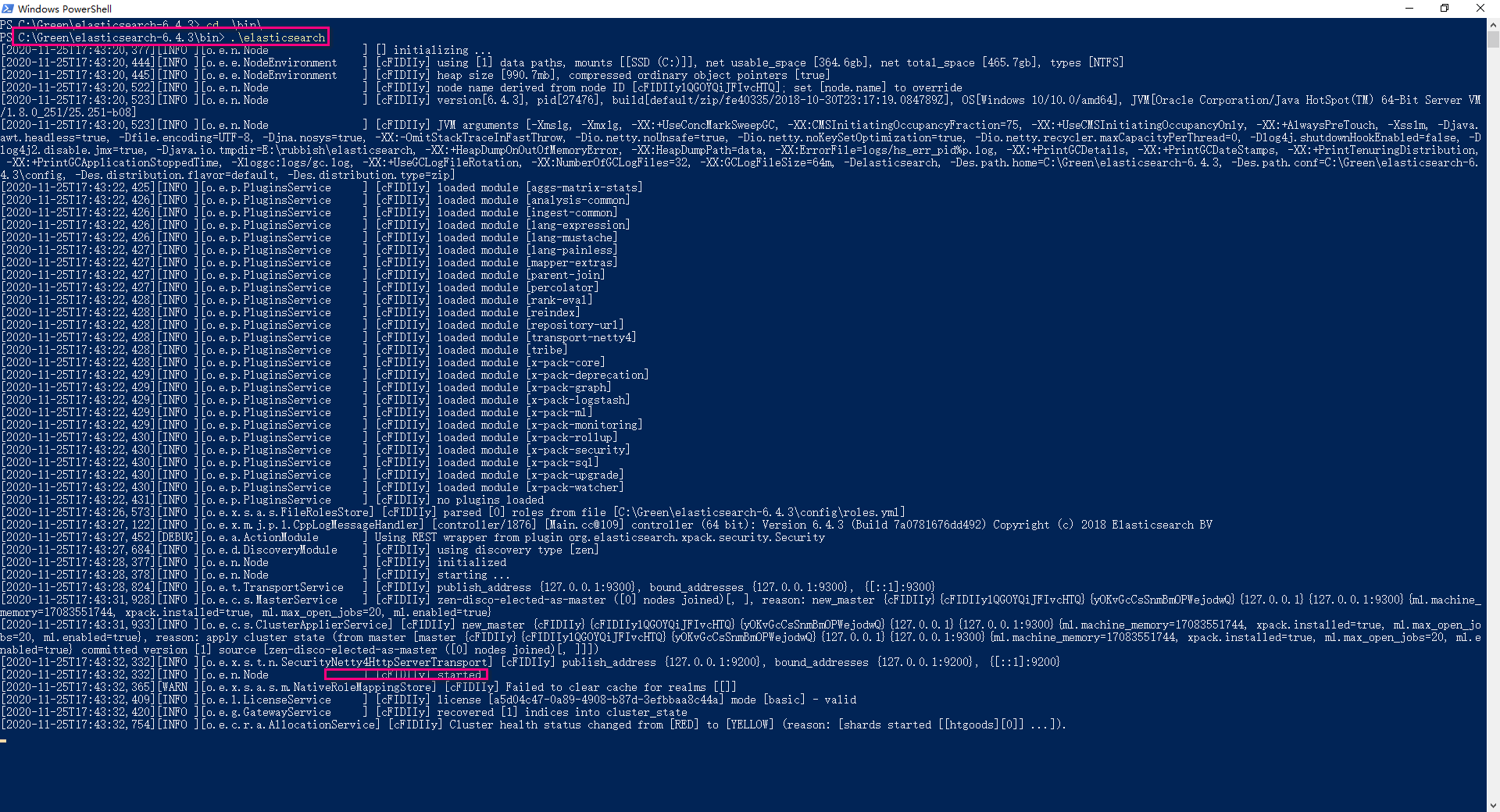
按下 Ctrl + C,Elastic 就会停止运行。
执行如下命令,可以查看一些服务的基本信息
Invoke-RestMethod http://localhost:9200
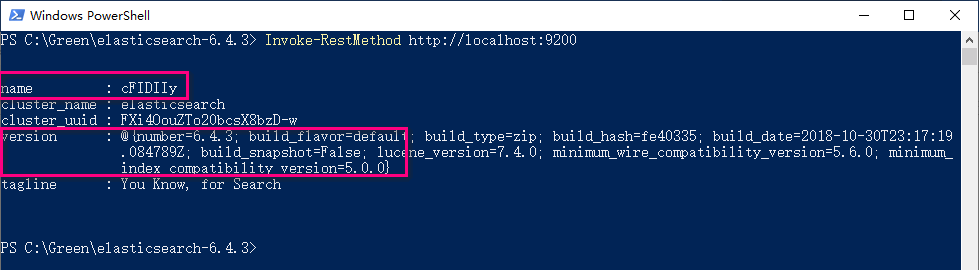
默认情况下,Elastic 只允许本机访问,如果需要远程访问,可以修改 Elastic 安装目录的config/elasticsearch.yml文件,去掉network.host的注释,将它的值改成0.0.0.0,然后重新启动 Elastic。
network.host: 0.0.0.0
WARNING
上面代码中,设成0.0.0.0让任何人都可以访问。线上服务不要这样设置,要设成具体的 IP。
# Install Elasticsearch with Docker
# Pulling the image
Obtaining Elasticsearch for Docker is as simple as issuing a docker pull command against the Elastic Docker registry.
docker pull docker.elastic.co/elasticsearch/elasticsearch:7.10.2
# Starting a single node cluster with Dockeredit
To start a single-node Elasticsearch cluster for development or testing, specify single-node discovery to bypass the bootstrap checks:
docker run -p 9200:9200 -p 9300:9300 -e "discovery.type=single-node" docker.elastic.co/elasticsearch/elasticsearch:7.10.2
# Starting a multi-node cluster with Docker Compose
To get a three-node Elasticsearch cluster up and running in Docker, you can use Docker Compose:
Create a docker-compose.yml file:
version: '2.2'
services:
  es01:
    image: docker.elastic.co/elasticsearch/elasticsearch:7.10.2
    container_name: es01
    environment:
      - node.name=es01
      - cluster.name=es-docker-cluster
      - discovery.seed_hosts=es02,es03
      - cluster.initial_master_nodes=es01,es02,es03
      - bootstrap.memory_lock=true
      - "ES_JAVA_OPTS=-Xms512m -Xmx512m"
    ulimits:
      memlock:
        soft: -1
        hard: -1
    volumes:
      - data01:/usr/share/elasticsearch/data
    ports:
      - 9200:9200
    networks:
      - elastic
  es02:
    image: docker.elastic.co/elasticsearch/elasticsearch:7.10.2
    container_name: es02
    environment:
      - node.name=es02
      - cluster.name=es-docker-cluster
      - discovery.seed_hosts=es01,es03
      - cluster.initial_master_nodes=es01,es02,es03
      - bootstrap.memory_lock=true
      - "ES_JAVA_OPTS=-Xms512m -Xmx512m"
    ulimits:
      memlock:
        soft: -1
        hard: -1
    volumes:
      - data02:/usr/share/elasticsearch/data
    networks:
      - elastic
  es03:
    image: docker.elastic.co/elasticsearch/elasticsearch:7.10.2
    container_name: es03
    environment:
      - node.name=es03
      - cluster.name=es-docker-cluster
      - discovery.seed_hosts=es01,es02
      - cluster.initial_master_nodes=es01,es02,es03
      - bootstrap.memory_lock=true
      - "ES_JAVA_OPTS=-Xms512m -Xmx512m"
    ulimits:
      memlock:
        soft: -1
        hard: -1
    volumes:
      - data03:/usr/share/elasticsearch/data
    networks:
      - elastic

volumes:
  data01:
    driver: local
  data02:
    driver: local
  data03:
    driver: local

networks:
  elastic:
    driver: bridge
2
3
4
5
6
7
8
9
10
11
12
13
14
15
16
17
18
19
20
21
22
23
24
25
26
27
28
29
30
31
32
33
34
35
36
37
38
39
40
41
42
43
44
45
46
47
48
49
50
51
52
53
54
55
56
57
58
59
60
61
62
63
64
65
66
67
68
69
70
# 删除索引
Invoke-WebRequest -Uri 'http://localhost:9200/users/' -Method Delete
curl -XDELETE http://localhost:9200/_all

#  或
 curl -XDELETE http://localhost:9200/*
2
3
4
# 2.基本概念
# 2.1Node 与 Cluster
Elastic 本质上是一个分布式数据库,允许多台服务器协同工作,每台服务器可以运行多个 Elastic 实例。
单个 Elastic 实例称为一个节点(node)。一组节点构成一个集群(cluster)。
# 2.2Index
Elastic 会索引所有字段,经过处理后写入一个反向索引(Inverted Index)。查找数据的时候,直接查找该索引。
所以,Elastic 数据管理的顶层单位就叫做 Index(索引)。它是单个数据库的同义词。每个 Index (即数据库)的名字必须是小写。
下面的命令可以查看当前节点的所有 Index。
# 2.3Document
Index 里面单条的记录称为 Document(文档)。许多条 Document 构成了一个 Index。
Document 使用 JSON 格式表示,下面是一个例子。
# 2.4 Type
Document 可以分组,比如weather这个 Index 里面,可以按城市分组(北京和上海),也可以按气候分组(晴天和雨天)。这种分组就叫做 Type,它是虚拟的逻辑分组,用来过滤 Document。
不同的 Type 应该有相似的结构(schema),举例来说,id字段不能在这个组是字符串,在另一个组是数值。这是与关系型数据库的表的一个区别。性质完全不同的数据(比如products和logs)应该存成两个 Index,而不是一个 Index 里面的两个 Type(虽然可以做到)。
下面的命令可以列出每个 Index 所包含的 Type。
curl 'localhost:9200/_mapping?pretty=true'
根据规划,Elastic 6.x 版只允许每个 Index 包含一个 Type,7.x 版将会彻底移除 Type。
# 3.新建和删除 Index
新建 Index,可以直接向 Elastic 服务器发出 PUT 请求。下面的例子是新建一个名叫hutingr的 Index。
curl -X PUT 'localhost:9200/huting'
服务器返回一个 JSON 对象,里面的acknowledged字段表示操作成功。
{
  "acknowledged": true,
  "shards_acknowledged": true,
  "index": "huting"
}
2
3
4
5
然后,我们发出 DELETE 请求,删除这个 Index。
curl -X DELETE 'localhost:9200/huting'
# 4.中文分词设置
首先,安装中文分词插件。这里使用的是 ik,也可以考虑其他插件(比如 smartcn)。
./bin/elasticsearch-plugin install https://github.com/medcl/elasticsearch-analysis-ik/releases/download/v5.5.1/elasticsearch-analysis-ik-5.5.1.zip
上面代码安装的是5.5.1版的插件,与 Elastic 5.5.1 配合使用。
接着,重新启动 Elastic,就会自动加载这个新安装的插件。
然后,新建一个 Index,指定需要分词的字段。这一步根据数据结构而异,下面的命令只针对本文。基本上,凡是需要搜索的中文字段,都要单独设置一下。
curl -X PUT 'localhost:9200/accounts' -d '
{
  "mappings": {
    "person": {
      "properties": {
        "user": {
          "type": "text",
          "analyzer": "ik_max_word",
          "search_analyzer": "ik_max_word"
        },
        "title": {
          "type": "text",
          "analyzer": "ik_max_word",
          "search_analyzer": "ik_max_word"
        },
        "desc": {
          "type": "text",
          "analyzer": "ik_max_word",
          "search_analyzer": "ik_max_word"
        }
      }
    }
  }
}'
2
3
4
5
6
7
8
9
10
11
12
13
14
15
16
17
18
19
20
21
22
23
24
上面代码中,首先新建一个名称为accounts的 Index,里面有一个名称为person的 Type。person有三个字段。
- user
- title
- desc
这三个字段都是中文,而且类型都是文本(text),所以需要指定中文分词器,不能使用默认的英文分词器。
Elastic 的分词器称为 analyzer。我们对每个字段指定分词器。
上面代码中,analyzer是字段文本的分词器,search_analyzer是搜索词的分词器。ik_max_word分词器是插件ik提供的,可以对文本进行最大数量的分词。
# 5.数据操作
# 5.1 新增记录
向指定的 /Index/Type 发送 PUT 请求,就可以在 Index 里面新增一条记录。比如,向/accounts/person发送请求,就可以新增一条人员记录。
$ curl -X PUT 'localhost:9200/accounts/person/1' -d '
{
  "user": "张三",
  "title": "工程师",
  "desc": "数据库管理"
}'
2
3
4
5
6
服务器返回的 JSON 对象,会给出 Index、Type、Id、Version 等信息。
{
  "_index":"accounts",
  "_type":"person",
  "_id":"1",
  "_version":1,
  "result":"created",
  "_shards":{"total":2,"successful":1,"failed":0},
  "created":true
}
2
3
4
5
6
7
8
9
如果你仔细看,会发现请求路径是/accounts/person/1,最后的1是该条记录的 Id。它不一定是数字,任意字符串(比如abc)都可以。
新增记录的时候,也可以不指定 Id,这时要改成 POST 请求。
 curl -X POST 'localhost:9200/accounts/person' -d '
{
  "user": "李四",
  "title": "工程师",
  "desc": "系统管理"
}'
2
3
4
5
6
上面代码中,向/accounts/person发出一个 POST 请求,添加一个记录。这时,服务器返回的 JSON 对象里面,_id字段就是一个随机字符串。
{
  "_index":"accounts",
  "_type":"person",
  "_id":"AV3qGfrC6jMbsbXb6k1p",
  "_version":1,
  "result":"created",
  "_shards":{"total":2,"successful":1,"failed":0},
  "created":true
}
2
3
4
5
6
7
8
9
注意,如果没有先创建 Index(这个例子是accounts),直接执行上面的命令,Elastic 也不会报错,而是直接生成指定的 Index。所以,打字的时候要小心,不要写错 Index 的名称。
查看记录 向/Index/Type/Id发出 GET 请求,就可以查看这条记录。
curl 'localhost:9200/accounts/person/1?pretty=true'
上面代码请求查看/accounts/person/1这条记录,URL 的参数pretty=true表示以易读的格式返回。
返回的数据中,found字段表示查询成功,_source字段返回原始记录。
{
  "_index" : "accounts",
  "_type" : "person",
  "_id" : "1",
  "_version" : 1,
  "found" : true,
  "_source" : {
    "user" : "张三",
    "title" : "工程师",
    "desc" : "数据库管理"
  }
}
2
3
4
5
6
7
8
9
10
11
12
如果 Id 不正确,就查不到数据,found字段就是false。
curl 'localhost:9200/weather/beijing/abc?pretty=true'

{
  "_index" : "accounts",
  "_type" : "person",
  "_id" : "abc",
  "found" : false
}
2
3
4
5
6
7
8
# 5.4删除记录
删除记录就是发出 DELETE 请求。
curl -X DELETE 'localhost:9200/accounts/person/1'
# 5.5更新记录
更新记录就是使用 PUT 请求,重新发送一次数据。
$ curl -X PUT 'localhost:9200/accounts/person/1' -d '
{
    "user" : "张三",
    "title" : "工程师",
    "desc" : "数据库管理,软件开发"
}'
2
3
4
5
6
{
  "_index":"accounts",
  "_type":"person",
  "_id":"1",
  "_version":2,
  "result":"updated",
  "_shards":{"total":2,"successful":1,"failed":0},
  "created":false
}
2
3
4
5
6
7
8
9
上面代码中,我们将原始数据从"数据库管理"改成"数据库管理,软件开发"。 返回结果里面,有几个字段发生了变化。
{
"_version" : 2,
"result" : "updated",
"created" : false
}
2
3
4
5
可以看到,记录的 Id 没变,但是版本(version)从1变成2,操作类型(result)从created变成updated,created字段变成false,因为这次不是新建记录。
# 6.数据查询
# 6.1 返回所有记录
使用 GET 方法,直接请求/Index/Type/_search,就会返回所有记录。
$ curl 'localhost:9200/accounts/person/_search'

{
  "took":2,
  "timed_out":false,
  "_shards":{"total":5,"successful":5,"failed":0},
  "hits":{
    "total":2,
    "max_score":1.0,
    "hits":[
      {
        "_index":"accounts",
        "_type":"person",
        "_id":"AV3qGfrC6jMbsbXb6k1p",
        "_score":1.0,
        "_source": {
          "user": "李四",
          "title": "工程师",
          "desc": "系统管理"
        }
      },
      {
        "_index":"accounts",
        "_type":"person",
        "_id":"1",
        "_score":1.0,
        "_source": {
          "user" : "张三",
          "title" : "工程师",
          "desc" : "数据库管理,软件开发"
        }
      }
    ]
  }
}
2
3
4
5
6
7
8
9
10
11
12
13
14
15
16
17
18
19
20
21
22
23
24
25
26
27
28
29
30
31
32
33
34
35
上面代码中,返回结果的 took字段表示该操作的耗时(单位为毫秒),timed_out字段表示是否超时,hits字段表示命中的记录,里面子字段的含义如下。
- total:返回记录数,本例是2条。
- max_score:最高的匹配程度,本例是1.0。
- hits:返回的记录组成的数组。
返回的记录中,每条记录都有一个_score字段,表示匹配的程序,默认是按照这个字段降序排列。
# 6.2 全文搜索
Elastic 的查询非常特别,使用自己的查询语法,要求 GET 请求带有数据体。
$ curl 'localhost:9200/accounts/person/_search'  -d '
{
  "query" : { "match" : { "desc" : "软件" }}
}'
2
3
4
上面代码使用 Match 查询,指定的匹配条件是desc字段里面包含"软件"这个词。返回结果如下。
{
  "took":3,
  "timed_out":false,
  "_shards":{"total":5,"successful":5,"failed":0},
  "hits":{
    "total":1,
    "max_score":0.28582606,
    "hits":[
      {
        "_index":"accounts",
        "_type":"person",
        "_id":"1",
        "_score":0.28582606,
        "_source": {
          "user" : "张三",
          "title" : "工程师",
          "desc" : "数据库管理,软件开发"
        }
      }
    ]
  }
}
2
3
4
5
6
7
8
9
10
11
12
13
14
15
16
17
18
19
20
21
22
Elastic 默认一次返回10条结果,可以通过size字段改变这个设置。
$ curl 'localhost:9200/accounts/person/_search'  -d '
{
  "query" : { "match" : { "desc" : "管理" }},
  "size": 1
}'
2
3
4
5
上面代码指定,每次只返回一条结果。
还可以通过from字段,指定位移。
$ curl 'localhost:9200/accounts/person/_search'  -d '
{
  "query" : { "match" : { "desc" : "管理" }},
  "from": 1,
  "size": 1
}'
2
3
4
5
6
上面代码指定,从位置1开始(默认是从位置0开始),只返回一条结果。
# 6.3 逻辑运算
如果有多个搜索关键字, Elastic 认为它们是or关系。
$ curl 'localhost:9200/accounts/person/_search'  -d '
{
  "query" : { "match" : { "desc" : "软件 系统" }}
}'
2
3
4
上面代码搜索的是软件 or 系统。
如果要执行多个关键词的and搜索,必须使用布尔查询。
$ curl 'localhost:9200/accounts/person/_search'  -d '
{
  "query": {
    "bool": {
      "must": [
        { "match": { "desc": "软件" } },
        { "match": { "desc": "系统" } }
      ]
    }
  }
}'
2
3
4
5
6
7
8
9
10
11
# Elasticsearch索引结构
TIP
Elasticsearch对外提供的是index的概念,可以类比为DB,用户查询是在index上完成的,每个index由若干个shard组成,以此来达到分布式可扩展的能力。
shard是Elasticsearch数据存储的最小单位,index的存储容量为所有shard的存储容量之和。Elasticsearch集群的存储容量则为所有index存储容量之和。
一个shard就对应了一个lucene的library。对于一个shard,Elasticsearch增加了translog的功能,类似于HBase WAL,是数据写入过程中的中间数据,其余的数据都在lucene库中管理的。
所以Elasticsearch索引使用的存储内容主要取决于lucene中的数据存储。