
# SpringBoot整合elasticsearch
# Versions
| Spring Data Release Train | Spring Data Elasticsearch | Elasticsearch | Spring Boot |
|---|---|---|---|
| 2020.0.0 | 4.1.x | 7.9.3 | 2.4.x |
| Moore | 3.2.x | 6.8.4 | 2.2.x |
| Lovelace | 3.1.x | 6.2.2 | 2.1.x |
| Kay[1] | 3.0.x[1] | 5.5.0 | 2.0.x[1] |
| Ingalls[1] | 2.1.x[1] | 2.4.0 | 1.5.x[1] |
Support for upcoming versions of Elasticsearch is being tracked and general compatibility should be given assuming the usage of the high-level REST client. :leveloffset: +1 :spring-framework-docs: https://docs.spring.io/spring/docs/5.2.3.RELEASE/spring-framework-reference :spring-framework-javadoc: https://docs.spring.io/spring/docs/5.2.3.RELEASE/javadoc-api
WARNING
geo_point类型的字段是:纬度在前,经度在后,但是geo_shape类型中的点是:经度在前,纬度在后。这点需要特别注意。
# pom依赖
<!-- https://mvnrepository.com/artifact/org.springframework.boot/spring-boot-starter-data-elasticsearch -->
<dependency>
    <groupId>org.springframework.boot</groupId>
    <artifactId>spring-boot-starter-data-elasticsearch</artifactId>
    <version>2.3.4.RELEASE</version>
</dependency>
2
3
4
5
6
# ElasticsearchRepository
ElasticsearchRepository里面有几个特殊的search方法,这些是ES特有的,和普通的JPA区别的地方,用来构建一些ES查询的。
主要是看QueryBuilder和SearchQuery两个参数,要完成一些特殊查询就主要看构建这两个参数。
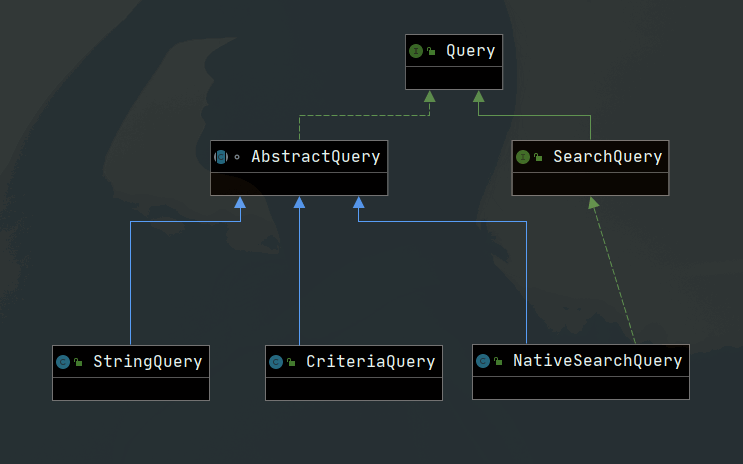
从这个关系中可以看到ES的search方法需要的参数SearchQuery是一个接口,有一个实现类叫NativeSearchQuery,实际使用中,我们的主要任务就是构建NativeSearchQuery来完成一些复杂的查询的。
public class NativeSearchQuery extends AbstractQuery implements SearchQuery {

private QueryBuilder query;
private QueryBuilder filter;
private List<SortBuilder> sorts;
private final List<ScriptField> scriptFields = new ArrayList<>();
private List<FacetRequest> facets;
private List<AbstractAggregationBuilder> aggregations;
private HighlightBuilder highlightBuilder;
private HighlightBuilder.Field[] highlightFields;
private List<IndexBoost> indicesBoost;


public NativeSearchQuery(QueryBuilder query) {
    this.query = query;
}

public NativeSearchQuery(QueryBuilder query, QueryBuilder filter) {
    this.query = query;
    this.filter = filter;
}

public NativeSearchQuery(QueryBuilder query, QueryBuilder filter, List<SortBuilder> sorts) {
    this.query = query;
    this.filter = filter;
    this.sorts = sorts;
}

public NativeSearchQuery(QueryBuilder query, QueryBuilder filter, List<SortBuilder> sorts, HighlightBuilder.Field[] highlightFields) {
    this.query = query;
    this.filter = filter;
    this.sorts = sorts;
    this.highlightFields = highlightFields;
}

public NativeSearchQuery(QueryBuilder query, QueryBuilder filter, List<SortBuilder> sorts,
        HighlightBuilder highlighBuilder, HighlightBuilder.Field[] highlightFields) {
    this.query = query;
    this.filter = filter;
    this.sorts = sorts;
    this.highlightBuilder = highlighBuilder;
    this.highlightFields = highlightFields;
}

public QueryBuilder getQuery() {
    return query;
}

public QueryBuilder getFilter() {
    return filter;
}

public List<SortBuilder> getElasticsearchSorts() {
    return sorts;
}
2
3
4
5
6
7
8
9
10
11
12
13
14
15
16
17
18
19
20
21
22
23
24
25
26
27
28
29
30
31
32
33
34
35
36
37
38
39
40
41
42
43
44
45
46
47
48
49
50
51
52
53
54
55
可以看出来,大概是需要QueryBuilder,filter,和排序的SortBuilder,和高亮的字段。
一般情况下,我们不是直接是new NativeSearchQuery,而是使用NativeSearchQueryBuilder。
通过NativeSearchQueryBuilder.withQuery(QueryBuilder1).withFilter(QueryBuilder2).withSort(SortBuilder1).withXXXX().build();这样的方式来完成NativeSearchQuery的构建。
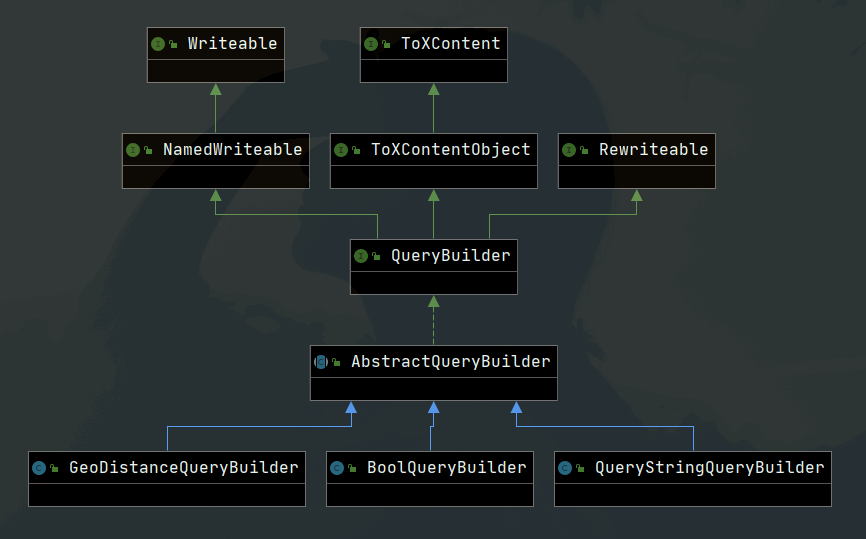
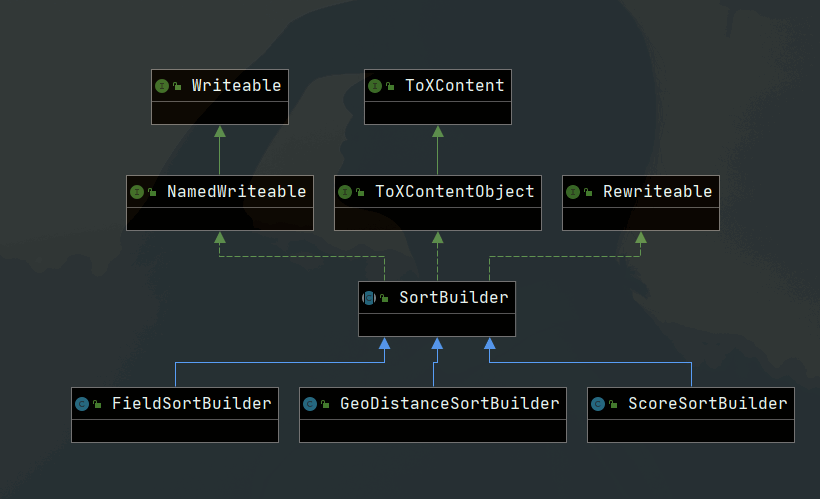
譬如,我们要查询距离某个位置100米范围内的所有人、并且按照距离远近进行排序:
double lat = 39.929986;
double lon = 116.395645;

Long nowTime = System.currentTimeMillis();
//查询某经纬度100米范围内
GeoDistanceQueryBuilder builder = QueryBuilders.geoDistanceQuery("address").point(lat, lon)
        .distance(100, DistanceUnit.METERS);

GeoDistanceSortBuilder sortBuilder = SortBuilders.geoDistanceSort("address")
        .point(lat, lon)
        .unit(DistanceUnit.METERS)
        .order(SortOrder.ASC);

Pageable pageable = new PageRequest(0, 50);

NativeSearchQueryBuilder builder1 = new NativeSearchQueryBuilder().withFilter(builder).withSort(sortBuilder).withPageable(pageable);
SearchQuery searchQuery = builder1.build();
2
3
4
5
6
7
8
9
10
11
12
13
14
15
16
17
要完成字符串的查询:
SearchQuery searchQuery = new NativeSearchQueryBuilder().withQuery(QueryBuilders.queryStringQuery("spring boot OR 书籍")).build();

// 或者

QueryStringQueryBuilder builder = new QueryStringQueryBuilder(q);
Iterable<Employee> searchResult = employeeRepository.search(builder);

// 或者
//  分数,并自动按分排序(对单个属性进行查询)
FunctionScoreQueryBuilder functionScoreQueryBuilder = QueryBuilders.
        functionScoreQuery(QueryBuilders.boolQuery().should(QueryBuilders.matchQuery("about", q)),
                ScoreFunctionBuilders.weightFactorFunction(1000));
SearchQuery searchQuery = new NativeSearchQueryBuilder().withPageable(pageable)
        .withQuery(functionScoreQueryBuilder).build();
2
3
4
5
6
7
8
9
10
11
12
13
14
要构建QueryBuilder,我们可以使用工具类QueryBuilders,里面有大量的方法用来完成各种各样的QueryBuilder的构建,字符串的、Boolean型的、match的、地理范围的等等。
要构建SortBuilder,可以使用SortBuilders来完成各种排序。
然后就可以通过NativeSearchQueryBuilder来组合这些QueryBuilder和SortBuilder,再组合分页的参数等等,最终就能得到一个SearchQuery了。
# Elasticsearch Operations
# ElasticsearchTemplate
WARNING
Usage of the ElasticsearchTemplate is deprecated as of version 4.0, use ElasticsearchRestTemplate instead.
@Configuration
public class TransportClientConfig extends ElasticsearchConfigurationSupport {

  @Bean
  public Client elasticsearchClient() throws UnknownHostException {
    Settings settings = Settings.builder().put("cluster.name", "elasticsearch").build();
    TransportClient client = new PreBuiltTransportClient(settings);
    client.addTransportAddress(new TransportAddress(InetAddress.getByName("127.0.0.1"), 9300));
    return client;
  }

  @Bean(name = {"elasticsearchOperations", "elasticsearchTemplate"})
  public ElasticsearchTemplate elasticsearchTemplate() throws UnknownHostException {
    return new ElasticsearchTemplate(elasticsearchClient());
  }
}
2
3
4
5
6
7
8
9
10
11
12
13
14
15
16
- Setting up the Transport Client. Deprecated as of version 4.0.
- Creating the ElasticsearchTemplate bean, offering both names, elasticsearchOperations and elasticsearchTemplate.
# ElasticsearchRestTemplate
ElasticsearchRestTemplate
The ElasticsearchRestTemplate is an implementation of the ElasticsearchOperations interface using the High Level REST Client.
@Configuration
public class RestClientConfig extends AbstractElasticsearchConfiguration {
  @Override
  public RestHighLevelClient elasticsearchClient() {
    return RestClients.create(ClientConfiguration.localhost()).rest();
  }

  // no special bean creation needed
}
2
3
4
5
6
7
8
9
- Setting up the High Level REST Client.
- The base class AbstractElasticsearchConfiguration already provides the elasticsearchTemplate bean.
# ElasticsearchOperations Usage examples
As both ElasticsearchTemplate and ElasticsearchRestTemplate implement the ElasticsearchOperations interface, the code to use them is not different. The example shows how to use an injected ElasticsearchOperations instance in a Spring REST controller. The decision, if this is using the TransportClient or the RestClient is made by providing the corresponding Bean with one of the configurations shown above.
@RestController
@RequestMapping("/")
public class TestController {

  private  ElasticsearchOperations elasticsearchOperations;

  public TestController(ElasticsearchOperations elasticsearchOperations) {
    this.elasticsearchOperations = elasticsearchOperations;
  }

  @PostMapping("/person")
  public String save(@RequestBody Person person) {

    IndexQuery indexQuery = new IndexQueryBuilder()
      .withId(person.getId().toString())
      .withObject(person)
      .build();
    String documentId = elasticsearchOperations.index(indexQuery);
    return documentId;
  }

  @GetMapping("/person/{id}")
  public Person findById(@PathVariable("id")  Long id) {
    Person person = elasticsearchOperations
      .queryForObject(GetQuery.getById(id.toString()), Person.class);
    return person;
  }
}
2
3
4
5
6
7
8
9
10
11
12
13
14
15
16
17
18
19
20
21
22
23
24
25
26
27
28
- Let Spring inject the provided ElasticsearchOperations bean in the constructor.
- Store some entity in the Elasticsearch cluster.
- Retrieve the entity with a query by id.
# Spring Data Elasticsearch核心
# 1、@Document注解
属性:
- 1、indexName 索引名称
- 2、refreshInterval 索引刷新间隔时间
- 3、indexStoreType 索引存储类型,一般使用niofs
- 4、shards 分片数,一般等于elasticsearch节点数,默认5
- 5、replicas 副本数,一般等于shards - 默认1
# 2、@Id注解
属性级别注解,标注变量映射到index中document的id字段
# @Field
- type:字段类型,是枚举:FieldType,可以是text、long、short、date、integer、object等
- text:存储数据时候,会自动分词,并生成索引
- keyword:存储数据时候,不会分词建立索引
- Numerical:数值类型,分两类
- 基本数据类型:long、interger、short、byte、double、float、half_float
- 浮点数的高精度类型:scaled_float
- 需要指定一个精度因子,比如10或100。elasticsearch会把真实值乘以这个因子后存储,取出时再还原。
- Date:日期类型
- elasticsearch可以对日期格式化为字符串存储,但是建议我们存储为毫秒值,存储为long,节省空间。
- index:是否索引,布尔类型,默认是true
- store:是否存储,布尔类型,默认是false
- analyzer:分词器名称,这里的ik_max_word即使用ik分词器
# 3、ElasticsearchRepository 被继承类,实现jpa对指定index操作
# 4、ElasticsearchRestTemplate 操作类,用于对elasticsearch的操作
# 6. Elasticsearch Object Mapping
Spring Data Elasticsearch Object Mapping is the process that maps a Java object - the domain entity - into the JSON representation that is stored in Elasticsearch and back.
Earlier versions of Spring Data Elasticsearch used a Jackson based conversion, Spring Data Elasticsearch 3.2.x introduced the 元模型对象映射 Meta Model Object Mapping. As of version 4.0 only the Meta Object Mapping is used, the Jackson based mapper is not available anymore and the MappingElasticsearchConverter is used.
The main reasons for the removal of the Jackson based mapper are:
Custom mappings of fields needed to be done with annotations like @JsonFormat or @JsonInclude. This often caused problems when the same object was used in different JSON based datastores or sent over a JSON based API.
Custom field types and formats also need to be stored into the Elasticsearch index mappings. The Jackson based annotations did not fully provide all the information that is necessary to represent the types of Elasticsearch.
Fields must be mapped not only when converting from and to entities, but also in query argument, returned data and on other places.
Using the MappingElasticsearchConverter now covers all these cases.
Spring Data Elasticsearch Object Mapping是将Java对象(域实体)映射到存储在Elasticsearch中的JSON表示形式并反向映射的过程。
Spring Data Elasticsearch的早期版本使用基于Jackson的转换,Spring Data Elasticsearch 3.2.x引入了元模型对象映射。从4.0版开始,仅使用元对象映射,不再提供基于Jackson的映射器,而使用MappingElasticsearchConverter。
删除基于Jackson的映射器的主要原因是:
- 需要使用@JsonFormat或@JsonInclude之类的注释来完成字段的自定义映射。当同一对象用于不同的基于JSON的数据存储中或通过基于JSON的API发送时,这通常会引起问题。
- 自定义字段类型和格式也需要存储到Elasticsearch索引映射中。基于Jackson的注释未完全提供表示Elasticsearch类型所需的所有信息。
- 不仅在从实体到实体的转换时,还必须在查询参数,返回的数据以及其他地方映射字段。
现在,使用MappingElasticsearchConverter可以解决所有这些情况。
TIP
Properties that derive from TemporalAccessor must either have a @Field annotation of type FieldType.Date or a custom converter must be registerd for this type.
If you are using a custom date format, you need to use uuuu for the year instead of yyyy. This is due to a change in Elasticsearch 7.
从TemporalAccessor派生的属性必须具有类型为FieldType.Date的@Field注释,或必须为此类型注册自定义转换器。
# Custom Conversions
Looking at the Configuration from the previous section ElasticsearchCustomConversions allows registering specific rules for mapping domain and simple types.
在上一节中查看配置,ElasticsearchCustomConversions允许注册用于映射域和简单类型的特定规则。
@Configuration
public class Config extends AbstractElasticsearchConfiguration {

  @Override
  public RestHighLevelClient elasticsearchClient() {
    return RestClients.create(ClientConfiguration.create("localhost:9200")).rest();
  }

  @Bean
  @Override
  public ElasticsearchCustomConversions elasticsearchCustomConversions() {
    return new ElasticsearchCustomConversions(
      Arrays.asList(new AddressToMap(), new MapToAddress()));
  }

  @WritingConverter
  static class AddressToMap implements Converter<Address, Map<String, Object>> {

    @Override
    public Map<String, Object> convert(Address source) {

      LinkedHashMap<String, Object> target = new LinkedHashMap<>();
      target.put("ciudad", source.getCity());
      // ...

      return target;
    }
  }

  @ReadingConverter
  static class MapToAddress implements Converter<Map<String, Object>, Address> {

    @Override
    public Address convert(Map<String, Object> source) {

      // ...
      return address;
    }
  }
}
2
3
4
5
6
7
8
9
10
11
12
13
14
15
16
17
18
19
20
21
22
23
24
25
26
27
28
29
30
31
32
33
34
35
36
37
38
39
40
- Add Converter implementations.
- Set up the Converter used for writing DomainType to Elasticsearch.
- Set up the Converter used for reading DomainType from search result.
# High Level REST Client
@Configuration
public class RestClientConfig extends AbstractElasticsearchConfiguration {

    @Override
    @Bean
    public RestHighLevelClient elasticsearchClient() {

        final ClientConfiguration clientConfiguration = ClientConfiguration.builder()
            .connectedTo("localhost:9200")
            .build();
        return RestClients.create(clientConfiguration).rest();
    }
}
// ...
  @Autowired
  RestHighLevelClient highLevelClient;

  RestClient lowLevelClient = highLevelClient.lowLevelClient();
// ...
IndexRequest request = new IndexRequest("spring-data", "elasticsearch", randomID())
  .source(singletonMap("feature", "high-level-rest-client"))
  .setRefreshPolicy(IMMEDIATE);

IndexResponse response = highLevelClient.index(request);
2
3
4
5
6
7
8
9
10
11
12
13
14
15
16
17
18
19
20
21
22
23
24
- Use the builder to provide cluster addresses, set default HttpHeaders or enable SSL.
- Create the RestHighLevelClient.
- It is also possible to obtain the
lowLevelRest()client.
# Client Configuration
Client behaviour can be changed via the ClientConfiguration that allows to set options for SSL, connect and socket timeouts, headers and other parameters.
HttpHeaders httpHeaders = new HttpHeaders();
httpHeaders.add("some-header", "on every request")

ClientConfiguration clientConfiguration = ClientConfiguration.builder()
  .connectedTo("localhost:9200", "localhost:9291")
  .useSsl()
  .withProxy("localhost:8888")
  .withPathPrefix("ela")
  .withConnectTimeout(Duration.ofSeconds(5))
  .withSocketTimeout(Duration.ofSeconds(3))
  .withDefaultHeaders(defaultHeaders)
  .withBasicAuth(username, password)
  .withHeaders(() -> {
    HttpHeaders headers = new HttpHeaders();
    headers.add("currentTime", LocalDateTime.now().format(DateTimeFormatter.ISO_LOCAL_DATE_TIME));
    return headers;
  })
  . // ... other options
  .build();
2
3
4
5
6
7
8
9
10
11
12
13
14
15
16
17
18
19
# 索引别名Type Hints with Alias
@TypeAlias("human")
public class Person {

  @Id String id;
  // ...
}
{
  "_class" : "human",
  "id" : ...
}
2
3
4
5
6
7
8
9
10
# 结合分词与拼音
# 创建setting和mapping文件
文件存放在resource目录下,为了方便区分,所以我新建了一个elasticsearch目录。
新建文件mapping.json
{
  "block": {
    "properties": {
      "userName": {
        "type": "text",
        "analyzer": "pinyin_analyzer",
        "search_analyzer": "pinyin_analyzer",
        "fields": {
          "pinyin": {
            "type": "string",
            "ignore_above": 256
          }
        }
      },
      "sex": {
        "type": "keyword",
        "fields": {
          "keyword": {
            "type": "keyword",
            "ignore_above": 256
          }
        }
      },
      "age": {
        "type": "keyword",
        "fields": {
          "keyword": {
            "type": "keyword",
            "ignore_above": 256
          }
        }
      }
    }
  }
}
2
3
4
5
6
7
8
9
10
11
12
13
14
15
16
17
18
19
20
21
22
23
24
25
26
27
28
29
30
31
32
33
34
35
新建setting.json
{
  "index": {
    "analysis": {
      "analyzer": {
        "pinyin_analyzer": {
          "tokenizer": "my_pinyin"
        }
      },
      "tokenizer": {
        "my_pinyin": {
          "type": "pinyin",
          "keep_first_letter": true,
          "keep_separate_first_letter": false,
          "keep_full_pinyin": true,
          "keep_original": true,
          "limit_first_letter_length": 16,
          "lowercase": true,
          "remove_duplicated_term": true
        }
      }
    }
  }
}
2
3
4
5
6
7
8
9
10
11
12
13
14
15
16
17
18
19
20
21
22
23
# 高亮
nativeSearchQueryBuilder.withQuery(functionScoreQueryBuilder).withHighlightFields(
        new HighlightBuilder.Field("name").preTags("<span style=\"color: red\">").postTags("</span>"),
        new HighlightBuilder.Field("address").preTags("<span style=\"color: red\">").postTags("</span>")
);
2
3
4