
# 生命周期函数
生命周期函数指在某一个时刻组件会自动调用执行的函数
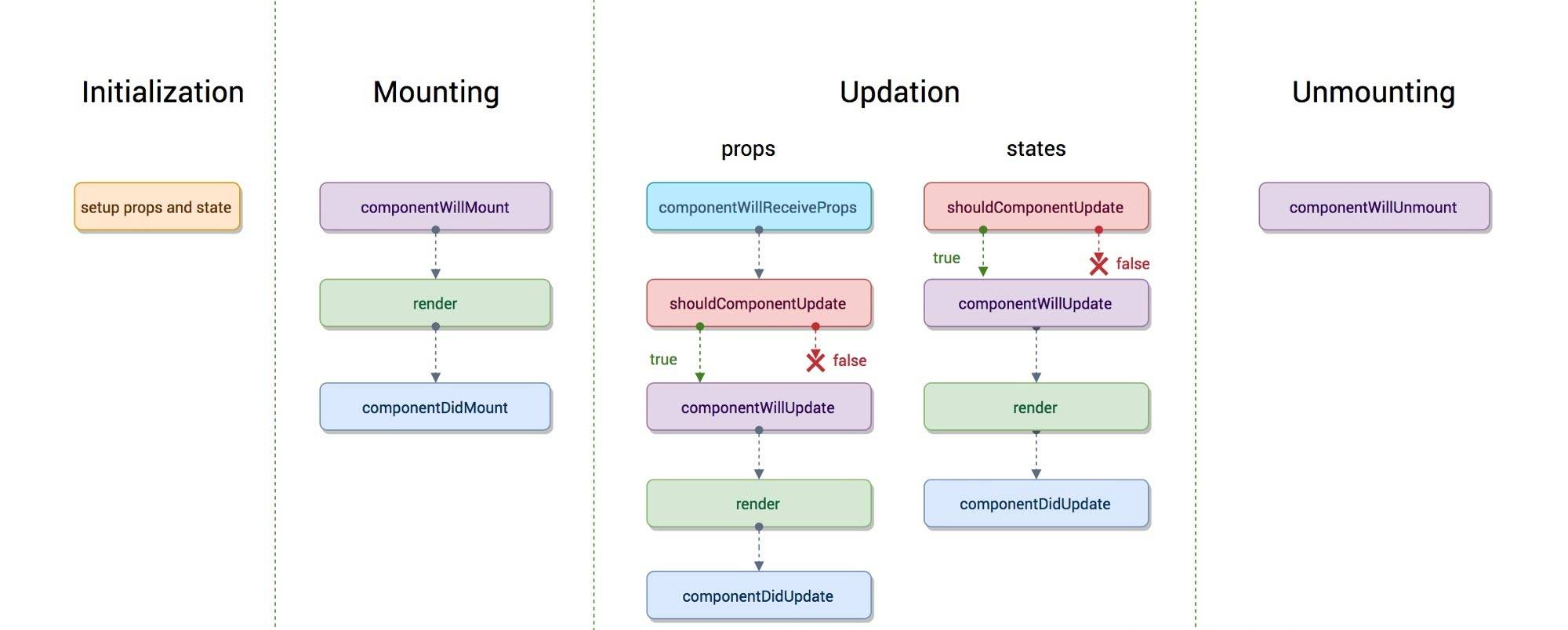
# 旧版生命周期
import React, { Component } from 'react'

export default class LifeCycle extends Component {
    //// props = {age:10,name:'计数器'}
  static defaultProps = {
      name:'计数器'
  }
  constructor(props){
      //Must call super constructor in derived class before accessing 'this' or returning from derived constructor
    super();//this.props = props;
    this.state = {number:0,users:[]};//初始化默认的状态对象
    console.log('1. constructor 初始化 props and state');

  }
  //componentWillMount在渲染过程中可能会执行多次
  componentWillMount(){
    console.log('2. componentWillMount 组件将要挂载');
    //localStorage.get('userss');
  }
  //componentDidMount在渲染过程中永远只有执行一次
  //一般是在componentDidMount执行副作用,进行异步操作
  componentDidMount(){
    console.log('4. componentDidMount 组件挂载完成');
    fetch('https://api.github.com/users').then(res=>res.json()).then(users=>{
        console.log(users);
        this.setState({users});
    });
  }
  shouldComponentUpdate(nextProps,nextState){
    console.log('Counter',nextProps,nextState);
    console.log('5. shouldComponentUpdate 询问组件是否需要更新');
    return true;
  }
  componentWillUpdate(nextProps, nextState){
    console.log('6. componentWillUpdate 组件将要更新');
  }
  componentDidUpdate(prevProps, prevState)){
    console.log('7. componentDidUpdate 组件更新完毕');
  }
  add = ()=>{
      this.setState({number:this.state.number});
  };
  render() {
    console.log('3.render渲染,也就是挂载')
    return (
      <div style={{border:'5px solid red',padding:'5px'}}>
        <p>{this.props.name}:{this.state.number}</p>
        <button onClick={this.add}>+</button>
        <ul>
            {
                this.state.users.map(user=>(<li>{user.login}</li>))
            }
        </ul>
        {this.state.number%2==0&&<SubCounter number={this.state.number}/>}
      </div>
    )
  }
}
class SubCounter extends Component{
    constructor(props){
        super(props);
        this.state = {number:0};
    }
    componentWillUnmount(){
        console.log('SubCounter componentWillUnmount');
    }
    //调用此方法的时候会把新的属性对象和新的状态对象传过来
    shouldComponentUpdate(nextProps,nextState){
        console.log('SubCounter',nextProps,nextState);
        if(nextProps.number%3==0){
            return true;
        }else{
            return false;
        }
    }
    //componentWillReceiveProp 组件收到新的属性对象
    componentWillReceiveProps(){
      console.log('SubCounter 1.componentWillReceiveProps')
    }
    render(){
        console.log('SubCounter  2.render')
        return(
            <div style={{border:'5px solid green'}}>
                <p>{this.props.number}</p>
            </div>
        )
    }
}
1
2
3
4
5
6
7
8
9
10
11
12
13
14
15
16
17
18
19
20
21
22
23
24
25
26
27
28
29
30
31
32
33
34
35
36
37
38
39
40
41
42
43
44
45
46
47
48
49
50
51
52
53
54
55
56
57
58
59
60
61
62
63
64
65
66
67
68
69
70
71
72
73
74
75
76
77
78
79
80
81
82
83
84
85
86
87
88
2
3
4
5
6
7
8
9
10
11
12
13
14
15
16
17
18
19
20
21
22
23
24
25
26
27
28
29
30
31
32
33
34
35
36
37
38
39
40
41
42
43
44
45
46
47
48
49
50
51
52
53
54
55
56
57
58
59
60
61
62
63
64
65
66
67
68
69
70
71
72
73
74
75
76
77
78
79
80
81
82
83
84
85
86
87
88
# componentWillMount()
- 执行场景
- 在
render()方法之前,并且永远都只执行一次 - 所以如果在这里定义了setState方法之后,页面永远都只会在加载前更新一次。
- 在
- 解释
- 1 因为componentWillMount是在render之前执行,所以在这个方法中
setState不会发生重新渲染(re-render); - 2 这是服务端渲染(server render)中唯一调用的钩子(hook);
- 3 通常情况下,推荐
用constructor()方法代替;
- 1 因为componentWillMount是在render之前执行,所以在这个方法中
# render
- 执行场景
- 1 在componentWillMount()方法之后
- 2 在componentWillReceive(nextProps, nextState)方法之后
# componentDidMount()
- 执行场景
- 在render()方法之后;
- 会在组件加载完毕之后立即执行
- 可以在这个方法中执行setTimeout, setInterval或者发送AJAX请求等操作(防止异部操作阻塞UI)。
- 解释
- 1 这个方法会在
render()之后立即执行; - 2 这里可以对DOM进行操作,这个函数之后ref变成实际的DOM(@TODO 表述可能不清晰);
- 3 这里可以加载服务器数据,并且如果使用了redux之类的数据服务,这里可以出发加载服务器数据的action;
- 4 这里可以使用
setState()方法触发重新渲染(re-render);
- 1 这个方法会在
# componentWillReceiveProps(nextProps)
- 执行场景
- 初始化render时不会被调用。
- 在已经挂在的组件(mounted component)
接收到新props时触发; - 简单的说是在除了第一次生命周期(
componentWillMount -> render -> componentDidMount)之后的生命周期中出发;
- 解释
- 1 如果你需要在props发生变化(或者说新传入的props)来更新state,你可能需要比较this.props和nextProps, 然后使用this.setState()方法来改变this.state;
- 注意
- 旧的props可以通过this.props来获取,在
这个函数内调用this.setState()方法不会增加一次新的render. - 1 React可能会在porps传入时即使没有发生改变的时候也发生重新渲染, 所以如果你想自己处理改变,请确保比较props当前值和下一次值; 这可能造成组件重新渲染;
- 2 如果你只是调用this.setState()而不是从外部传入props, 那么不会触发componentWillReceiveProps(nextProps)函数;这就意味着:
this.setState()方法不会触发componentWillReceiveProps(), props的改变或者props没有改变才会触发这个方法;
- 旧的props可以通过this.props来获取,在
# shouldComponentUpdate(nextProps, nextState)
- 执行场景
- 在接收到新props或state时,或者说在componentWillReceiveProps(nextProps)后触发
- 解释
- 在接收新的props或state时确定是否发生重新渲染,默认情况返回true,表示会发生重新渲染
- 注意
- 1 这个方法在
首次渲染时或者forceUpdate()时不会触发; - 2 这个方法如果返回false, 那么props或state发生改变的时候会阻止子组件发生重新渲染;
- 3 目前,如果shouldComponentUpdate(nextProps, nextState)
返回false, 那么componentWillUpdate(nextProps, nextState), render(), componentDidUpdate()都不会被触发; - 4 Take care: 在未来,React可能把shouldComponentUpdate()当做一个小提示(hint)而不是一个指令(strict directive),并且它返回false仍然可能触发组件重新渲染(re-render);
- 特别是在有上百个组件时,可以使用shouldComponentUpdate来提升应用速度。
- 1 这个方法在
- Good Idea
- 在React 15.3以后, React.PureComponent已经支持使用,个人推荐,它代替了(或者说合并了)pure-render-mixin,实现了shallowCompare()。
# componentWillUpdate(nextProps, nextState)
- 执行场景
- 在props或state发生改变或者shouldComponentUpdate(nextProps, nextState)触发后,
在render()之前
- 在props或state发生改变或者shouldComponentUpdate(nextProps, nextState)触发后,
- 解释
- 1 这个方法在组件初始化时不会被调用;
- 注意
- 1 千万
不要在这个函数中调用this.setState()方法.; - 2 如果
确实需要响应props的改变,那么你可以在componentWillReceiveProps(nextProps)中做响应操作; - 3 如果shouldComponentUpdate(nextProps, nextState)返回false,那么componentWillUpdate()不会被触发;
- 1 千万
# componentDidUpdate(prevProps, prevState)
- 执行场景
- 在
发生更新或componentWillUpdate(nextProps, nextState)后
- 在
- 解释
- 1 该方法不会在组件初始化时触发;
- 2 使用这个方法可以对组件中的DOM进行操作;
- 3 只要你比较了this.props和nextProps,你想要发出网络请求(nextwork requests)时就可以发出, 当然你也可以不发出网络请求;
- 注意
- 如果
shouldComponentUpdate(nextProps, nextState)返回false, 那么componentDidUpdate(prevProps, prevState)不会被触发;
- 如果
# componentWillUnmount()
- 执行场景
- 在组件卸载(unmounted)或销毁(destroyed)之前
- 解释
- 这个方法可以让你处理一些必要的清理操作,比如无效的timers、interval,或者取消网络请求,或者清理任何在componentDidMount()中创建的DOM元素(elements);
# 相关 setState(Object/Function)
- 解释
- 通过事件(event handlers)或服务请求回调(server request callbacks), 触发UI更新(re-render);
- 参数
- 1 可以是Object类型, 这时是异步的setState, 同时接收一个在state发生改变之后的回调, 如this.setState(Object, callback), 其中callback可以是() => { ... this.state ... };
- 2 可以是Function类型, 这时是同步的setState, 例如: (prevState, prevProps) => nextState, 同步存在一定效率问题(不理解), 但是它有一个好处就是支持Immutable;
# 二 两种生命周期
- 1 组件初始化
- 原因
- 组件第一次建立
- 触发
- componentWillMount -> render -> componentDidMount
- 原因
- 2 组件更新 – props change
- 原因
- props发生改变
- 触发
- componentWillReceiveProps -> shouldComponentUpdate -> componentWillUpdate -> componentDidUpdate
- 原因
- 3 组件更新 – state change
- 原因
- this.setState()使state发生改变
- 触发
- shoudlComponentUpdate -> componentWillUpdate -> componentDidUpdate
- 原因
- 4 组件卸载或销毁
- 原因
- 组件卸载或销毁
- 触发
- componentWillUnmount
- 原因
# 父子孙组件的洋葱模型

# 新版生命周期
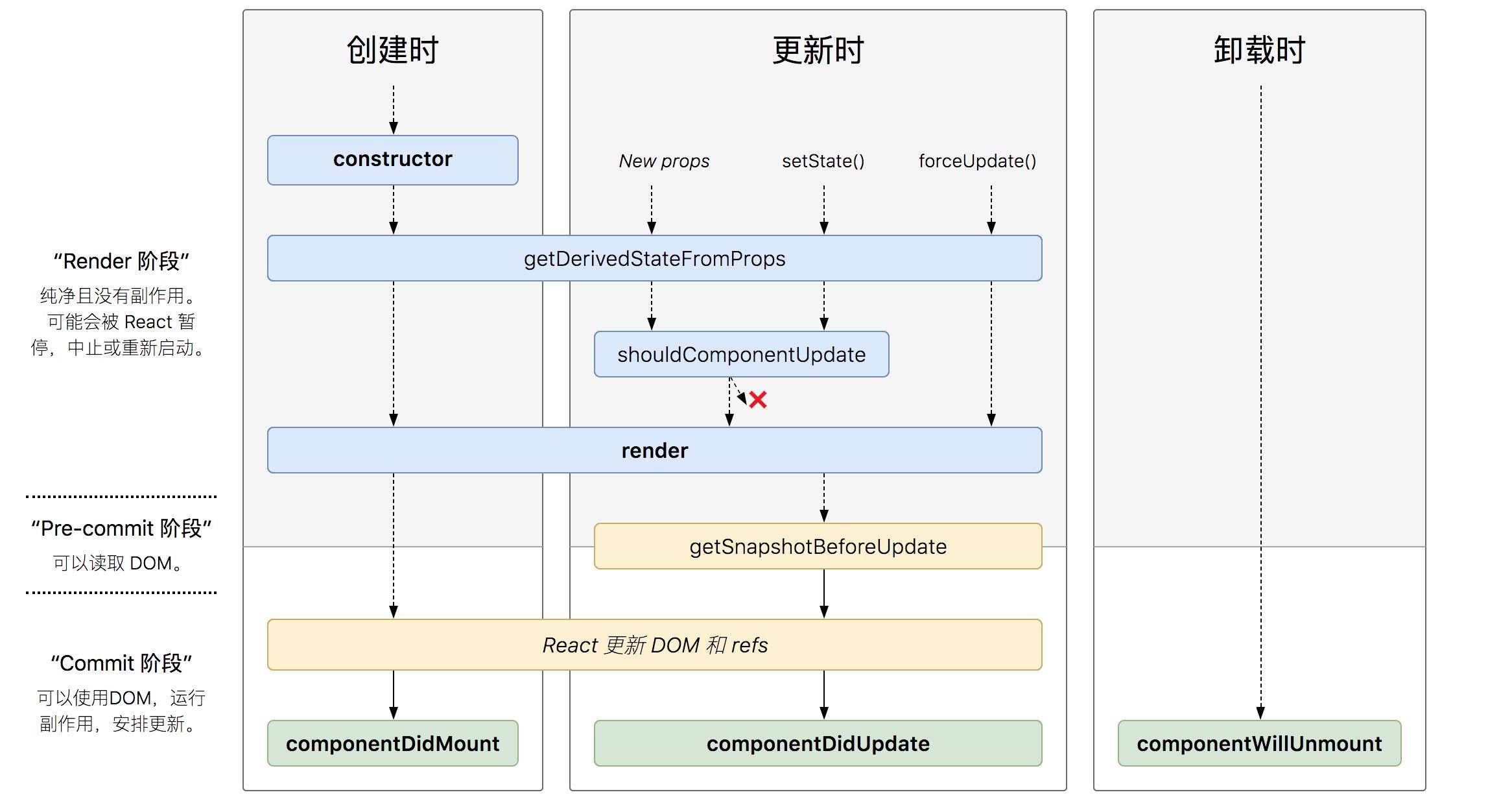
# getDerivedStateFromProps
static getDerivedStateFromProps(nextProps,prevState):接收父组件传递过来的 props 和组件之前的状态,返回一个对象来更新 state 或者返回 null 来表示接收到的 props 没有变化,不需要更新 state该生命周期钩子的作用: 将父组件传递过来的 props 映射 到子组件的 state 上面,这样组件内部就不用再通过 this.props.xxx 获取属性值了,统一通过 this.state.xxx 获取。映射就相当于拷贝了一份父组件传过来的 props ,作为子组件自己的状态。注意:子组件通过 setState 更新自身状态时,不会改变父组件的 props- 配合 componentDidUpdate,
可以覆盖 componentWillReceiveProps 的所有用法 该生命周期钩子触发的时机:- 在 React 16.3.0 版本中:在组件实例化、接收到新的 props 时会被调用
- 在 React 16.4.0 版本中:在组件实例化、接收到新的 props 、组件状态更新时会被调用
注意:派生状态时,不需要把组件自身的状态也设置进去
import React from "react";
import ReactDOM from "react-dom";
import "./styles.css";

function App() {
  return (
    <div className="App">
      <AAA />
    </div>
  );
}

class AAA extends React.Component {
  state = {
    age: 666
  };

  add = () => {
    this.setState({ age: this.state.age + 1 });
  };

  render() {
    return (
      <div>
        <ChildA onChangeParent={this.add} age={this.state.age} />
      </div>
    );
  }
}

class ChildA extends React.Component {
  state = {
    num: 888
  };
// 根据新的属性对象派生状态对象
// nextProps——新的属性对象 prevState——旧的状态对象
  static getDerivedStateFromProps(nextprops, state) {
    console.log('props',nextprops);
    // 返回一个对象来更新 state 或者返回 null 来表示接收到的 props 不需要更新 state
    if (nextprops.age !== state.age) {
      console.log("更新吧");
      return {
        onChangeParent:nextprops.onChangeParent,
        age: nextprops.age,
        // 注意:这里不需要把组件自身的状态也放进来
        // num:state.num
      };
    }
    return null;
  }

  add = () => {
    this.setState({ num: this.state.num + 1 });
  };
  render() {
    const { onChangeParent } = this.state;
    console.log('state',this.state);
    return (
      <>
        <div onClick={onChangeParent}>change</div>
        <div onClick={this.add}>add</div>
      </>
    );
  }
}

const rootElement = document.getElementById("root");
ReactDOM.render(<App />, rootElement);
1
2
3
4
5
6
7
8
9
10
11
12
13
14
15
16
17
18
19
20
21
22
23
24
25
26
27
28
29
30
31
32
33
34
35
36
37
38
39
40
41
42
43
44
45
46
47
48
49
50
51
52
53
54
55
56
57
58
59
60
61
62
63
64
65
66
67
68
2
3
4
5
6
7
8
9
10
11
12
13
14
15
16
17
18
19
20
21
22
23
24
25
26
27
28
29
30
31
32
33
34
35
36
37
38
39
40
41
42
43
44
45
46
47
48
49
50
51
52
53
54
55
56
57
58
59
60
61
62
63
64
65
66
67
68
# getSnapshotBeforeUpdate
getSnapshotBeforeUpdate(prevProps, prevState):接收父组件传递过来的 props 和组件之前的状态,此生命周期钩子必须有返回值,返回值将作为第三个参数传递给 componentDidUpdate。必须和 componentDidUpdate 一起使用,否则会报错该生命周期钩子触发的时机:被调用于 render 之后、更新 DOM 和 refs 之前- 该生命周期钩子的作用: 它能让你在组件更新 DOM 和 refs 之前,从 DOM 中捕获一些信息(例如滚动位置)
- 配合 componentDidUpdate,
可以覆盖 componentWillUpdate 的所有用法
每次组件更新时,都去获取之前的滚动位置,让组件保持在之前的滚动位置
import React, { Component } from "react";
import ReactDOM from "react-dom";

import "./styles.css";

function App() {
  return (
    <div className="App">
      <GetSnapshotBeforeUpdate />
    </div>
  );
}

class GetSnapshotBeforeUpdate extends Component {
  constructor(props) {
    super(props);
    this.wrapper = React.createRef();
    this.state = { messages: [] };
  }
  componentDidMount() {
    setInterval(() => {
      this.setState({
        messages: ["msg:" + this.state.messages.length, ...this.state.messages]
      });
      //this.setState({messages:[...this.state.messages,this.state.messages.length]});
    }, 1000);
  }
  getSnapshotBeforeUpdate() {
    // 返回更新内容的高度 300px
    return this.wrapper.current.scrollHeight;
  }
  componentDidUpdate(prevProps, prevState, prevScrollHeight) {
    this.wrapper.current.scrollTop =
      this.wrapper.current.scrollTop +
      (this.wrapper.current.scrollHeight - prevScrollHeight);
  }
  render() {
    let style = {
      height: "100px",
      width: "200px",
      border: "1px solid red",
      overflow: "auto"
    };
    return (
      <ul style={style} ref={this.wrapper}>
        {this.state.messages.map((message, index) => (
          <li key={index}>{message}</li>
        ))}
      </ul>
    );
  }
}

const rootElement = document.getElementById("root");
ReactDOM.render(<App />, rootElement);
1
2
3
4
5
6
7
8
9
10
11
12
13
14
15
16
17
18
19
20
21
22
23
24
25
26
27
28
29
30
31
32
33
34
35
36
37
38
39
40
41
42
43
44
45
46
47
48
49
50
51
52
53
54
55
2
3
4
5
6
7
8
9
10
11
12
13
14
15
16
17
18
19
20
21
22
23
24
25
26
27
28
29
30
31
32
33
34
35
36
37
38
39
40
41
42
43
44
45
46
47
48
49
50
51
52
53
54
55
# 版本迁移
componentWillMount,componentWillReceiveProps,componentWillUpdate这三个生命周期因为经常会被误解和滥用,所以被称为不安全(不是指安全性,而是表示使用这些生命周期的代码,有可能在未来的 React 版本中存在缺陷,可能会影响未来的异步渲染) 的生命周期。- React 16.3 版本:为不安全的生命周期引入别名 UNSAFE_componentWillMount,UNSAFE_componentWillReceiveProps 和 UNSAFE_componentWillUpdate。(旧的生命周期名称和新的别名都可以在此版本中使用)
- React 16.3 之后的版本:为 componentWillMount,componentWillReceiveProps 和 componentWillUpdate 启用弃用警告。(旧的生命周期名称和新的别名都可以在此版本中使用,但旧名称会记录DEV模式警告)
- React 17.0 版本:
推出新的渲染方式——异步渲染( Async Rendering),提出一种可被打断的生命周期,而可以被打断的阶段正是实际 dom 挂载之前的虚拟 dom 构建阶段,也就是要被去掉的三个生命周期 componentWillMount,componentWillReceiveProps 和 componentWillUpdate。(从这个版本开始,只有新的“UNSAFE_”生命周期名称将起作用)
# 常见问题
当外部的 props 改变时,如何再次执行请求数据、更改状态等操作,使用 componentWillReceiveProps
class ExampleComponent extends React.Component {
  state = {
    externalData: null,
  };

  componentDidMount() {
    this._loadAsyncData(this.props.id);
  }

  componentWillReceiveProps(nextProps) {
    // 当父组件的 props 改变时,重新请求数据
    if (nextProps.id !== this.props.id) {
      this.setState({externalData: null});
      this._loadAsyncData(nextProps.id);
    }
  }

  componentWillUnmount() {
    if (this._asyncRequest) {
      this._asyncRequest.cancel();
    }
  }

  render() {
    if (this.state.externalData === null) {
      // Render loading state ...
    } else {
      // Render real UI ...
    }
  }

  _loadAsyncData(id) {
    this._asyncRequest = asyncLoadData(id).then(
      externalData => {
        this._asyncRequest = null;
        this.setState({externalData});
      }
    );
  }
}
1
2
3
4
5
6
7
8
9
10
11
12
13
14
15
16
17
18
19
20
21
22
23
24
25
26
27
28
29
30
31
32
33
34
35
36
37
38
39
40
2
3
4
5
6
7
8
9
10
11
12
13
14
15
16
17
18
19
20
21
22
23
24
25
26
27
28
29
30
31
32
33
34
35
36
37
38
39
40
使用 getDerivedStateFromProps + componentDidUpdate 加载数据
class ExampleComponent extends React.Component {
  state = {
    externalData: null,
  };

  static getDerivedStateFromProps(nextProps, prevState) {
    if (nextProps.id !== prevState.prevId) {
      return {
        externalData: null,
        prevId: nextProps.id,
      };
    }
    return null;
  }

  componentDidMount() {
    this._loadAsyncData(this.props.id);
  }

  // 借助 componentDidUpdate
  componentDidUpdate(prevProps, prevState) {
    if (this.state.externalData === null) {
      this._loadAsyncData(this.props.id);
    }
  }

  componentWillUnmount() {
    if (this._asyncRequest) {
      this._asyncRequest.cancel();
    }
  }

  render() {
    if (this.state.externalData === null) {
      // Render loading state ...
    } else {
      // Render real UI ...
    }
  }

  _loadAsyncData(id) {
    this._asyncRequest = asyncLoadData(id).then(
      externalData => {
        this._asyncRequest = null;
        this.setState({externalData});
      }
    );
  }
}
1
2
3
4
5
6
7
8
9
10
11
12
13
14
15
16
17
18
19
20
21
22
23
24
25
26
27
28
29
30
31
32
33
34
35
36
37
38
39
40
41
42
43
44
45
46
47
48
49
2
3
4
5
6
7
8
9
10
11
12
13
14
15
16
17
18
19
20
21
22
23
24
25
26
27
28
29
30
31
32
33
34
35
36
37
38
39
40
41
42
43
44
45
46
47
48
49
使用 getDerivedStateFromProps 更改状态
import React from "react";
import ReactDOM from "react-dom";

import "./styles.css";

function App() {
  return (
    <div className="App">
      <AAA />
    </div>
  );
}

class AAA extends React.Component {
  state = {
    age: 66
  };

  add = () => {
    this.setState({ age: this.state.age + 1 });
  };
  render() {
    return (
      <div>
        <ChildA onChangeParent={this.add} age={this.state.age} />
      </div>
    );
  }
}

class ChildA extends React.Component {
  state = {
    num: 88
  };

  static getDerivedStateFromProps(nextProps, prevState) {
    if (nextProps.age !== prevState.age) {
      return {
        age: nextProps.age
      };
    }
    return null;
  }

  add = () => {
    this.setState({ num: this.state.num + 1 });
  };

  render() {
    const { onChangeParent } = this.props;
    console.log("render", this.state);
    return (
      <>
        <div onClick={onChangeParent}>change</div>
        <div onClick={this.add}>add</div>
      </>
    );
  }
}

const rootElement = document.getElementById("root");
ReactDOM.render(<App />, rootElement);
1
2
3
4
5
6
7
8
9
10
11
12
13
14
15
16
17
18
19
20
21
22
23
24
25
26
27
28
29
30
31
32
33
34
35
36
37
38
39
40
41
42
43
44
45
46
47
48
49
50
51
52
53
54
55
56
57
58
59
60
61
62
2
3
4
5
6
7
8
9
10
11
12
13
14
15
16
17
18
19
20
21
22
23
24
25
26
27
28
29
30
31
32
33
34
35
36
37
38
39
40
41
42
43
44
45
46
47
48
49
50
51
52
53
54
55
56
57
58
59
60
61
62
- 只用 componentDidUpdate 的写法,不一定要使用 getDerivedStateFromProps 或者 componentWillReceiveProps
import React from "react";
import ReactDOM from "react-dom";

import "./styles.css";

function App() {
  return (
    <div className="App">
      <AAA />
    </div>
  );
}

class AAA extends React.Component {
  state = {
    age: 66
  };

  add = () => {
    this.setState({ age: this.state.age + 1 });
  };
  render() {
    return (
      <div>
        <ChildA onChangeParent={this.add} age={this.state.age} />
      </div>
    );
  }
}

class ChildA extends React.Component {
  state = {
    num: 88,
    age: this.props.age
  };

  add = () => {
    this.setState({ num: this.state.num + 1 });
  };

  componentDidUpdate() {
    if (this.props.age !== this.state.age) {
      console.log("componentDidUpdate", this.props.age);
      this.setState({ age: this.props.age });
    }
  }

  render() {
    const { onChangeParent } = this.props;
    console.log("render", this.state);
    return (
      <>
        <div onClick={onChangeParent}>change</div>
        <div onClick={this.add}>add</div>
      </>
    );
  }
}

const rootElement = document.getElementById("root");
ReactDOM.render(<App />, rootElement);
1
2
3
4
5
6
7
8
9
10
11
12
13
14
15
16
17
18
19
20
21
22
23
24
25
26
27
28
29
30
31
32
33
34
35
36
37
38
39
40
41
42
43
44
45
46
47
48
49
50
51
52
53
54
55
56
57
58
59
60
61
2
3
4
5
6
7
8
9
10
11
12
13
14
15
16
17
18
19
20
21
22
23
24
25
26
27
28
29
30
31
32
33
34
35
36
37
38
39
40
41
42
43
44
45
46
47
48
49
50
51
52
53
54
55
56
57
58
59
60
61
- 使用 key 的写法
通过改变 key ,来重新初始化组件,这听起来很慢,但是这点的性能是可以忽略的。如果在组件树的更新上有很重的逻辑,这样反而会更快,因为省略了子组件的 diff - React 官方建议的模式
我觉得这种写法,非常适合:当你调用同事写的业务 UI 组件时,如果他没有考虑到组件内部状态需要跟随外部 props 的更改的情况(恨不得上去就给他个膝盖重锤 😂😂😂),可以使用 key 来快速实现
class ExampleComponent extends React.Component {
  state = {
    id: '123456',
  };
  render(){
    const {id} = this.state;
    // 当 id 变化时,key 也随之改变,那么组件就会重新初始化
    return <ExampleComponent key={id} id={id}/>;
  }
}


class ExampleComponent extends React.Component {
  state = {
    externalData: null,
  };
  // 不需要使用 getDerivedStateFromProps 或者 componentWillReceiveProps
  // static getDerivedStateFromProps(nextProps, prevState) {
  //   if (nextProps.id !== prevState.prevId) {
  //     return {
  //       externalData: null,
  //       prevId: nextProps.id,
  //     };
  //   }
  //   return null;
  // }

  componentDidMount() {
    this._loadAsyncData(this.props.id);
  }

  componentWillUnmount() {
    if (this._asyncRequest) {
      this._asyncRequest.cancel();
    }
  }

  render() {
    if (this.state.externalData === null) {
      // Render loading state ...
    } else {
      // Render real UI ...
    }
  }

  _loadAsyncData(id) {
    this._asyncRequest = asyncLoadData(id).then(
      externalData => {
        this._asyncRequest = null;
        this.setState({externalData});
      }
    );
  }
}
1
2
3
4
5
6
7
8
9
10
11
12
13
14
15
16
17
18
19
20
21
22
23
24
25
26
27
28
29
30
31
32
33
34
35
36
37
38
39
40
41
42
43
44
45
46
47
48
49
50
51
52
53
54
2
3
4
5
6
7
8
9
10
11
12
13
14
15
16
17
18
19
20
21
22
23
24
25
26
27
28
29
30
31
32
33
34
35
36
37
38
39
40
41
42
43
44
45
46
47
48
49
50
51
52
53
54
- getDerivedStateFromProps 是一个静态方法,而组件实例无法继承静态方法,所以该生命周期钩子内部无法通过使用 this 获取组件实例的属性/方法。
- 有些情况下,我们需要对父组件传递过来的数据进行过滤/筛选等操作,而这些操作一般都会放在一个单独的函数中(单一原则),然后将该生命周期钩子获取到的 props 传递进这些方法中进行处理。
- 如果选择把这些方法放在 class 组件上,那么这些方法得申明成静态方法,然后在该生命周期钩子中通过 className.xxx 调用这些方法。
class AAA extends React.Component {

  static getDerivedStateFromProps(nextProps, prevState) {
    if (nextProps.id !== prevState.prevId) {
      const data = AAA.filterFn(nextProps.data);
      return {
        data,
        prevId: nextProps.id,
      };
    }
    return null;
  }

  static filterFn(data){
// 过滤数据
    ...
    return newData;
  }

  ...
}
1
2
3
4
5
6
7
8
9
10
11
12
13
14
15
16
17
18
19
20
21
2
3
4
5
6
7
8
9
10
11
12
13
14
15
16
17
18
19
20
21
- 或者把这些方法放在 class 组件外面,就不用申明成静态方法,在该生命周期钩子中直接调用这些方法。
function filterFn(data){
  // 过滤数据
    ...
    return newData;
}


class AAA extends React.Component {

  static getDerivedStateFromProps(nextProps, prevState) {
    if (nextProps.id !== prevState.prevId) {
      const data = filterFn(nextProps.data);
      return {
        data,
        prevId: nextProps.id,
      };
    }
    return null;
  }
  ...
}
1
2
3
4
5
6
7
8
9
10
11
12
13
14
15
16
17
18
19
20
21
2
3
4
5
6
7
8
9
10
11
12
13
14
15
16
17
18
19
20
21
在使用以上两种方法时,我个人认为的一个缺点:如果这些方法比较复杂,内部还调用了别的函数,此时,要么所有的处理函数都申明成静态方法,要么所有的方法都提到组件外部去,并且需要一层层的往下传递 props 值。无法像组件实例的方法一样,可以在每个组件实例方法内,通过 this.props.xxx / this.state.xxx 访问属性,会比较麻烦。 还有一种方法: 结合 componentDidUpdate 使用
import React from "react";
import ReactDOM from "react-dom";

import "./styles.css";

function App() {
  return (
    <div className="App">
      <AAA />
    </div>
  );
}

class AAA extends React.Component {
  state = {
    age: 66
  };

  add = () => {
    this.setState({ age: this.state.age + 1 });
  };
  render() {
    return (
      <div>
        <ChildA onChangeParent={this.add} age={this.state.age} />
      </div>
    );
  }
}

class ChildA extends React.Component {
  state = {
    num: 88
  };
  static getDerivedStateFromProps(nextprops, state) {
    console.log("getDerivedStateFromProps", nextprops);
    if (nextprops.age !== state.age) {
      return {
        // 给一个标识
        status: false,
        // age: nextprops.age,
        onChangeParent: nextprops.onChangeParent
      };
    }
    return null;
  }

  add = () => {
    this.setState({ num: this.state.num + 1 });
  };


  processData(){
    console.log("process",this.props);
    return this.props.age;
  }

  componentDidUpdate() {
    // 根据标识来更新状态
    if (!this.state.status) {
      this.setState({
        age: this.processData(),
        status: true
      });
      console.log("componentDidUpdate");
    }
  }
  componentDidMount() {
    this.setState({
      age: this.props.age,
      status: true
    });
  }

  render() {
    const { onChangeParent } = this.state;
    console.log("render", this.state);
    return (
      <>
        <div onClick={onChangeParent}>change</div>
        <div onClick={this.add}>add</div>
      </>
    );
  }
}

const rootElement = document.getElementById("root");
ReactDOM.render(<App />, rootElement);
1
2
3
4
5
6
7
8
9
10
11
12
13
14
15
16
17
18
19
20
21
22
23
24
25
26
27
28
29
30
31
32
33
34
35
36
37
38
39
40
41
42
43
44
45
46
47
48
49
50
51
52
53
54
55
56
57
58
59
60
61
62
63
64
65
66
67
68
69
70
71
72
73
74
75
76
77
78
79
80
81
82
83
84
85
86
87
88
2
3
4
5
6
7
8
9
10
11
12
13
14
15
16
17
18
19
20
21
22
23
24
25
26
27
28
29
30
31
32
33
34
35
36
37
38
39
40
41
42
43
44
45
46
47
48
49
50
51
52
53
54
55
56
57
58
59
60
61
62
63
64
65
66
67
68
69
70
71
72
73
74
75
76
77
78
79
80
81
82
83
84
85
86
87
88
- 使用 getDerivedStateFromProps 派生状态时,不需要把组件自身的状态也设置进去
class AAA extends React.Component {
  // 必须给 state 设置一个值,哪怕是一个空对象
  state = {
    num:666
  };
  static getDerivedStateFromProps(nextProps, prevState) {
    if (nextProps.id !== prevState.prevId) {
      return {
        data:nextProps.data,
        prevId: nextProps.id,
        // 只需要映射属性,不需要把组件自身的状态也加进去
        // num:prevState.num
      };
    }
    return null;
  }

  ...
}
1
2
3
4
5
6
7
8
9
10
11
12
13
14
15
16
17
18
19
2
3
4
5
6
7
8
9
10
11
12
13
14
15
16
17
18
19
- 如果 setState 更新的值不变,那么还会触发这些生命周期钩子吗?哪怕每次都设置同样的值,还是会触发更新
import React, {Component} from 'react'

export default class LifeCycle extends Component {
    static defaultProps = {
        name: '计数器'
    };

    constructor(props) {
        super(props);
        this.state = {number: 0};//初始化默认的状态对象
        console.log('1. constructor 初始化 props and state');
    }
    componentWillMount() {
        console.log('2. componentWillMount 组件将要挂载');
    }
    componentDidMount() {
        console.log('4. componentDidMount 组件挂载完成');
    }

    shouldComponentUpdate(nextProps, nextState) {
        console.log('Counter', nextProps, nextState);
        console.log('5. shouldComponentUpdate 询问组件是否需要更新');
        return true;
    }

    componentWillUpdate() {
        console.log('6. componentWillUpdate 组件将要更新');
    }

    componentDidUpdate() {
        console.log('7. componentDidUpdate 组件更新完毕');
    }

    add = () => {
        this.setState({number: this.state.number });
    };

    render() {
        console.log('3.render渲染')
        return (
            <div style={{border: '5px solid red', padding: '5px'}}>
                <p>{this.state.number}</p>
                <button onClick={this.add}>+</button>
            </div>
        )
    }
}
1
2
3
4
5
6
7
8
9
10
11
12
13
14
15
16
17
18
19
20
21
22
23
24
25
26
27
28
29
30
31
32
33
34
35
36
37
38
39
40
41
42
43
44
45
46
47
2
3
4
5
6
7
8
9
10
11
12
13
14
15
16
17
18
19
20
21
22
23
24
25
26
27
28
29
30
31
32
33
34
35
36
37
38
39
40
41
42
43
44
45
46
47
不要在 componentWillMount 中添加事件监听,在 componentDidMount 中添加事件监听- componentWillMount 可以被打断或调用多次,因此无法保证事件监听能在 unmount 的时候被成功卸载,可能会引起内存泄露
- 由于 React 未来的版本中推出了异步渲染,在 dom 被挂载之前的阶段都可以被打断重来,导致 componentWillMount、componentWillUpdate、componentWillReceiveProps 在一次更新中可能会被触发多次,因此那些
只希望触发一次的副作用应该放在 componentDidUpdate 中- 这也就是为什么要把异步请求放在 componentDidMount 中,而不是放在 componentWillMount 中的原因,为了向后兼容
- 最
常见的误解就是 getDerivedStateFromProps 和 componentWillReceiveProps 只会在 props “改变”时才会调用。实际上只要父组件重新渲染时,这两个生命周期函数就会重新调用,不管 props 有没有“变化”