
# nginx
Nginx是一款轻量级的Web服务器、反向代理服务器,由于它的内存占用少(一个worker进程只占用10-12M内存),启动极快,高并发能力强,在互联网项目中广泛应用。
Nginx是一款轻量级的Web 服务器/反向代理服务器及电子邮件(IMAP/POP3)代理服务器。
高性能:事件驱动的异步架构,能够处理大量并发连接静态资源服务器:部署前端静态页面及静态资源反向代理服务器:接收客户端请求,并将请求转发到后端服务,可以实现负载均衡、请求分发和缓存等功能支持 HTTPS
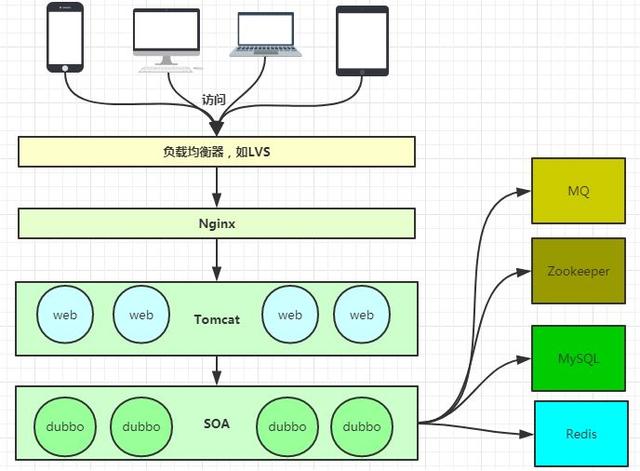
- 静态资源服务器
- 动态匹配
- 反向代理
- Gzip 压缩
- 负载均衡
# Nginx 转发匹配规则,后端程序员不得不会
# 当初我要是这么学习Nginx就好了
# ccb中写入的一些说明
# nginx运行重载关闭
# 关闭,推荐quit
nginx -s stop
nginx -s quit
# 重载conf配置
nginx -s reload

# 启动,推荐start nginx
nginx
start nginx
2
3
4
5
6
7
8
9
# location匹配
Syntax: location [ = | ~ | ~* | ^~ ] uri { ... }
location @name { ... }
Default: —
Context: server, location
2
3
4
理解
| 语法 | 含义 |
|---|---|
| location = /uri | =表示精准匹配,只要完全匹配上才能生效。 |
| location /uri | 不带任何修饰符,也表示前缀匹配,但是在正则匹配之后 |
| location / | 通用匹配,任何未匹配到其他location的请求都会匹配到 |
| location ^~ /uri | 开头对URL路径进行前缀匹配,并且在正则之前。一旦匹配到最长匹配,则不再查找其他匹配项 |
| location ~ pattern | 开头表示区分大小写的正则匹配 |
| location ~* pattern | 开头表示不区分大小写的正则匹配,如果有多个location匹配,则选择匹配最长的那个 |
location !~ 和 !~* | 分别为区分大小写不匹配及不区分大小写不匹配 |
Sets configuration depending on a request URI.
The matching is performed against a normalized URI, after decoding the text encoded in the “%XX” form, resolving references to relative path components “.” and “..”, and possible compression of two or more adjacent slashes into a single slash.
在对以“%XX”形式编码的文本进行解码,解析对相对路径分量“.”和“..”,的引用后,针对规范化URI执行匹配。,并可能将两个或多个相邻的斜杠压缩为单个斜杠。
A location can either be defined by a prefix string, or by a regular expression. Regular expressions are specified with the preceding “~*” modifier (for case-insensitive matching), or the “~” modifier (for case-sensitive matching). To find location matching a given request, nginx first checks locations defined using the prefix strings (prefix locations). Among them, the location with the longest matching prefix is selected and remembered. Then regular expressions are checked, in the order of their appearance in the configuration file. The search of regular expressions terminates on the first match, and the corresponding configuration is used. If no match with a regular expression is found then the configuration of the prefix location remembered earlier is used.
位置可以由前缀字符串或正则表达式定义。正则表达式由前面的“〜*”修饰符(不区分大小写)或“〜”修饰符(不区分大小写)指定。为了找到与给定请求匹配的位置,nginx首先检查使用前缀字符串定义的位置(前缀位置)。其中,选择并记住具有最长匹配前缀的位置。
然后按照在配置文件中出现的顺序检查正则表达式。正则表达式的搜索在第一个匹配项上终止,并使用相应的配置。如果未找到与正则表达式匹配的内容,则使用前面记住的前缀位置的配置。
TIP
If the longest matching prefix location has the “^~” modifier then regular expressions are not checked.
如果最长的匹配前缀位置具有'“ ^〜”`修饰符,则不检查正则表达式。
WARNING
Also, using the “=” modifier it is possible to define an exact match of URI and location. If an exact match is found, the search terminates. For example, if a “/” request happens frequently, defining “location = /” will speed up the processing of these requests, as search terminates right after the first comparison. Such a location cannot obviously contain nested locations.
同样,使用“ =”修饰符可以定义URI和位置的精确匹配。如果找到完全匹配的内容,搜索将终止。
例如,如果“ /”请求频繁发生,则定义“ location = /”将加快这些请求的处理速度,因为搜索将在第一次比较后立即终止。这样的位置显然不能包含嵌套位置。
# 举例说明匹配规则
location = / {
    [ configuration A ]
}

location / {
    [ configuration B ]
}

location /documents/ {
    [ configuration C ]
}

location ^~ /images/ {
    [ configuration D ]
}

location ~* \.(gif|jpg|jpeg)$ {
    [ configuration E ]
}
2
3
4
5
6
7
8
9
10
11
12
13
14
15
16
17
18
19
以上例子
The “/” request will match configuration A,
the “/index.html” request will match configuration B,
the “/documents/document.html” request will match configuration C,
the “/images/1.gif” request will match configuration D,
and the “/documents/1.jpg” request will match configuration E.
The “@” prefix defines a named location. Such a location is not used for a regular request processing, but instead used for request redirection. They cannot be nested, and cannot contain nested locations.
“ @”前缀定义命名位置。这样的位置不用于常规请求处理,而是用于请求重定向。它们不能嵌套,也不能包含嵌套位置。
If a location is defined by a prefix string that ends with the slash character, and requests are processed by one of proxy_pass, fastcgi_pass, uwsgi_pass, scgi_pass, memcached_pass, or grpc_pass, then the special processing is performed. In response to a request with URI equal to this string, but without the trailing slash, a permanent redirect with the code 301 will be returned to the requested URI with the slash appended. If this is not desired, an exact match of the URI and location could be defined like this:
如果位置由以斜杠字符结尾的前缀字符串定义,并且请求由proxy_pass,fastcgi_pass,uwsgi_pass,scgi_pass,memcached_pass或grpc_pass中的一个处理,则将执行特殊处理。
响应URI等于此字符串但不带斜杠的请求,带有代码301的永久重定向将返回到请求的URI,并附加斜杠。如果不希望这样,则可以这样定义URI和位置的完全匹配:
TIP
精准匹配: 相等(=) 字符串匹配:字符串匹配(空格)、匹配开头(^~) 正则匹配: 区分大小写匹配(~)、不区分大小写匹配(~)、区分大小写不匹配(!~)、不区分大小写不匹配(!~)
优先级:精准匹配 > 字符串匹配(长 > 短,^~匹配是最长匹配则停止匹配) > 正则匹配(先后顺序)
# Nginx配置文件结构
nginx.conf文件中主要有三个结构:Global: nginx 运行相关全局块:从配置文件开始到events块之间,主要是设置一些影响nginx服务器整体运行的配置指令,
配置影响nginx全局的指令。一般有运行nginx服务器的用户组,nginx进程pid存放路径,日志存放路径,配置文件引入,允许生成worker process数等。events: 与用户的网络连接相关events块:配置影响nginx服务器或与用户的网络连接。有每个进程的最大连接数,选取哪种事件驱动模型处理连接请求,是否允许同时接受多个网路连接,开启多个网络连接序列化等。- http
- http块:
可以嵌套多个server,配置代理,缓存,日志定义等绝大多数功能和第三方模块的配置。如文件引入,mime-type定义,日志自定义,是否使用sendfile传输文件,连接超时时间,单连接请求数等。
# server
了解了以上Nginx配置文件结构后,今天主要学习http块中的 server。server块,用于配置虚拟主机的相关参数,一个http中可以有多个server。
server {
  # 配置网络监听
  # 监听所有的 80
  listen 80;

  # 基于名称的虚拟主机配置
  server_name design.luweitech.cn;

  # 配置请求的根目录
  # Web 服务器收到请求后,首先要在服务端指定的目录中寻找请求资源
  root /xxx/abc;

  # 设置网站的默认首页
  index index.html;

  location / {
    proxy_pass http://localhost:端口号;
  }

  location /favicon.ico {
    # 过期时间设置 12 小时
    expires 12h;
  }

  location ~ .*\.(js|css)?$ {
     # proxy_pass http://localhost:端口号;
     expires 12h;
  }
}
2
3
4
5
6
7
8
9
10
11
12
13
14
15
16
17
18
19
20
21
22
23
24
25
26
27
28
29
# server_name
基于名称的虚拟主机配置
server_name 是虚拟服务器的识别路径,不同的域名会通过请求头中的HOST字段,匹配到特定的server块,转发到对应的应用服务器中去。
比如,以下代码
server {
  listen  80;
  server_name www.xxx.com;
  location / {
    proxy_pass http://localhost:6002;
  }
}

server {
  listen 80;
  server_name www.xxx.*;
  location / {
    proxy_pass http://localhost:6003;
}
2
3
4
5
6
7
8
9
10
11
12
13
14
TIP
- 访问
www.xxx.comNginx会转发到 http://localhost:6002 - 访问
www.xxx.orgNginx会转发到http://localhost:6003
# index
设置网站的默认首页
- index 指令主要有 2 个作用:
- 对请求地址没有指明首页的,
指定默认首页 - 对一个请求,根据请求内容而设置不同的首页,比如:
- 对请求地址没有指明首页的,
location ~ ^/luwei/(.+)/web/$ {
    index index.$1.html index.htm;
}
2
3
# location
location ~ .*\.(js|css)?$ {
  # proxy_pass http://localhost:端口号;
  expires 12h;
}
2
3
4
以上,简单来说是设置 js、css 文件的过期时间(注意,是注释了proxy_pass后的作用),这样原本是没有问题的,问题在于,如果这么一写,因为注释了proxy_pass,所以一旦浏览器访问js、css 文件,Nginx 会默认去上面配置的 root 中找,然而,我们使用的是 node 服务,js、css 不是单纯的静态文件,不直接在root 中,结果浏览器就访问不了。
- 对于 js、css 不是静态文件的情况,有两种处理办法:
- 第一种是
解开 proxy_pass http://localhost:端口号;这句的注释,让其回到 node 提供的服务中 - 第二种是
把 location ~ .*\.(js|css)?$ 整个都注释掉,这样请求的 js、css 文件会匹配上面的 location /,回到 node 提供的服务中
- 第一种是
# 正向代理
由于防火墙的原因,我们并不能直接访问谷歌,那么我们可以借助VPN来实现,这就是一个简单的正向代理的例子。这里你能够发现,正向代理“代理”的是客户端,而且客户端是知道目标的,而目标是不知道客户端是通过VPN访问的。
- 访问原来无法访问的资源,如 Google。
- 可以做缓存,加速访问资源。
- 对客户端访问授权,上网进行认证。
- 代理可以记录用户访问记录(上网行为管理),对外隐藏用户信息。
# 反向代理
当我们在外网访问多吉的时候,其实会进行一个转发,代理到内网去,这就是所谓的反向代理,即反向代理“代理”的是服务器端,而且这一个过程对于客户端而言是透明的。
- 保证内网的安全,通常将反向代理作为公网访问地址,Web 服务器是内网。
- 负载均衡,通过反向代理服务器来优化网站的负载。
# Nginx配置一键生成
nginxconfig 目前支持:
- Angular、React、Vue、Node.js
- PHP、Python
- wordpress、Magento、Drupal
- 缓存、Https、日志等各种配置...
# 看完这篇还不了解 Nginx,那我就哭了
Nginx
Nginx 同 Apache 一样都是一种 Web 服务器。基于 REST 架构风格,以统一资源描述符(Uniform Resources Identifier)URI 或者统一资源定位符(Uniform Resources Locator)URL 作为沟通依据,通过 HTTP 协议提供各种网络服务。
由于以下这几点,所以,Nginx 火了:
- Nginx 使用基于事件驱动架构,使得其可以支持数以百万级别的 TCP 连接。
- 高度的模块化和自由软件许可证使得第三方模块层出不穷(这是个开源的时代啊)。
- Nginx 是一个跨平台服务器,可以运行在 Linux、Windows、FreeBSD、Solaris、AIX、Mac OS 等操作系统上。
关于代理
说到代理,首先我们要明确一个概念,所谓代理就是一个代表、一个渠道;此时就涉及到两个角色,一个是被代理角色,一个是目标角色。
# Nginx 支持的负载均衡调度算法方式如下
- ①weight 轮询(默认):接收到的请求按照顺序逐一分配到不同的后端服务器,即使在使用过程中,某一台后端服务器宕机,Nginx 会自动将该服务器剔除出队列,请求受理情况不会受到任何影响。
这种方式下,可以给不同的后端服务器设置一个权重值(weight),用于调整不同的服务器上请求的分配率。
权重数据越大,被分配到请求的几率越大;该权重值,主要是针对实际工作环境中不同的后端服务器硬件配置进行调整的。 - ②ip_hash:每个请求按照发起客户端的 ip 的 hash 结果进行匹配,这样的算法下一个固定 ip 地址的客户端总会访问到同一个后端服务器,这也在一定程度上解决了集群部署环境下 Session 共享的问题。
- ③fair:智能调整调度算法,动态的根据后端服务器的请求处理到响应的时间进行均衡分配。
响应时间短处理效率高的服务器分配到请求的概率高,响应时间长处理效率低的服务器分配到的请求少,它是结合了前两者的优点的一种调度算法。
但是需要注意的是 Nginx 默认不支持 fair 算法,如果要使用这种调度算法,请安装 upstream_fair 模块。 - ④url_hash:按照访问的 URL 的 hash 结果分配请求,每个请求的 URL 会指向后端固定的某个服务器,可以在 Nginx 作为静态服务器的情况下提高缓存效率。
# Nginx常用模块
# ngx_http_headers_module
HTTP头信息,是实际业务中一个很重要的功能。例如,如果需要将请求结果在浏览器上缓存一段时间,或者在请求代理到后端服务器的过程中生成一个唯一的 ID进行识别。通过对 Nginx进行配置,可以轻松实现这些功能。
ngx_http_headers_module是在 Nginx编译时默认自带的模块,主要包含add_header和expires两个指令。
# ngx_http_headers_module使用语法
# expires
expires语法: expires [modified] time; expires epoch | max | off;
默认值: expires off;
环境: http、 server、 location、 if in location
用途:设置 Expires和 Cache-Control响应头字段,主要作用是控制缓存时间,如在浏览器上的缓存时间、 CDN的缓存时间。参数值可以是正数、负数或零;
2
3
4
此配置只能在 HTTP状态码是
200、 201、 204、 206、 301、 302、 303、 304、 307或308时才会生效。
# add_ header
语法: add_ header name value [always];
默认值:无
环境: http、 server、 location、 if in location
用途:添加自定义的响应头。
2
3
4
在默认情况下, add_ header只能在 HTTP状态码是 200、 201、 204、 206、 301、 302、 303、 304、 307或 308时输出响应头,如果出现 404、 500等异常状态码则无法输出响应头。
# 文件及目录匹配
-f 和 !-f用来判断是否存在文件-d 和 !-d用来判断是否存在目录-e 和 !-e用来判断是否存在文件或目录-x 和 !-x用来判断文件是否可执行
# rewrite指令
最后一项参数为flag标记,flag标记有
last相当于 apache 里面的[L]标记,表示 rewrite。break本条规则匹配完成后,终止匹配,不再匹配后面的规则。redirect返回302临时重定向,浏览器地址会显示跳转后的URL地址。permanent返回301永久重定向,浏览器地址会显示跳转后的URL地址。
使用 last 和 break 实现URI重写,浏览器地址栏不变
使用alias指令必须用 last标记;使用proxy_pass指令时,需要使用break标记。
# NginxRewrite 规则相关指令
# break指令
- 使用环境:server、location、if
- 该指令的作用是完成当前的规则集,不再处理rewrite指令。
# if 指令
- 使用环境:server、location
- 该指令用于检查一个条件是否符合,如果条件符合,则执行大括号内的语句。If指令
不支持嵌套,不支持多个条件&&和||处理。
# return指令
- 语法:returncode
- 使用环境:server、location、if
- 该指令用于结束规则的执行并返回状态码给客户端。
如果访问的URL以".sh"或".bash"结尾,则返回403状态码
location ~ .*\.(sh|bash)?$
{
   return 403;
}
2
3
4
# rewrite 指令
- 语法:rewriteregex replacement flag
- 使用环境:server、location、if
- 该指令根据表达式来重定向URI,或者修改字符串。指令根据配置文件中的顺序来执行。注意重写表达式只对相对路径有效。如果你想配对主机名,你应该使用if语句
if( $host ~* www\.(.*) )
{
   set $host_without_www $1;
   rewrite ^(.*)$  http://$host_without_www$1permanent;
}
2
3
4
5
# Set指令
- 语法:setvariable value ; 默认值:none
- 使用环境:server、location、if
- 该指令用于定义一个变量,并给变量赋值。变量的值可以为文本、变量以及文本变量的联合。
set$varname "hello world";
# rewrite实例
- 当访问的文件和目录不存在时,重定向到某个html文件
if( !-e $request_filename )
{
    rewrite ^/(.*)$ index.html last;
}
2
3
4
- 目录对换
/123456/xxxx ====> /xxxx?id=123456
rewrite ^/(\d+)/(.+)/ /$2?id=$1 last;
- 如果客户端使用的是IE浏览器,则重定向到/ie目录下
if( $http_user_agent  ~ MSIE)
{
    rewrite ^(.*)$ /ie/$1 break;
}
2
3
4
- 禁止访问多个目录
location ~ ^/(cron|templates)/
{
    deny all;
    break;
}
2
3
4
5
- 禁止访问以/data开头的文件
location ~ ^/data
{
    deny all;
}
2
3
4
- 禁止访问以.sh,.flv,.mp3为文件后缀名的文件
location ~ .*\.(sh|flv|mp3)$
{
    return 403;
}
2
3
4
- 设置某些类型文件的浏览器缓存时间
location ~ .*\.(gif|jpg|jpeg|png|bmp|swf)$
{
    expires 30d;
}
location ~ .*\.(js|css)$
{
    expires 1h;
}
2
3
4
5
6
7
8
- 给favicon.ico和robots.txt设置过期时间
这里为favicon.ico为99天,robots.txt为7天并不记录404错误日志
location ~(favicon.ico) {
   log_not_found off;
   expires 99d;
   break;
}
location ~(robots.txt) {
   log_not_found off;
   expires 7d;
   break;
}
2
3
4
5
6
7
8
9
10
- 设定某个文件的过期时间;这里为600秒,并不记录访问日志
location ^~ /html/scripts/loadhead_1.js {
    access_log  off;
    root /opt/lampp/htdocs/web;
    expires 600;
    break;
}
2
3
4
5
6
- 只允许固定ip访问网站,并加上密码
root /opt/htdocs/www;
allow  208.97.167.194;
allow  222.33.1.2;
allow  231.152.49.4;
deny  all;
auth_basic “C1G_ADMIN”;
auth_basic_user_file htpasswd;
2
3
4
5
6
7
- 将多级目录下的文件转成一个文件,增强seo效果
// /job-123-456-789.html 指向/job/123/456/789.html
rewrite^/job-([0-9]+)-([0-9]+)-([0-9]+)\.html$ /job/$1/$2/jobshow_$3.html last;
2
- 文件和目录不存在的时候重定向:
if (!-e $request_filename) {
    proxy_pass http://127.0.0.1;
}
2
3
- 域名跳转
server{

  listen      80;
  server_name  jump.linuxidc.com;
  index index.html index.htm index.php;
  root  /opt/lampp/htdocs/www;
  rewrite ^/ http://www.linuxidc.com/;
  access_log  off;
}
2
3
4
5
6
7
8
9
- 多域名转向
server_name  www.linuxidc.comwww.linuxidc.net;
index index.html index.htm index.php;
root  /opt/lampp/htdocs;
if ($host ~ "linuxidc\.net") {
    rewrite ^(.*) http://www.linuxidc.com$1permanent;
}
2
3
4
5
6
# 错误实例
nginx: [emerg] "upstream" directive is not allowed
解决方法:upstream backend 位置放错了, upstream位置应该放在http模块里面 但必须是在server模块的外面
# 彻底搞懂 Nginx 的五大应用场景
# Nginx官方推荐的nginx.conf标准配置
http {
    upstream node_backend {
        zone upstreams 64K;
        server 127.0.0.1:3000 max_fails=1 fail_timeout=2s;
        keepalive 2;
    }

    server {
        listen 80;
        server_name example.com;

        location / {
            proxy_set_header Host $host;
            proxy_pass http://node_backend/;
            proxy_next_upstream error timeout http_500;

        }
    }
}
2
3
4
5
6
7
8
9
10
11
12
13
14
15
16
17
18
19
- 即使没有负载平衡或在一台机器内,也要
启用upstream{}块,它解锁了几个提高性能的功能:- 该zone指令建立了一个共享内存区域,主机上的所有 NGINX 工作进程都可以访问有关上游服务器的配置和状态信息。几个上游组可以共享该区域。
- 该server指令有几个参数可用于调整服务器行为。在这个例子中,我们改变了 NGINX 用来确定服务器不健康并因此没有资格接受请求的条件。在这里,如果通信尝试在每 2 秒内失败一次(而不是默认的每10 秒一次),它就会认为服务器不健康。
- 我们把这个设置和proxy_next_upstream指令结合起来,以配置NGINX认为的失败的通信尝试,在这种情况下,它把请求传递给上游组的下一个服务器。在默认的错误和超时条件中,我们添加了http_500,以便NGINX认为来自上游服务器的HTTP 500(内部服务器错误)代码代表一个失败的尝试。
- keepalive指令设置每个工作进程的缓存中保存的与上游服务器的空闲keepalive连接的数量。默认情况下,NGINX 会为每个新的传入请求打开一个到上游(后端)服务器的新连接。这是安全但低效的,因为 NGINX 和服务器必须交换三个数据包来建立连接,并交换三个或四个数据包来终止它。在高流量时,为每个请求打开一个新连接会耗尽系统资源,并且根本无法打开连接。修复是在 NGINX 和上游服务器之间启用keepalive 连接——而不是在请求完成时关闭,连接保持打开状态以用于其他请求。这既减少了源端口用完的可能性,又提高了性能。该参数设置为块中列出的服务器数量的两倍。
# nginx部署多个前端项目
- 基于域名配置
- 基于端口配置
- 基于location配置
编写多个conf文件
# 基于域名配置
基于域名配置,前提是先配置好了域名解析。比如说你自己买了一个域名:
www.fly.com。 然后你在后台配置了2个它的二级域名:a.fly.com、b.fly.com。
配置 a.fly.com 的配置文件:
vim /usr/nginx/modules/a.conf
server {
        listen 80;
        server_name a.fly.com;

        location / {
                root /data/web-a/dist;
                index index.html;
        }
}
2
3
4
5
6
7
8
9
配置 b.fly.com 的配置文件:
vim /usr/nginx/modules/b.conf
server {
        listen 80;
        server_name b.fly.com;

        location / {
                root /data/web-b/dist;
                index index.html;
        }
}
2
3
4
5
6
7
8
9
这种方式的好处是主机只要开放80端口即可。然后访问的话直接访问二级域名就可以访问。
# 基于端口配置
配置 a.fly.com 的配置文件:
vim /usr/nginx/modules/a.conf
server {
        listen 8000;

        location / {
                root /data/web-a/dist;
                index index.html;
        }
}

# nginx 80端口配置 (监听a二级域名)
server {
        listen  80;
        server_name a.fly.com;

        location / {
                proxy_pass http://localhost:8000; #转发
        }
}
2
3
4
5
6
7
8
9
10
11
12
13
14
15
16
17
18
配置 b.fly.com 的配置文件:
vim /usr/nginx/modules/b.conf
server {
        listen 8001;

        location / {
                root /data/web-b/dist;
                index index.html;
        }
}

# nginx 80端口配置 (监听b二级域名)

server {
        listen  80;
        server_name b.fly.com;

        location / {
                proxy_pass http://localhost:8001; #转发
        }
}
2
3
4
5
6
7
8
9
10
11
12
13
14
15
16
17
18
19
这种方式一共启动了4个server,而且配置远不如第一种简单,所以不推荐。
# 基于location配置
配置 a.fly.com 的配置文件:
vim /usr/nginx/modules/ab.conf
server {
        listen 80;

        location / {
                root /data/web-a/dist;
                index index.html;
        }

        location /web-b {
                alias /data/web-b/dist;
                index index.html;
        }
}
2
3
4
5
6
7
8
9
10
11
12
13
这种方式配置的话,location / 目录是root,其他的要使用alias。