# 导出excel
# apache poi导出导入excel
# 你还在用原生poi处理excel?太麻烦了来瞧瞧这个——easypoi
- 修改pom
<!-- https://mvnrepository.com/artifact/cn.afterturn/easypoi-annotation -->
<dependency>
    <groupId>cn.afterturn</groupId>
    <artifactId>easypoi-annotation</artifactId>
    <version>4.1.3</version>
</dependency>
<!-- https://mvnrepository.com/artifact/cn.afterturn/easypoi-base -->
<dependency>
    <groupId>cn.afterturn</groupId>
    <artifactId>easypoi-base</artifactId>
    <version>4.1.3</version>
</dependency>
1
2
3
4
5
6
7
8
9
10
11
12
2
3
4
5
6
7
8
9
10
11
12
或者springboot
<dependency>
    <groupId>cn.afterturn</groupId>
    <artifactId>easypoi-spring-boot-starter</artifactId>
    <version>4.1.3</version>
</dependency>
1
2
3
4
5
2
3
4
5
- 一使用注解配置实体类,二调用工具类。
public class API implements Serializable {

 @Excel(name = "接口名称")
 private String name;
 @Excel(name = "接口编号")
 private String id;
 @Excel(name = "接口提交方式")
 private String type;
 @Excel(name = "接口地址")
 private String url;
 @Excel(name = "参数类型")
 private String contentType;
}

FileInputStream fis = new FileInputStream(EXCEL_PATH);
//导入参数设置类
ImportParams params = new ImportParams();
List<API> importExcel = ExcelImportUtil.importExcel(fis, API.class, params);
1
2
3
4
5
6
7
8
9
10
11
12
13
14
15
16
17
18
2
3
4
5
6
7
8
9
10
11
12
13
14
15
16
17
18
# 最简单的导出
List<API> list = new ArrayList<API>();
ExportParams exportParams = new ExportParams();
Workbook workbook = ExcelExportUtil.exportExcel(exportParams, API.class, list);
workbook.write(new FileOutputStream(EXCEL_PATH));
1
2
3
4
2
3
4
# 7行代码导出excel(Alibaba)
pom文件
<!-- https://mvnrepository.com/artifact/com.alibaba/easyexcel 最新版beta5 -->
        <dependency>
            <groupId>com.alibaba</groupId>
            <artifactId>easyexcel</artifactId>
            <version>1.1.2-beta5</version>
        </dependency>
1
2
3
4
5
6
2
3
4
5
6
ExayExcel 提供注解的方式, 来方便的定义 Excel 需要的数据模型:
- ①:首先,定义的写入模型必须要继承自 BaseRowModel.java;
- ②:通过 @ExcelProperty 注解来指定每个字段的列名称,以及下标位置;
且需要有get、set方法
# 其他场景需求
# 动态生成excel内容
表头根据名称类似进行合并操作
private List<List<String>> genDynamicHead(){
        return new ArrayList<List<String>>(){{
            add(new ArrayList<String>(){{add("第一列");add("第一列");add("第一列");}});
            add(new ArrayList<String>(){{add("第一列");add("第一列");add("第一列");}});
            add(new ArrayList<String>(){{add("第3列");add("第3列");add("第3列");}});
            add(new ArrayList<String>(){{add("第4列");add("第4列2");add("第4列2");}});
            add(new ArrayList<String>(){{add("第一列");add("第5列");add("第6列");}});
        }};
    }
1
2
3
4
5
6
7
8
9
2
3
4
5
6
7
8
9
# 合并单元格
merge()
try(OutputStream out =
                    new FileOutputStream("E:/IDEA_Work/tmpFile/test.xlsx")) {
            ExcelWriter excelWriter = EasyExcelFactory.getWriter(out);
            //固定表头
//            Sheet sheet1 = new Sheet(1,0,ExcelTestModel.class);
            Sheet sheet1 = new Sheet(1,0);
            Table table = new Table(1);
            table.setHead(genDynamicHead());
            table.setTableStyle(genTableStyle());

            sheet1.setSheetName("first");
//            excelWriter.write(genListModel(),sheet1);
            excelWriter.write1(genDataList(),sheet1,table);
            //下标从0开始的
            excelWriter.merge(5,6,1,4);
            excelWriter.finish();
        } catch (IOException e) {
            e.printStackTrace();
        }
1
2
3
4
5
6
7
8
9
10
11
12
13
14
15
16
17
18
19
2
3
4
5
6
7
8
9
10
11
12
13
14
15
16
17
18
19
// 动态合并单元格
EasyExcel.write(out, clazz)
                    .registerWriteHandler(new LongestMatchColumnWidthStyleStrategy())
                    .registerWriteHandler(new EasyExcelCellMergeStrategy(2, new int[]{0}))
                    .sheet(excelName)
                    .doWrite(data);


public class EasyExcelCellMergeStrategy extends AbstractMergeStrategy {
    private int startRowIndex;
    private int[] mergeColumnIndexes;

    public EasyExcelCellMergeStrategy() {
    }

    public EasyExcelCellMergeStrategy(int startRowIndex, int[] mergeColumnIndexes) {
        this.startRowIndex = startRowIndex;
        this.mergeColumnIndexes = mergeColumnIndexes;
    }

    @Override
    protected void merge(Sheet sheet, Cell cell, Head head, Integer relativeRowIndex) {
        //当前行
        int curRowIndex = cell.getRowIndex();
        //当前列
        int curColIndex = cell.getColumnIndex();
        if (curRowIndex >= startRowIndex) {
//            循环需要合并的列
            for (int mergeColumnIndex : mergeColumnIndexes) {
//                当前列在需要合并的列中才做合并逻辑处理
                if (curColIndex == mergeColumnIndex) {
                    // 当前单元格
//                    Object curData = cell.getCellTypeEnum() == CellType.STRING
//                            ? cell.getStringCellValue()
//                            : cell.getNumericCellValue();
                    String curStr = cell.getStringCellValue();
//                    Cell curNextCell = cell.getSheet().getRow(curRowIndex).getCell(curColIndex + 1);
//                    int curMount = (int) curNextCell.getNumericCellValue();
                    // 当前单元格上方的单元格
                    Cell preCell = cell.getSheet().getRow(curRowIndex - 1).getCell(curColIndex);
                    String prevStr = preCell.getStringCellValue();
//                    Cell prevNextCell = cell.getSheet().getRow(curRowIndex - 1).getCell(curColIndex + 1);
//                    int prevMount = (int) prevNextCell.getNumericCellValue();
//                    Object preData = preCell.getCellTypeEnum() == CellType.STRING
//                            ? preCell.getStringCellValue()
//                            : preCell.getNumericCellValue();
//                    preCell.setCellValue(curMount + prevMount);
//                    prevNextCell.setCellValue(90);

                    if (StringUtils.equals(curStr, prevStr)) {
                        List<CellRangeAddress> mergeRegions = sheet.getMergedRegions();
                        // 当前列是否合并
                        boolean hasMerged = false;
                        // 隔壁列是否合并
                        boolean nextHasMerged = false;
                        for (int i = 0; i < mergeRegions.size() && (!hasMerged || !nextHasMerged); i++) {
                            CellRangeAddress cellRangeAddr = mergeRegions.get(i);
                            // 若上一个单元格已经被合并,则先移出原有的合并单元,再重新添加合并单元
                            if (cellRangeAddr.isInRange(curRowIndex - 1, curColIndex)) {
                                sheet.removeMergedRegion(i);
                                cellRangeAddr.setLastRow(curRowIndex);
                                sheet.addMergedRegion(cellRangeAddr);
                                hasMerged = true;
                            }
                            if (cellRangeAddr.isInRange(curRowIndex - 1, curColIndex + 1)) {
                                sheet.removeMergedRegion(i - 1);
                                cellRangeAddr.setLastRow(curRowIndex);
                                sheet.addMergedRegion(cellRangeAddr);
                                nextHasMerged = true;
                            }
                        }
                        // 若上一个单元格未被合并,则新增合并单元,此处有特殊处理,下一列合并规则同该列
                        if (!hasMerged && !nextHasMerged) {
                            CellRangeAddress cellRangeAddress = new CellRangeAddress(curRowIndex - 1, curRowIndex, curColIndex, curColIndex);
                            CellRangeAddress nextCellRangeAddress = new CellRangeAddress(curRowIndex - 1,
                                    curRowIndex,
                                    curColIndex + 1,
                                    curColIndex + 1);
                            sheet.addMergedRegion(cellRangeAddress);
                            sheet.addMergedRegion(nextCellRangeAddress);
                        }
                    }
                }
            }
        }
    }
}
1
2
3
4
5
6
7
8
9
10
11
12
13
14
15
16
17
18
19
20
21
22
23
24
25
26
27
28
29
30
31
32
33
34
35
36
37
38
39
40
41
42
43
44
45
46
47
48
49
50
51
52
53
54
55
56
57
58
59
60
61
62
63
64
65
66
67
68
69
70
71
72
73
74
75
76
77
78
79
80
81
82
83
84
85
86
87
88
2
3
4
5
6
7
8
9
10
11
12
13
14
15
16
17
18
19
20
21
22
23
24
25
26
27
28
29
30
31
32
33
34
35
36
37
38
39
40
41
42
43
44
45
46
47
48
49
50
51
52
53
54
55
56
57
58
59
60
61
62
63
64
65
66
67
68
69
70
71
72
73
74
75
76
77
78
79
80
81
82
83
84
85
86
87
88
# 自定义处理
WriterHandler接口预留
# 通用导入excel(结合实际项目)
注意model实体,不可以走链式调用,set方法只可以返回void,否则无法解析excel数据
# 1.Listener
import com.alibaba.excel.context.AnalysisContext;
import com.alibaba.excel.event.AnalysisEventListener;
import com.alibaba.excel.metadata.BaseRowModel;
import com.google.common.collect.Lists;
import lombok.Getter;
import lombok.Setter;
import lombok.extern.slf4j.Slf4j;

import java.util.List;

/**
 - easy excel监听类
 - @author huting
 - @date 2019-07-23
 */
@Getter
@Setter
@Slf4j
public class ExcelListener<T extends BaseRowModel> extends AnalysisEventListener<T> {
    private List<T> rows = Lists.newArrayList();
    @Override
    public void invoke(T object, AnalysisContext context) {
        rows.add(object);

    }

    @Override
    public void doAfterAllAnalysed(AnalysisContext context) {
        log.info("读取行数:[{}]",rows.size());
    }
}
1
2
3
4
5
6
7
8
9
10
11
12
13
14
15
16
17
18
19
20
21
22
23
24
25
26
27
28
29
30
31
2
3
4
5
6
7
8
9
10
11
12
13
14
15
16
17
18
19
20
21
22
23
24
25
26
27
28
29
30
31
# 3.Util
import com.alibaba.excel.EasyExcelFactory;
import com.alibaba.excel.ExcelReader;
import com.alibaba.excel.metadata.BaseRowModel;
import com.alibaba.excel.metadata.Sheet;
import com.faith.event.listener.ExcelListener;
import org.springframework.util.Assert;

import java.io.InputStream;
import java.util.List;

/**
 - easy excel工具类
 - @author huting
 - @date 2019-07-23
 */
public class EasyExcelUtil {

    /**
     *
     - @param inputStream 输入流
     - @param sheet excel中的sheet
     - @param <T> excel实体类
     - @return List
     */
    public static <T extends BaseRowModel> List<T> readFromExcel(final InputStream inputStream,final Sheet sheet){
        Assert.notNull(inputStream,"inputStream 不可为 null");
        ExcelListener<T> listener = new ExcelListener<>();
        ExcelReader reader = EasyExcelFactory.getReader(inputStream,listener);
        reader.read(sheet);
        return listener.getRows();
    }
}
1
2
3
4
5
6
7
8
9
10
11
12
13
14
15
16
17
18
19
20
21
22
23
24
25
26
27
28
29
30
31
32
2
3
4
5
6
7
8
9
10
11
12
13
14
15
16
17
18
19
20
21
22
23
24
25
26
27
28
29
30
31
32
# 3.Controller层
import com.alibaba.excel.EasyExcelFactory;
import com.alibaba.excel.ExcelWriter;
import com.alibaba.excel.metadata.BaseRowModel;
import com.alibaba.excel.metadata.Font;
import com.alibaba.excel.metadata.Sheet;
import com.alibaba.excel.metadata.TableStyle;
import com.alibaba.excel.support.ExcelTypeEnum;
import com.faith.exception.BusinessException;
import com.faith.mvc.pojo.EasyExcelModelEnum;
import com.faith.mvc.service.EasyExcelService;
import com.faith.source.BaseController;
import com.faith.utils.EasyExcelUtil;
import org.apache.commons.io.FilenameUtils;
import org.apache.commons.lang3.StringUtils;
import org.apache.poi.ss.usermodel.IndexedColors;
import org.springframework.beans.factory.annotation.Autowired;
import org.springframework.stereotype.Controller;
import org.springframework.util.Assert;
import org.springframework.util.ObjectUtils;
import org.springframework.web.bind.annotation.RequestMapping;
import org.springframework.web.bind.annotation.ResponseBody;
import org.springframework.web.multipart.MultipartFile;
import org.springframework.web.multipart.MultipartHttpServletRequest;

import javax.servlet.http.HttpServletRequest;
import javax.servlet.http.HttpServletResponse;
import javax.servlet.http.HttpSession;
import java.io.BufferedInputStream;
import java.io.IOException;
import java.io.InputStream;
import java.io.OutputStream;
import java.util.List;
import java.util.Map;
import java.util.Optional;

/**
 - excel相关控制类
 - @author huting
 - @date 2019-07-23
 */
@Controller
@RequestMapping("/excel")
public class EasyExcelController extends BaseController {

    @Autowired
    private EasyExcelService easyExcelService;

    @RequestMapping("/import")
    @ResponseBody
    public Map importByExcel(HttpServletRequest request, HttpSession httpSession
            , EasyExcelModelEnum easyExcelModelEnum){
        try {

            MultipartHttpServletRequest multipartRequest = (MultipartHttpServletRequest) request;
            MultipartFile multipartFile = multipartRequest.getFile("file");
            InputStream is = multipartFile.getInputStream();
            String fileName = multipartFile.getOriginalFilename();
            Assert.hasText(fileName,"请选择要导入的文件");

            Optional.of("."+FilenameUtils.getExtension(fileName))
                    .filter(str -> StringUtils.equals(str,ExcelTypeEnum.XLS.getValue())
                            || StringUtils.equals(str,ExcelTypeEnum.XLSX.getValue()))
                    .orElseThrow(() -> new BusinessException("01","文件类型不正确"));
            List lists = EasyExcelUtil.readFromExcel(new BufferedInputStream(is),new Sheet(1,1
                    , (Class<? extends BaseRowModel>) Class.forName(easyExcelModelEnum.getClazz())));
            Object obj = this.easyExcelService.handleInputStream(this.getCurrentUser(request),lists,easyExcelModelEnum);
            if (ObjectUtils.isEmpty(obj)){
                return this.resultData("00");
            } else {
                httpSession.setAttribute(easyExcelModelEnum.name(),obj);
                return this.resultData("01");
            }
        } catch (Exception e){
            logger.error(e.getMessage(),e);
            return this.resultData("10",e.getMessage());
        }
    }

    /**
     - 导出入库失败的数据
     - @param response 响应
     - @param easyExcelModelEnum 导出实体类别
     */
    @ResponseBody
    @RequestMapping("/exportFail")
    public void exportFailExcel(HttpServletResponse response,HttpSession httpSession
            ,EasyExcelModelEnum easyExcelModelEnum){
        Assert.notNull(easyExcelModelEnum,"业务异常,请联系相应模块开发者");
        Assert.hasText(easyExcelModelEnum.getClazz(),"业务异常,请联系相应模块开发者");
        String excelName = easyExcelModelEnum.getModelName()+"失败列表";

        OutputStream out = null;
        ExcelWriter excelWriter = null;
        try {
            response.setContentType("octets/stream");
            response.addHeader("Content-Disposition"
                    , "attachment;filename="+
                            new String(excelName.getBytes("gb2312"), "ISO8859-1" )+
                            ".xlsx");
            out = response.getOutputStream();
            excelWriter = EasyExcelFactory.getWriter(out);
            Sheet sheet = new Sheet(1,0
                    , (Class<? extends BaseRowModel>) Class.forName(easyExcelModelEnum.getClazz())
                    ,easyExcelModelEnum.getModelName(),null);
            sheet.setTableStyle(this.genTableStyle());
            excelWriter.write1((List<List<Object>>) httpSession.getAttribute(easyExcelModelEnum.name())
                    ,sheet);

            httpSession.removeAttribute(easyExcelModelEnum.name());
        } catch (Exception e){
            logger.error("下载失败,请重试",e);
        } finally {
            try {

                if (!ObjectUtils.isEmpty(excelWriter)){
                    excelWriter.finish();
                }
                if (!ObjectUtils.isEmpty(out)){
                    out.close();
                }} catch (IOException e) {
                e.printStackTrace();
            }
        }
    }

    private TableStyle genTableStyle(){
        TableStyle tableStyle = new TableStyle();
        Font headFont = new Font();
        headFont.setBold(true);
        headFont.setFontHeightInPoints((short) 13);
        headFont.setFontName("微软雅黑");
        tableStyle.setTableHeadFont(headFont);
        //设置背景颜色
        tableStyle.setTableHeadBackGroundColor(IndexedColors.SKY_BLUE);

        Font contentFont = new Font();
        contentFont.setFontHeightInPoints((short) 11);
        contentFont.setFontName("黑体");
        tableStyle.setTableContentFont(contentFont);
        tableStyle.setTableContentBackGroundColor(IndexedColors.LIGHT_ORANGE);
        return tableStyle;
    }
}
1
2
3
4
5
6
7
8
9
10
11
12
13
14
15
16
17
18
19
20
21
22
23
24
25
26
27
28
29
30
31
32
33
34
35
36
37
38
39
40
41
42
43
44
45
46
47
48
49
50
51
52
53
54
55
56
57
58
59
60
61
62
63
64
65
66
67
68
69
70
71
72
73
74
75
76
77
78
79
80
81
82
83
84
85
86
87
88
89
90
91
92
93
94
95
96
97
98
99
100
101
102
103
104
105
106
107
108
109
110
111
112
113
114
115
116
117
118
119
120
121
122
123
124
125
126
127
128
129
130
131
132
133
134
135
136
137
138
139
140
141
142
143
2
3
4
5
6
7
8
9
10
11
12
13
14
15
16
17
18
19
20
21
22
23
24
25
26
27
28
29
30
31
32
33
34
35
36
37
38
39
40
41
42
43
44
45
46
47
48
49
50
51
52
53
54
55
56
57
58
59
60
61
62
63
64
65
66
67
68
69
70
71
72
73
74
75
76
77
78
79
80
81
82
83
84
85
86
87
88
89
90
91
92
93
94
95
96
97
98
99
100
101
102
103
104
105
106
107
108
109
110
111
112
113
114
115
116
117
118
119
120
121
122
123
124
125
126
127
128
129
130
131
132
133
134
135
136
137
138
139
140
141
142
143
# 4.处理转换的列表
import com.faith.mvc.entity.TbSysUserFile;
import com.faith.mvc.pojo.EasyExcelModelEnum;
import com.faith.mvc.service.EasyExcelService;
import com.faith.utils.SpringContextHolder;
import org.springframework.stereotype.Service;

import java.lang.reflect.InvocationTargetException;
import java.util.List;

/**
 - easy excel通用处理类
 - @author huting
 - @date 2019-07-23
 */
@Service
public class EasyExcelServiceImpl implements EasyExcelService {

    @Override
    public Object handleInputStream(TbSysUserFile currentUser, List list
            , EasyExcelModelEnum easyExcelModelEnum) throws IllegalAccessException
            ,  NoSuchMethodException
            , InvocationTargetException {
        String serviceBean = easyExcelModelEnum.getServiceClazz();
//        Method method = ReflectionUtils.findMethod(SpringContextHolder.getBean(serviceBean).getClass()
//                ,easyExcelModelEnum.getMethodName());
//        SpringContextHolder.getBean(serviceBean)
//        ContextLoader.getCurrentWebApplicationContext().getBean("tsBiAreaService");
//        return ReflectionUtils.invokeMethod(method,SpringContextHolder.getBean(serviceBean),list,currentUser);
//        return null;
        Object obj = SpringContextHolder.getBean(serviceBean);
        return obj.getClass()
                .getMethod(easyExcelModelEnum.getMethodName(),List.class,TbSysUserFile.class)
                .invoke(obj,list,currentUser);

//        Object obj = ContextLoader.getCurrentWebApplicationContext()
//                .getBean(Class.forName(easyExcelModelEnum.getServiceClazz()));
//        return obj.getClass()
//                .getMethod(easyExcelModelEnum.getMethodName(),List.class,TbSysUserFile.class)
//                .invoke(obj,list,currentUser);
//        TsBiAreaService tsBiAreaService = SpringContextHolder.getBean("tsBiAreaService");
//        return Reflections.invokeMethodByName(Class.forName(easyExcelModelEnum.getServiceClazz()).newInstance()
//                ,easyExcelModelEnum.getMethodName(),new Object[] {list,currentUser});
//        Method method = SpringContextHolder.getBean("tsBiAreaService");

    }
}
1
2
3
4
5
6
7
8
9
10
11
12
13
14
15
16
17
18
19
20
21
22
23
24
25
26
27
28
29
30
31
32
33
34
35
36
37
38
39
40
41
42
43
44
45
46
2
3
4
5
6
7
8
9
10
11
12
13
14
15
16
17
18
19
20
21
22
23
24
25
26
27
28
29
30
31
32
33
34
35
36
37
38
39
40
41
42
43
44
45
46
# 5.枚举类
import lombok.AllArgsConstructor;
import lombok.Getter;

/**
 - excel批量导入的实体相关enum
 - @author huting
 - @date 2019-07-23
 */
@Getter
@AllArgsConstructor
public enum EasyExcelModelEnum {
    /**
     - 组织架构
     */
    tsBiAreaExcel("com.faith.mvc.entity.excel.TsBiAreaExcel"
            ,"组织架构"
            ,"tsBiAreaService"
            ,"handleEasyExcel"),
    /**
     - 维保单位
     */
    tmEzMaintainExcel("com.faith.mvc.entity.excel.TmEzMaintainExcel"
            ,"维保单位"
            ,"tmEzMaintainService"
            ,"handleEasyExcel"),
    /**
     - 建筑档案
     */
    tsBiOffcomBuildExcel("com.faith.mvc.entity.excel.TsBiOffcomBuildExcel"
            ,"建筑档案"
            ,"tsBiOffcomBuildService"
            ,"handleEasyExcel"),
    /**
     - 业务部门
     */
    tsBiOffcomExcel("com.faith.mvc.entity.excel.TsBiOffcomExcel"
            ,"业务部门"
            ,"tsBiOffcomService"
            ,"handleEasyExcel");

    /**
     - excel导入对应实体类
     */
    private String clazz;
    /**
     - 实体类名称,仅作解释用,可用作上传失败后文件名称
     */
    private String modelName;
    /**
     - 具体处理导入生成的对象列表的service
     */
    private String serviceClazz;
    /**
     - 具体处理导入生成的列表的service中的方法名称,
     - <p>接受两个参数:1、List,2、currentUser(当前登陆的用户的信息)</p>
     */
    private String methodName;
}
1
2
3
4
5
6
7
8
9
10
11
12
13
14
15
16
17
18
19
20
21
22
23
24
25
26
27
28
29
30
31
32
33
34
35
36
37
38
39
40
41
42
43
44
45
46
47
48
49
50
51
52
53
54
55
56
57
58
2
3
4
5
6
7
8
9
10
11
12
13
14
15
16
17
18
19
20
21
22
23
24
25
26
27
28
29
30
31
32
33
34
35
36
37
38
39
40
41
42
43
44
45
46
47
48
49
50
51
52
53
54
55
56
57
58
# easyexcel_2.0版
# 实际项目实现
- 工具类
package com.fourfaith.common.tools.utils;

import com.alibaba.excel.EasyExcel;
import com.alibaba.excel.write.style.column.LongestMatchColumnWidthStyleStrategy;
import lombok.extern.slf4j.Slf4j;

import javax.servlet.http.HttpServletResponse;
import java.io.OutputStream;
import java.net.URLEncoder;
import java.util.List;

/**
 - <p>Title: EasyExcelUtil</p>
 - <p>Description:excel导出、导入工具 </p>
 *
 - @author huting
 - @date 2019/10/23 16:51
 */
@Slf4j
public class EasyExcelUtil {
    public static void exportExcel(HttpServletResponse response, String excelName, Class clazz,List data){
        try(OutputStream out = response.getOutputStream()) {
            response.setContentType("application/vnd.ms-excel");
            response.setCharacterEncoding("utf-8");
            response.setHeader("Content-disposition", "attachment;filename=" + URLEncoder.encode(excelName,"utf-8") + ".xlsx");
            EasyExcel.write(out,clazz).registerWriteHandler(new LongestMatchColumnWidthStyleStrategy()).sheet(excelName).doWrite(data);
        } catch (Exception e) {
            log.error("下载失败:{}",e.getMessage(),e);
        }
    }
}
1
2
3
4
5
6
7
8
9
10
11
12
13
14
15
16
17
18
19
20
21
22
23
24
25
26
27
28
29
30
31
2
3
4
5
6
7
8
9
10
11
12
13
14
15
16
17
18
19
20
21
22
23
24
25
26
27
28
29
30
31
- 数据对象
注意最好不要@ExcelProperty中同时出现name和value
package com.fourfaith.fire.detachment.publicalarm.vo.excel;

import com.alibaba.excel.annotation.ExcelIgnore;
import com.alibaba.excel.annotation.ExcelProperty;
import lombok.Getter;
import lombok.Setter;

import java.io.Serializable;
import java.util.Date;

/**
 - <p>Title: AlarmInfoExcelVo</p>
 - <p>Description: 告警、隐患信息导出类</p>
 *
 - @author huting
 - @date 2019/10/23 17:36
 */
@Getter
@Setter
public class AlarmInfoExcelVo implements Serializable {
    @ExcelIgnore
    private static final long serialVersionUID = -2658524267234290886L;
    @ExcelProperty("上报时间")
    private Date createTime;
    @ExcelProperty("报警人姓名")
    private String alarmUserName;
    @ExcelProperty("状态")
    private String statusName;
    /**
     - 报警地点、系统记录地点
     */
    @ExcelProperty("系统记录地点")
    private String sysAddress;
    /**
     - 报警地点、系统记录地点
     */
    @ExcelProperty("报警地点")
    private String alarmAddress;
    @ExcelProperty("事发地点")
    private String incidentAddress;
    @ExcelProperty("事件描述")
    private String incidentDescription;
    @ExcelProperty("照片导出")
    private InputStream photo;
}
1
2
3
4
5
6
7
8
9
10
11
12
13
14
15
16
17
18
19
20
21
22
23
24
25
26
27
28
29
30
31
32
33
34
35
36
37
38
39
40
41
42
43
44
45
2
3
4
5
6
7
8
9
10
11
12
13
14
15
16
17
18
19
20
21
22
23
24
25
26
27
28
29
30
31
32
33
34
35
36
37
38
39
40
41
42
43
44
45
- web导出
@RequestMapping("exportExcel")
    public void exportExcel(HttpServletResponse response,@RequestBody AlarmInfoVo queryVo){
//        AlarmInfoVo queryVo = new AlarmInfoVo();
        final String excelName = "警情列表";
        List<AlarmInfoExcelVo> data = this.alarmInfoBs.queryList(queryVo).getRecords().stream()
                .map(bo -> {
                    AlarmInfoExcelVo vo = new AlarmInfoExcelVo();
                    BeanUtils.copyProperties(bo,vo);
                    vo.setSysAddress(bo.getAlarmAddress());
                    vo.setPhoto(new DataInputStream(new URL("http://192.168.25.236/2019-5fqwbbx/11fe20e4-870e-41bf-a683-96b5f2dd4308.jpg").openStream()));
                    return vo;
                }).collect(Collectors.toList());
        EasyExcelUtil.exportExcel(response,excelName, AlarmInfoExcelVo.class,data);
    }
1
2
3
4
5
6
7
8
9
10
11
12
13
14
2
3
4
5
6
7
8
9
10
11
12
13
14
需要注意目前easyexcel不支持java8时间的导出,需自行实现Converter
import com.alibaba.excel.converters.Converter;
import com.alibaba.excel.enums.CellDataTypeEnum;
import com.alibaba.excel.metadata.CellData;
import com.alibaba.excel.metadata.GlobalConfiguration;
import com.alibaba.excel.metadata.property.ExcelContentProperty;

import java.time.LocalDate;
import java.time.LocalDateTime;
import java.time.LocalTime;
import java.time.format.DateTimeFormatter;
import java.util.Optional;

/**
 - <p>Title: EasyExcelLocalDateConverter</p>
 - <p>Description: easyexcel自定义LocalDateTime转换器</p>
 *
 - @author huting
 - @date 2019/10/30 10:35
 */
public class EasyExcelLocalDateConverter implements Converter<LocalDateTime> {
    /**
     - 线程安全,所以可以static
     */
    private static final DateTimeFormatter DATE_TIME_FORMATTER_DAY = DateTimeFormatter.ofPattern("yyyy-MM-dd");
    /**
     - 24小时
     */
    private static final DateTimeFormatter DATE_TIME_FORMATTER_24 = DateTimeFormatter.ofPattern("yyyy-MM-dd HH:mm:ss");
    @Override
    public Class supportJavaTypeKey() {
        return LocalDateTime.class;
    }

    @Override
    public CellDataTypeEnum supportExcelTypeKey() {
        return CellDataTypeEnum.STRING;
    }

    @Override
    public LocalDateTime convertToJavaData(CellData cellData, ExcelContentProperty contentProperty, GlobalConfiguration globalConfiguration)
            throws Exception {
        String value = cellData.getStringValue();
        LocalDate date = Optional.ofNullable(value).map(str -> LocalDate.parse(str,DATE_TIME_FORMATTER_DAY)).orElse(null);
        return Optional.ofNullable(date).map(localDate -> LocalDateTime.of(localDate, LocalTime.MIN)).orElse(null);
    }

    @Override
    public CellData convertToExcelData(LocalDateTime value, ExcelContentProperty contentProperty, GlobalConfiguration globalConfiguration)
            throws Exception {
        return new CellData(Optional.ofNullable(value).map(date -> date.format(DATE_TIME_FORMATTER_24)).orElse(StringUtils.EMPTY));
    }
}
1
2
3
4
5
6
7
8
9
10
11
12
13
14
15
16
17
18
19
20
21
22
23
24
25
26
27
28
29
30
31
32
33
34
35
36
37
38
39
40
41
42
43
44
45
46
47
48
49
50
51
52
2
3
4
5
6
7
8
9
10
11
12
13
14
15
16
17
18
19
20
21
22
23
24
25
26
27
28
29
30
31
32
33
34
35
36
37
38
39
40
41
42
43
44
45
46
47
48
49
50
51
52
# easyExcel的注解
# @ExcelProperty
- index——对应Excel表中的列数,默认-1,建议指定时从0开始
- value——对应Excel表中的列头
- converter——成员变量转换器,自定义转换器需要实
Converter接口
建议:要么全部不写,要么全部用index,要么全部用value去匹配,尽量不要三个混着用
# @ExcelIgnore
标注在成员变量上,默认所有字段都会和excel去匹配,加了这个注解会忽略该字段
# @DateTimeFormat
标注在成员变量上,日期转换,代码中用String类型的成员变量去接收excel中日期格式的数据会调用这个注解。里面的value参照java.text.SimpleDateFormat
# @NumberFormat
标注在成员变量上,数字转换,代码中用String类型的成员变量去接收excel数字格式的数据会调用这个注解。里面的value参照java.text.DecimalFormat
# @ExcelIgnoreUnannotated
标注在类上。
- 不标注该注解时,默认类中所有成员变量都会参与读写,无论是否在成员变量上加了@ExcelProperty 的注解。
- 标注该注解后,类中的成员变量如果
没有标注@ExcelProperty 注解将不会参与读写。
# 其他
- @ContentRowHeight() 标注在类上或属性上,指定内容行高
- @HeadRowHeight() 标注在类上或属性上,指定列头行高
- @ColumnWidth() 标注在类上或属性上,指定列宽
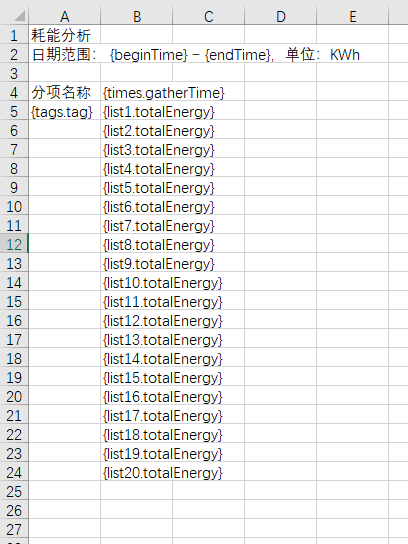
# easyExcel填充导出
根据模板导出excel文件
public void exportEnergy(HttpServletResponse response, DeviceVo queryVo) {
        String excelName = "耗能分析";
        try {
            OutputStream out = response.getOutputStream();
            response.setContentType("application/vnd.openxmlformats-officedocument.spreadsheetml.sheet");
            response.setCharacterEncoding(StandardCharsets.UTF_8.displayName());
            response.setHeader("Content-disposition", "attachment;filename="
                    + URLEncoder.encode(excelName, StandardCharsets.UTF_8.displayName())
                    + ExcelTypeEnum.XLSX.getValue());
            InputStream fontStream = com.itextpdf.io.util.ResourceUtil.getResourceStream("template/energy.xlsx");
            ExcelWriter excelWriter = EasyExcel.write(out).withTemplate(fontStream).build();
            WriteSheet writeSheet = EasyExcel.writerSheet().build();
            // 拿取数据
            List<JSONObject> energyJson = Optional.ofNullable(this.baseMapper.findEnergyAnalysis(queryVo))
                    .filter(CollectionUtils::isNotEmpty)
                    .orElse(new ArrayList<>());
            String totalEnergy = "totalEnergy";
            String thisEnergy = "thisEnergy";
            String groupKey = "groupKey";
            String tag = "tag";
            String gatherTime = "gatherTime";
            // 根据两个字段进行整合数据
            Map<String, JSONObject> map = energyJson.stream().collect(
                    Collectors.groupingBy(item -> String.join(",", item.getString(tag), item.getString(gatherTime)),
                            Collectors.collectingAndThen(Collectors.toList(), list -> {
                                JSONObject jsonObject = new JSONObject();
                                jsonObject.put(totalEnergy, list.stream().mapToDouble(subItem -> subItem.getDoubleValue(thisEnergy)).sum());
                                jsonObject.put(groupKey, String.join(",", list.get(0).getString(tag), list.get(0).getString(gatherTime)));
                                jsonObject.put(tag, list.get(0).getString(tag));
                                jsonObject.put(gatherTime, list.get(0).getString(gatherTime));
                                return jsonObject;
                            })));
//            FillConfig fillConfig = FillConfig.builder().forceNewRow(Boolean.TRUE).build();
            // 横向循环导出配置
            FillConfig fillHorizontalConfig = FillConfig.builder().direction(WriteDirectionEnum.HORIZONTAL).build();
            // 时间列表
            List<JSONObject> timesJson = map.values().stream()
                    .filter(ListUtil.distinctByKey(item -> item.getString(gatherTime)))
                    .sorted(Comparator.comparing(item -> item.getString(gatherTime)))
                    .collect(Collectors.toList());
            // 标签列表
            List<JSONObject> tagsList = map.values().stream()
                    .filter(ListUtil.distinctByKey(item -> item.getString(tag)))
                    .collect(Collectors.toList());
            // 动态根据标签的数量,来逐行循环导出总用电量
            for (int i = 0, length = tagsList.size(); i < length; i++) {
                String currentTag = tagsList.get(i).getString(tag);
                Map<String, JSONObject> tagTimeMap = map.values().stream()
                        .filter(item -> StringUtils.equals(item.getString(tag), currentTag))
                        .collect(Collectors.groupingBy(item -> item.getString(gatherTime),
                                Collectors.collectingAndThen(Collectors.toList(), list -> {
                                    JSONObject jsonObject = new JSONObject();
                                    jsonObject.put(totalEnergy, list.stream().mapToDouble(subItem -> subItem.getDoubleValue(totalEnergy)).sum());
                                    jsonObject.put(gatherTime, list.get(0).getString(gatherTime));
                                    return jsonObject;
                                })));
                // 根据时间列表信息,补齐不足的标签用电量为0
                timesJson.forEach(item -> {
                    String timeStr = item.getString(gatherTime);
                    JSONObject tagJson = tagTimeMap.get(timeStr);
                    if (Objects.isNull(tagJson) || tagJson.isEmpty()) {
                        JSONObject jsonObject = new JSONObject();
                        jsonObject.put(totalEnergy, BigDecimal.ZERO);
                        jsonObject.put(gatherTime, timeStr);
                        tagTimeMap.put(timeStr, jsonObject);
                    }
                });
                List<JSONObject> tagEnergyList = tagTimeMap.values().stream()
                        .sorted(Comparator.comparing(item -> item.getString(gatherTime)))
                        .collect(Collectors.toList());
                // 增加该行用电量小计
                JSONObject tagTotalJson = new JSONObject();
                tagTotalJson.put(totalEnergy, tagEnergyList.stream().mapToDouble(item -> item.getDoubleValue(totalEnergy)).sum());
                tagEnergyList.add(tagTotalJson);
                // 注意这个名【StringUtils.join("list", i + 1)】,不能为list0,不可带上0,否则报错,原因未知
                excelWriter.fill(new FillWrapper(StringUtils.join("list", i + 1),tagEnergyList), fillHorizontalConfig, writeSheet);
            }
            // 默认纵向,纵向写入标签列表
            excelWriter.fill(new FillWrapper("tags", tagsList), writeSheet);
            // 时间信息最后添加一列“合计”
            JSONObject totalJson = new JSONObject();
            totalJson.put(gatherTime, "合计");
            timesJson.add(totalJson);
            // 横向写入时间列表信息
            excelWriter.fill(new FillWrapper("times", timesJson), fillHorizontalConfig, writeSheet);
            // 填充普通变量
            Map<String, Object> mapParam = new HashMap<>(4);
            mapParam.put("beginTime", DateUtil.getStringByFmt(queryVo.getBeginTime(), SysConstants.DATE_PRINT_FORMAT));
            mapParam.put("endTime", DateUtil.getStringByFmt(queryVo.getEndTime(), SysConstants.DATE_PRINT_FORMAT));
            excelWriter.fill(mapParam, writeSheet);
            excelWriter.finish();
            out.flush();
            response.getOutputStream().close();
        } catch (Exception e) {
            log.error(e.getMessage(), e);
            throw new BusinessException(e.getMessage());
        }
    }
1
2
3
4
5
6
7
8
9
10
11
12
13
14
15
16
17
18
19
20
21
22
23
24
25
26
27
28
29
30
31
32
33
34
35
36
37
38
39
40
41
42
43
44
45
46
47
48
49
50
51
52
53
54
55
56
57
58
59
60
61
62
63
64
65
66
67
68
69
70
71
72
73
74
75
76
77
78
79
80
81
82
83
84
85
86
87
88
89
90
91
92
93
94
95
96
97
98
2
3
4
5
6
7
8
9
10
11
12
13
14
15
16
17
18
19
20
21
22
23
24
25
26
27
28
29
30
31
32
33
34
35
36
37
38
39
40
41
42
43
44
45
46
47
48
49
50
51
52
53
54
55
56
57
58
59
60
61
62
63
64
65
66
67
68
69
70
71
72
73
74
75
76
77
78
79
80
81
82
83
84
85
86
87
88
89
90
91
92
93
94
95
96
97
98
模板内容如下截图