
# Oauth2
OAuth 的核心就是向第三方应用颁发令牌
# 授权映射地址
TIP
/oauth/token
# 授权方式(authorization grant)
# authorizationCode
授权码(authorization code)方式,指的是第三方应用先申请一个授权码,然后再用该码获取令牌。
//b.com/oauth/authorize?
https: response_type = code & client_id = CLIENT_ID &
redirect_uri = CALLBACK_URL & scope = read;
2
3
- response_type 参数表示要求返回授权码(code),
- client_id 参数让 B 知道是谁在请求,
- redirect_uri 参数是 B 接受或拒绝请求后的跳转网址,
- scope 参数表示要求的授权范围(这里是只读)。
B 网站会要求用户登录,然后询问是否同意给予 A 网站授权。用户表示同意,这时 B 网站就会跳回 redirect_uri 参数指定的网址。跳转时,会传回一个授权码,就像下面这样。
https://a.com/callback?code=AUTHORIZATION_CODE
A 网站拿到授权码以后,就可以在后端,向 B 网站请求令牌。
//b.com/oauth/token?
https: client_id = CLIENT_ID & client_secret = CLIENT_SECRET &
grant_type = authorization_code & code = AUTHORIZATION_CODE &
redirect_uri = CALLBACK_URL;
2
3
4
- client_id 参数和 client_secret 参数用来让 B 确认 A 的身份(client_secret 参数是保密的,因此只能在后端发请求)
- grant_type 参数的值是 AUTHORIZATION_CODE,表示采用的授权方式是授权码,code 参数是上一步拿到的授权码,
- redirect_uri 参数是令牌颁发后的回调网址。
B 网站收到请求以后,就会颁发令牌。具体做法是向 redirect_uri 指定的网址,发送一段 JSON 数据。
{
  "access_token":"ACCESS_TOKEN",
  "token_type":"bearer",
  "expires_in":2592000,
  "refresh_token":"REFRESH_TOKEN",
  "scope":"read",
  "uid":100101,
  "info":{...}
}
2
3
4
5
6
7
8
9
# implicit
有些 Web 应用是纯前端应用,没有后端。这时就不能用上面的方式了,必须将令牌储存在前端。RFC 6749 就规定了第二种方式,允许直接向前端颁发令牌。这种方式没有授权码这个中间步骤,所以称为(授权码)"隐藏式"(implicit)。
A 网站提供一个链接,要求用户跳转到 B 网站,授权用户数据给 A 网站使用。
//b.com/oauth/authorize?
https: response_type = token & client_id = CLIENT_ID &
redirect_uri = CALLBACK_URL & scope = read;
2
3
用户跳转到 B 网站,登录后同意给予 A 网站授权。这时,B 网站就会跳回 redirect_uri 参数指定的跳转网址,并且把令牌作为 URL 参数,传给 A 网站。
https://a.com/callback#token=ACCESS_TOKEN
WARNING
令牌的位置是 URL 锚点(fragment),而不是查询字符串(querystring),这是因为 OAuth 2.0 允许跳转网址是 HTTP 协议,因此存在"中间人攻击"的风险,而浏览器跳转时,锚点不会发到服务器,就减少了泄漏令牌的风险。
这种方式把令牌直接传给前端,是很不安全的。因此,只能用于一些安全要求不高的场景,并且令牌的有效期必须非常短,通常就是会话期间(session)有效,浏览器关掉,令牌就失效了。
# password
如果你高度信任某个应用,RFC 6749 也允许用户把用户名和密码,直接告诉该应用。该应用就使用你的密码,申请令牌,这种方式称为"密码式"(password)。
//b.com/oauth/token?
https: grant_type = password & username = USERNAME & password = PASSWORD &
client_id = CLIENT_ID;
2
3
# credentials
适用于没有前端的命令行应用,即在命令行下请求令牌
//b.com/oauth/token?
https: grant_type = client_credentials & client_id = CLIENT_ID &
client_secret = CLIENT_SECRET;
2
3
- grant_type 参数等于 client_credentials 表示采用凭证式
- client_id 和 client_secret 用来让 B 确认 A 的身份。
# 更新令牌
B 网站颁发令牌的时候,一次性颁发两个令牌,一个用于获取数据,另一个用于获取新的令牌(refresh token 字段)。令牌到期前,用户使用 refresh token 发一个请求,去更新令牌。
//b.com/oauth/token?
https: grant_type = refresh_token & client_id = CLIENT_ID &
client_secret = CLIENT_SECRET & refresh_token = REFRESH_TOKEN;
2
3
# Spring Security Oauth2 认证(获取 token/刷新 token)流程(password 模式)
# 获取 access_token 请求(/oauth/token)
http://localhost/oauth/token?client_id=demoClientId&client_secret=demoClientSecret&grant_type=password&username=demoUser&password=50575tyL86xp29O380t1
- 用户发起获取 token 的请求。
- 过滤器会验证 path 是否是认证的请求/oauth/token,如果为 false,则直接返回没有后续操作。
- 过滤器通过 clientId 查询生成一个 Authentication 对象。
- 然后会通过 username 和生成的 Authentication 对象生成一个 UserDetails 对象,并检查用户是否存在。
- 以上全部通过会进入地址/oauth/token,即 TokenEndpoint 的 postAccessToken 方法中。
- postAccessToken 方法中会验证 Scope,然后验证是否是 refreshToken 请求等。
- 之后调用 AbstractTokenGranter 中的 grant 方法。
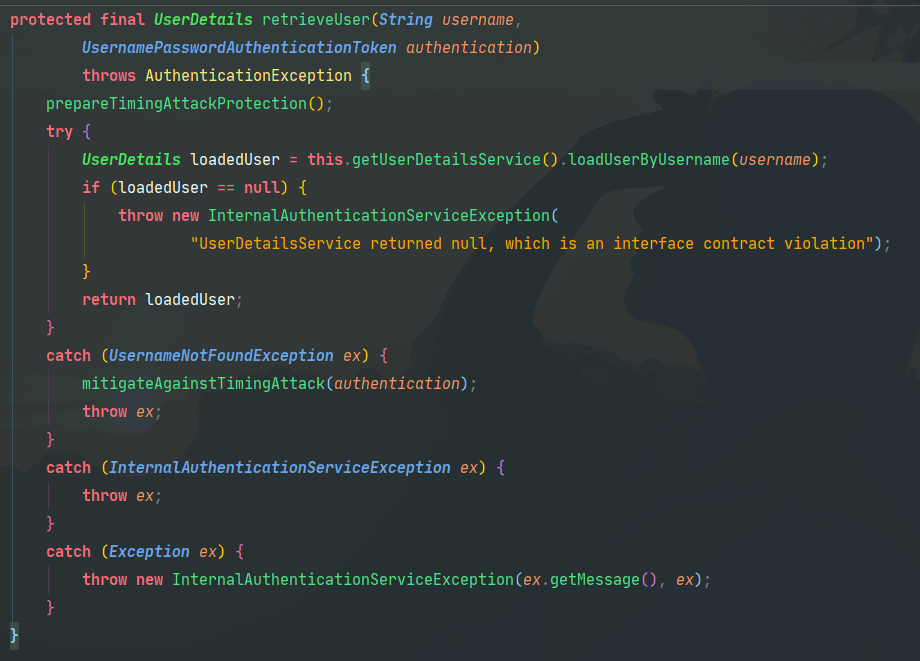
- grant 方法中调用 AbstractUserDetailsAuthenticationProvider 的 authenticate 方法,通过 username 和 Authentication 对象来检索用户是否存在。
- 然后通过 DefaultTokenServices 类从 tokenStore 中获取 OAuth2AccessToken 对象。 10.然后将 OAuth2AccessToken 对象包装进响应流返回。
一个比较重要的过滤器
spring-security-web:org.springframework.security.web.authentication.AbstractAuthenticationProcessingFilter;

org.springframework.security.oauth2.provider.client.ClientCredentialsTokenEndpointFilter
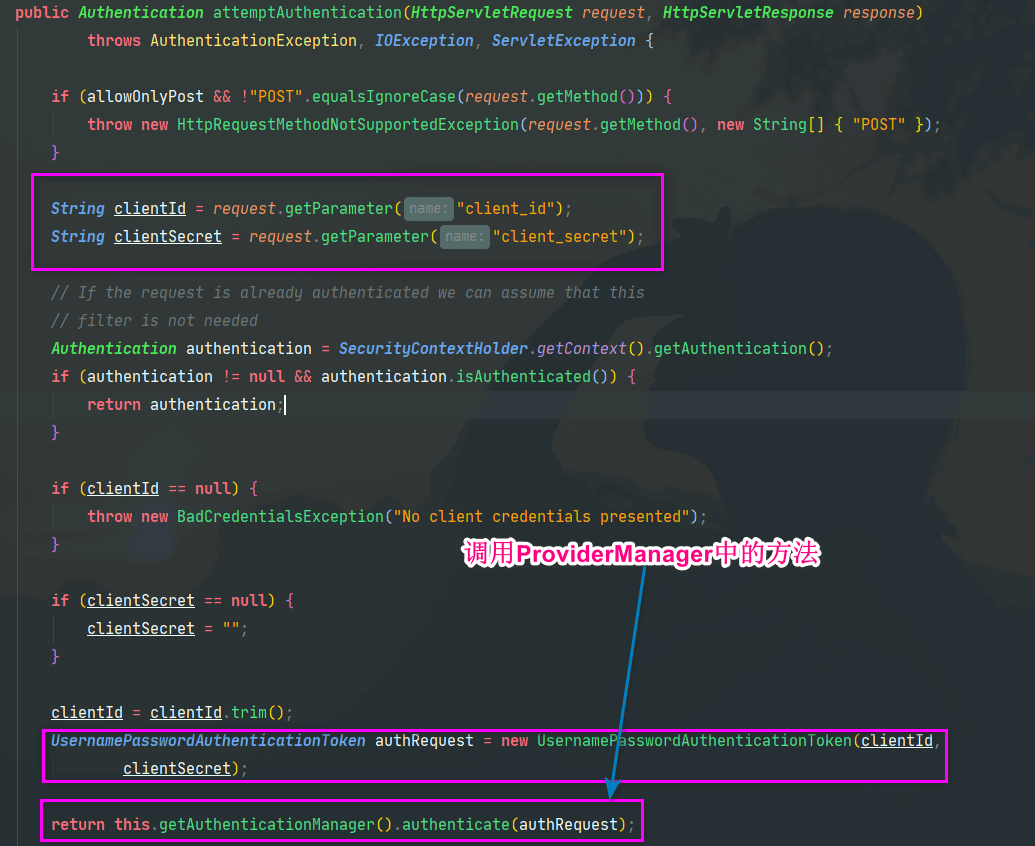
org.springframework.security.authentication.ProviderManager
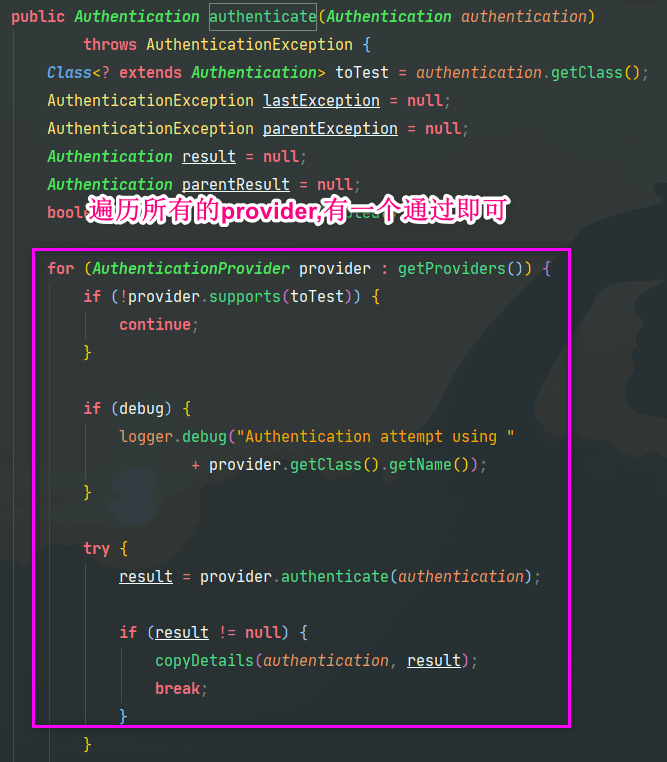
org.springframework.security.authentication.dao.AbstractUserDetailsAuthenticationProvider
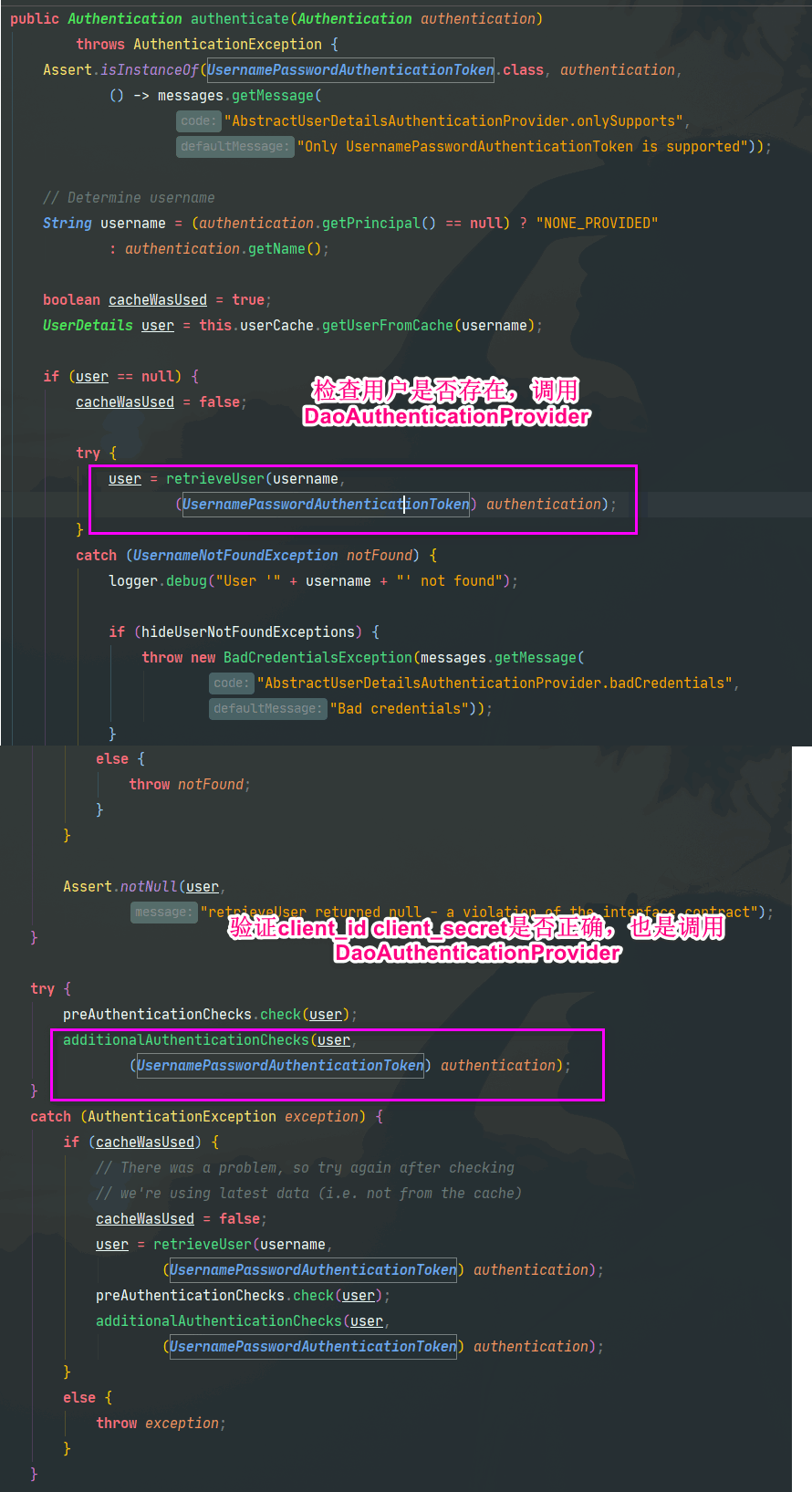
org.springframework.security.authentication.dao.DaoAuthenticationProvider
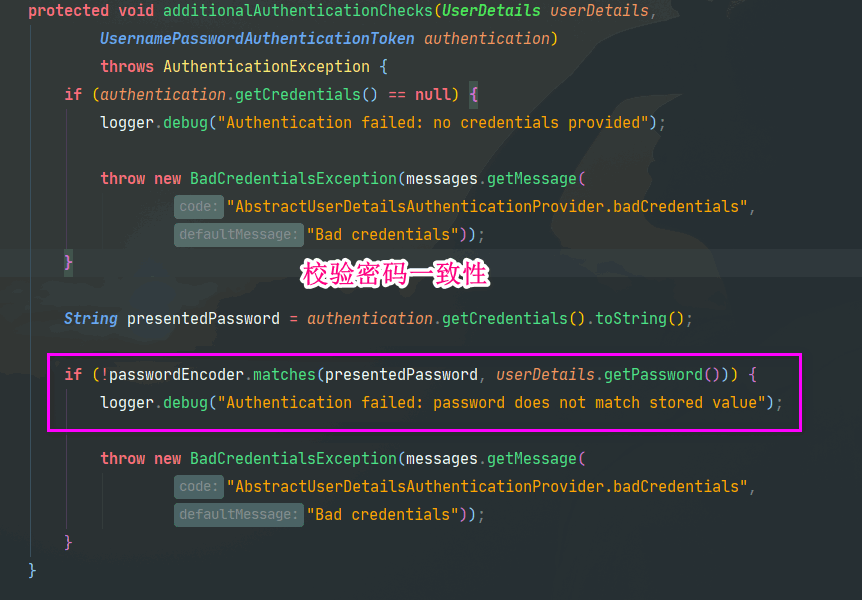

进入/oauth/token映射的TokenEndpoint类的postAccessToken方法
@RequestMapping(value = "/oauth/token", method=RequestMethod.POST)
public ResponseEntity<OAuth2AccessToken> postAccessToken(
        Principal principal, @RequestParam Map<String, String> parameters)
        throws HttpRequestMethodNotSupportedException {

    if (!(principal instanceof Authentication)) {
        throw new InsufficientAuthenticationException(
                "There is no client authentication. Try adding an appropriate authentication filter.");
    }

// 获取ClientDetails
    String clientId = getClientId(principal);
    ClientDetails authenticatedClient = getClientDetailsService().loadClientByClientId(clientId);

    TokenRequest tokenRequest = getOAuth2RequestFactory().createTokenRequest(parameters, authenticatedClient);

    // Only validate client details if a client is authenticated during this request.
    // Double check to make sure that the client ID is the same in the token request and authenticated client.
    if (StringUtils.hasText(clientId) && !clientId.equals(tokenRequest.getClientId())) {
        throw new InvalidClientException("Given client ID does not match authenticated client");
    }
// 验证scope
    if (authenticatedClient != null) {
        oAuth2RequestValidator.validateScope(tokenRequest, authenticatedClient);
    }

    if (!StringUtils.hasText(tokenRequest.getGrantType())) {
        throw new InvalidRequestException("Missing grant type");
    }

    if (tokenRequest.getGrantType().equals("implicit")) {
        throw new InvalidGrantException("Implicit grant type not supported from token endpoint");
    }

    if (isAuthCodeRequest(parameters) && !tokenRequest.getScope().isEmpty()) {
        // The scope was requested or determined during the authorization step
        logger.debug("Clearing scope of incoming token request");
        tokenRequest.setScope(Collections.<String>emptySet());
    } else if (isRefreshTokenRequest(parameters)) {
        if (StringUtils.isEmpty(parameters.get("refresh_token"))) {
            throw new InvalidRequestException("refresh_token parameter not provided");
        }
        // A refresh token has its own default scopes, so we should ignore any added by the factory here.
        tokenRequest.setScope(OAuth2Utils.parseParameterList(parameters.get(OAuth2Utils.SCOPE)));
    }
// 调用AbstractTokenGranter
    OAuth2AccessToken token = getTokenGranter().grant(tokenRequest.getGrantType(), tokenRequest);
    if (token == null) {
        throw new UnsupportedGrantTypeException("Unsupported grant type");
    }
// 包装结果数据
    return getResponse(token);
}
2
3
4
5
6
7
8
9
10
11
12
13
14
15
16
17
18
19
20
21
22
23
24
25
26
27
28
29
30
31
32
33
34
35
36
37
38
39
40
41
42
43
44
45
46
47
48
49
50
51
52
53
// AbstractTokenGranter
public OAuth2AccessToken grant(String grantType, TokenRequest tokenRequest) {

    if (!this.grantType.equals(grantType)) {
        return null;
    }

    String clientId = tokenRequest.getClientId();
    ClientDetails client = clientDetailsService.loadClientByClientId(clientId);
    validateGrantType(grantType, client);

    if (logger.isDebugEnabled()) {
        logger.debug("Getting access token for clientId");
    }

    return getAccessToken(client, tokenRequest);

}
2
3
4
5
6
7
8
9
10
11
12
13
14
15
16
17
18
org.springframework.security.oauth2.provider.password.ResourceOwnerPasswordTokenGranter
protected OAuth2Authentication getOAuth2Authentication(ClientDetails client, TokenRequest tokenRequest) {

    Map<String, String> parameters = new LinkedHashMap<String, String>(tokenRequest.getRequestParameters());
    String username = parameters.get("username");
    String password = parameters.get("password");
    // Protect from downstream leaks of password
    parameters.remove("password");

    Authentication userAuth = new UsernamePasswordAuthenticationToken(username, password);
    ((AbstractAuthenticationToken) userAuth).setDetails(parameters);
    try {
        // 使用Provider类遍历所有的provider来验证用户名密码
        userAuth = authenticationManager.authenticate(userAuth);
    }
    catch (AccountStatusException ase) {
        //covers expired, locked, disabled cases (mentioned in section 5.2, draft 31)
        throw new InvalidGrantException(ase.getMessage());
    }
    catch (BadCredentialsException e) {
        // If the username/password are wrong the spec says we should send 400/invalid grant
        throw new InvalidGrantException(e.getMessage());
    }
    catch (UsernameNotFoundException e) {
        // If the user is not found, report a generic error message
        throw new InvalidGrantException("username not found");
    }
    if (userAuth == null || !userAuth.isAuthenticated()) {
        throw new InvalidGrantException("Could not authenticate user");
    }

    OAuth2Request storedOAuth2Request = getRequestFactory().createOAuth2Request(client, tokenRequest);
    return new OAuth2Authentication(storedOAuth2Request, userAuth);
}
2
3
4
5
6
7
8
9
10
11
12
13
14
15
16
17
18
19
20
21
22
23
24
25
26
27
28
29
30
31
32
33
# 检查头肯是否有效请求(/oauth/check_token)
http://localhost/oauth/check_token?token=f57ce129-2d4d-4bd7-1111-f31ccc69d4d1
# 刷新 token 请求(/oauth/token)
http://localhost/oauth/token?grant_type=refresh_token&refresh_token=fbde81ee-f419-42b1-1234-9191f1f95be9&client_id=demoClientId&client_secret=demoClientSecret
刷新 token(refresh token)的流程与获取 token 的流程只有⑨有所区别:
- 获取 token 调用的是 AbstractTokenGranter 中的 getAccessToken 方法,然后调用 tokenStore 中的 getAccessToken 方法获取 token。
- 刷新 token 调用的是 RefreshTokenGranter 中的 getAccessToken 方法,然后使用 tokenStore 中的 refreshAccessToken 方法获取 token。
# tokenStore 的特点
tokenStore 通常情况为自定义实现,一般放置在缓存或者数据库中。此处可以利用自定义 tokenStore 来实现多种需求,如:
- 同已用户每次获取 token,获取到的都是同一个 token,只有 token 失效后才会获取新 token。
- 同一用户每次获取 token 都生成一个完成周期的 token 并且保证每次生成的 token 都能够使用(多点登录)。
- 同一用户每次获取 token 都保证只有最后一个 token 能够使用,之前的 token 都设为无效(单点 token)。