
# SpringBoot详解
Springboot的Java配置方式
是通过 @Configuration 和@Bean 这两个注解实现的:
- 1、@Configuration 作用于类上,相当于一个xml配置文件;
- 2、@Bean 作用于方法上,相当于xml配置中的
<bean>;
主入口
在做项目开发的时候,主入口Application类(带有注解@SpringBootApplication),要放在所有包之上。
# 文件上传
# war包方式进行上传
springboot文件上传的对象是MultipartFile,它是file的子类,源自
1)静态页面直接访问:localhost:8080/index.html 注意点: 如果想要直接访问html页面,则需要把html放在springboot默认加载的文件夹下面 2)MultipartFile 对象的transferTo方法,用于文件保存(效率和操作比原先用FileOutStream方便和高效)
# 支持jsp(官方不建议)
# 支持jsp
添加jar包
<!-- https://mvnrepository.com/artifact/javax.servlet.jsp.jstl/jstl -->
<dependency>
    <groupId>javax.servlet</groupId>
    <artifactId>jstl</artifactId>
</dependency>
<!-- servlet 依赖 -->
<dependency>
    <groupId>javax.servlet</groupId>
    <artifactId>javax.servlet-api</artifactId>
    <scope>provided</scope>
</dependency>
<dependency>
            <groupId>org.apache.tomcat.embed</groupId>
            <artifactId>tomcat-embed-jasper</artifactId>
            <scope>provided</scope>
        </dependency>
2
3
4
5
6
7
8
9
10
11
12
13
14
15
16
配置文件修改
先在src/main/下新建文件夹webapp/WEB-INF/jsp/
application.properties
spring.mvc.view.prefix=/WEB-INF/jsp/
spring.mvc.view.suffix=.jsp
2
# 新建mapper接口
public interface DeviceMapper {
@Select("select - from device")
public List<DeviceBo> getAllDevices();


@Select("select - from device where deviceip=#{ip}")
public List<DeviceBo> findByIp(String ip);

@Select("select - from device where deviceip=#{ip} and deviceport=#{port} ")
public DeviceBo findByIpPort(@Param("ip") String ip, @Param("port")String port);

@Insert("INSERT INTO device (deviceip,deviceport,deviceusername,devicepassword,deviceuuid,deviceadminuser) "
        + "VALUES (#{deviceIp},#{devicePort},#{deviceUserName},#{devicePassword},#{deviceUuid},#{deviceAdminUser})" )
public int insertDevice(DeviceBo device) throws Exception;

@Select("SELECT - FROM device WHERE deviceadminuser=#{userName}")
public List<DeviceBo> findByUserName(String userName);
2
3
4
5
6
7
8
9
10
11
12
13
14
15
16
17
sql语句都采用注解形式,省去了麻烦的xml文件映射配置等,接口也不用实现类,直接可以调用,在启动类加上注解@MapperScan
@SpringBootApplication
@MapperScan("com.ffCamera.mapper")
public class FfCameraApplication {

public static void main(String[] args) {
    SpringApplication.run(FfCameraApplication.class, args);
}
}
2
3
4
5
6
7
8
扫描mapper所在的包,一劳永逸。快捷。如果有service层,也进行包的扫描。
# 让工程支持热部署
添加jar包
<dependency>
            <groupId>org.springframework.boot</groupId>
            <artifactId>spring-boot-devtools</artifactId>
            <optional>true</optional> <!-- 这个需要为 true 热部署才有效 -->
        </dependency>
2
3
4
5
热部署
注意此项如果开启,那么对于多实例运行,需要关闭热部署
# 国际化
- resource下新建国际化目录及文件
spring.messages.basename=static/messages/message,static/message/java
1.可以有多个,用英文逗号“,”隔开
2.实现ResourceBundleMessageSource
@Configuration
public class InternationalConfig {
@Value(value="${spring.messages.basename}")
private String baseName;

@Bean(name="messageSource")
public ResourceBundleMessageSource getMessageBundle() {
    ResourceBundleMessageSource messageResource = new ResourceBundleMessageSource();
    messageResource.setBasename(this.baseName);
    //默认编码格式是:ISO-8859-1,不设置的话,中文会乱码
    messageResource.setDefaultEncoding("UTF-8");
    return messageResource;
}

}
2
3
4
5
6
7
8
9
10
11
12
13
14
15
3.实现页面切换语言
@RequestMapping("/changeLang")
public String langChange(String lang,HttpServletRequest request) {
    if("zh_cn".equals(lang)) {
        Locale locale = Locale.CHINA;
        request.getSession().setAttribute(SessionLocaleResolver.LOCALE_SESSION_ATTRIBUTE_NAME, locale);
        request.getSession().setAttribute("lan", "zh_CN");
    } else if("en_us".equals(lang)) {
        Locale locale = new Locale("en", "US");
        request.getSession().setAttribute(SessionLocaleResolver.LOCALE_SESSION_ATTRIBUTE_NAME, locale);
        request.getSession().setAttribute("lan", "en_US");
    } else {
        request.getSession().setAttribute(SessionLocaleResolver.LOCALE_SESSION_ATTRIBUTE_NAME, LocaleContextHolder.getLocale());
        request.getSession().setAttribute("lan", "en_US");
    }
    return JSON.toJSONString(ConstantEnum.SUCCESS.getIndex());
}
2
3
4
5
6
7
8
9
10
11
12
13
14
15
16
5.使用
messageSource.getMessage("html.namePass.null"
                , null
                , "用户名和密码不可为空"
                ,LocaleContextHolder.getLocale())
2
3
4
6.动态参数
start.ge.end = 开始日期{0}必须小于结束日期{1}!
String [] param = {startDate, endDate};

String msg =getMessage("start.ge.end", param);
2
3
7.设置默认语言体系
@Configuration
@EnableAutoConfiguration
@Component
public class LocaleConfig implements WebMvcConfigurer {
@Bean
public LocaleResolver localeResolver() {
    // 所以默认情况下,无需做过多的编码,只要请求头中含Accept-Language信息,spring boot自动会处理,但是弊端就是每次都必须带请求头。所以才考虑如下的session保存的方式
     // 提供了一个 SessionLocaleResolver 实例,这个实例会替换掉默认的 AcceptHeaderLocaleResolver,不同于 AcceptHeaderLocaleResolver 通过请求头来判断当前的环境信息,SessionLocaleResolver 将客户端的 Locale 保存到 HttpSession 对象中,并且可以进行修改(这意味着当前环境信息,前端给浏览器发送一次即可记住,只要 session 有效,浏览器就不必再次告诉服务端当前的环境信息)。
    SessionLocaleResolver slr = new SessionLocaleResolver();
    slr.setDefaultLocale(Locale.CHINA);
    return slr;
}
2
3
4
5
6
7
8
9
10
11
12
# 大致思路就是判断url路径上是否有对应参数,如果没有就去请求头中寻找
import org.springframework.util.StringUtils;
import org.springframework.web.servlet.LocaleResolver;
import javax.servlet.http.HttpServletRequest;
import javax.servlet.http.HttpServletResponse;
import java.util.Locale;

/**
 * @Author xiaoshijiu
 * @Date 2019/5/15
 * @Description 自定义国际化处理器LocaleResolver
 * SpringBoot为我们自动配置的LocalResolver,是根据请求的请求头中的"Accept-Language"获取判断的
 * 现在我们改写成先从url路径上寻找是否有国际化语言变量,如果没有再从请求头的"Accept-Language"中获取
 */
public class MyLocaleResolver implements LocaleResolver {

    /**
     * 处理逻辑
     * 接口核心方法,获取Locale,并返回
     * @param request 请求
     * @return Locale区域信息
     */
    @Override
    public Locale resolveLocale(HttpServletRequest request) {
        String l = request.getParameter("lang");
        if (StringUtils.isEmpty(l)) {
            //路径上没有国际化语言参数,采用默认的(从请求头中获取)
            return request.getLocale();
        } else {
            String[] split = l.split("_");
            //语言、国家构造器
            return new Locale(split[0], split[1]);
        }
    }

    @Override
    public void setLocale(HttpServletRequest request, HttpServletResponse response, Locale locale) {
    }
}


/**
    * 注册自定义的LocaleResolver
    */
@Bean
public LocaleResolver localeResolver(){
    return new MyLocaleResolver();
}
2
3
4
5
6
7
8
9
10
11
12
13
14
15
16
17
18
19
20
21
22
23
24
25
26
27
28
29
30
31
32
33
34
35
36
37
38
39
40
41
42
43
44
45
46
47
# 国际化源码透析
springMVC国际化机制就是可以设置整个系统的运行语言,其定义了一个国际化支持接口LocaleResolver,提供的默认实现类如下图。
springMVC国际化提供了四个默认实现的类
AcceptHeaderLocaleResolver,FixedLocaleResolver、CookieLocaleResolver和SessionLocaleResolver。接下来我们简单介绍一下这四个实现类的源码。
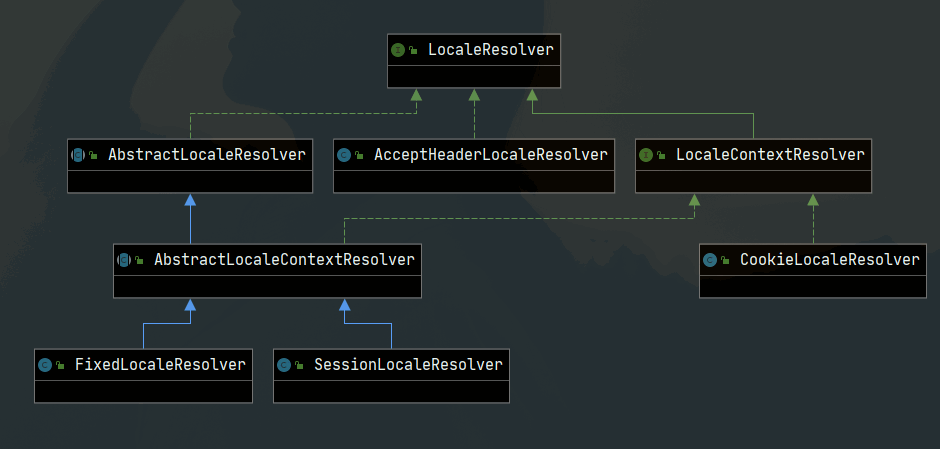
AcceptHeaderLocaleResolver:其实没有任何具体实现,是通过浏览器头部的语言信息来进行多语言选择。FixedLocaleResolver:设置固定的语言信息,这样整个系统的语言是一成不变的,用处不大。CookieLocaleResolver:将语言信息设置到Cookie中,这样整个系统就可以获得语言信息SessionLocaleResolver:与CookieLocaleResolver类似将语言信息放到Session中,这样整个系统就可以从Session中获得语言信息。
# SpringBoot2启动全过程源码分析
/**
    *静态助手,可用于运行{@link SpringApplication}
    *使用默认设置和用户提供的参数指定的源。
    *@param primarySources要加载的主要来源
    *@param args应用程序参数(通常从Java main方法传递)
    *@return正在运行{@link ApplicationContext}
    */
public static ConfigurableApplicationContext run(Class<?>[] primarySources, String[] args) {
    return new SpringApplication(primarySources).run(args);
}
2
3
4
5
6
7
8
9
10
再来看run方法
/**
    *运行Spring应用程序,创建并刷新新的应用程序
    *{@link ApplicationContext}。
    *@param args应用程序参数(通常从Java main方法传递)
    *@return正在运行{@link ApplicationContext}
    */
public ConfigurableApplicationContext run(String... args) {
    // 1、创建并启动计时监控类
    StopWatch stopWatch = new StopWatch();
    stopWatch.start();
    // 2、初始化应用上下文和异常报告集合
    ConfigurableApplicationContext context = null;
    Collection<SpringBootExceptionReporter> exceptionReporters = new ArrayList<>();
    // 3、设置系统属性 `java.awt.headless` 的值,默认值为:true
    configureHeadlessProperty();
    // 4、创建所有 Spring 运行监听器并发布应用启动事件
    SpringApplicationRunListeners listeners = getRunListeners(args);
    listeners.starting();
    try {
        // 5、初始化默认应用参数类
        ApplicationArguments applicationArguments = new DefaultApplicationArguments(args);
        // 6、根据运行监听器和应用参数来准备 Spring 环境
        ConfigurableEnvironment environment = prepareEnvironment(listeners, applicationArguments);
        configureIgnoreBeanInfo(environment);
        // 7、创建 Banner 打印类
        Banner printedBanner = printBanner(environment);
        // 8、创建应用上下文
        context = createApplicationContext();
        // 9、准备异常报告器
        exceptionReporters = getSpringFactoriesInstances(SpringBootExceptionReporter.class,
                new Class[] { ConfigurableApplicationContext.class }, context);
        // 10、准备应用上下文
        prepareContext(context, environment, listeners, applicationArguments, printedBanner);
        // 11、刷新应用上下文
        refreshContext(context);
        // 12、应用上下文刷新后置处理
        afterRefresh(context, applicationArguments);
        // 13、停止计时监控类
        stopWatch.stop();
        // 14、输出日志记录执行主类名、时间信息
        if (this.logStartupInfo) {
            new StartupInfoLogger(this.mainApplicationClass).logStarted(getApplicationLog(), stopWatch);
        }
        // 15、发布应用上下文启动完成事件
        listeners.started(context);
        // 16、执行所有 Runner 运行器
        callRunners(context, applicationArguments);
    }
    catch (Throwable ex) {
        handleRunFailure(context, ex, exceptionReporters, listeners);
        throw new IllegalStateException(ex);
    }

    try {
        // 17、发布应用上下文就绪事件
        listeners.running(context);
    }
    catch (Throwable ex) {
        handleRunFailure(context, ex, exceptionReporters, null);
        throw new IllegalStateException(ex);
    }
    // 18、返回应用上下文
    return context;
}
2
3
4
5
6
7
8
9
10
11
12
13
14
15
16
17
18
19
20
21
22
23
24
25
26
27
28
29
30
31
32
33
34
35
36
37
38
39
40
41
42
43
44
45
46
47
48
49
50
51
52
53
54
55
56
57
58
59
60
61
62
63
64
# 创建并启动计时监控类
来看下这个计时监控类 StopWatch 的相关源码:
/**
    - Start a named task. The results are undefined if {@link #stop()}
    - or timing methods are called without invoking this method.
    - @param taskName the name of the task to start
    - @see #stop()
    */
public void start(String taskName) throws IllegalStateException {
    if (this.currentTaskName != null) {
        throw new IllegalStateException("Can't start StopWatch: it's already running");
    }
    this.currentTaskName = taskName;
    this.startTimeMillis = System.currentTimeMillis();
}
2
3
4
5
6
7
8
9
10
11
12
13
首先记录了当前任务的名称,默认为空字符串,然后记录当前 Spring Boot 应用启动的开始时间。
# 初始化应用上下文和异常报告集合
ConfigurableApplicationContext context = null;
Collection<SpringBootExceptionReporter> exceptionReporters = new ArrayList<>();
2
# 设置系统属性java.awt.headless的值
configureHeadlessProperty();
设置该默认值为:true,Java.awt.headless = true 有什么作用?
对于一个 Java 服务器来说经常要处理一些图形元素,例如地图的创建或者图形和图表等。这些API基本上总是需要运行一个X-server以便能使用AWT(Abstract Window Toolkit,抽象窗口工具集)。然而运行一个不必要的 X-server 并不是一种好的管理方式。有时你甚至不能运行 X-server,因此最好的方案是运行 headless 服务器,来进行简单的图像处理。
private void configureHeadlessProperty() {
    System.setProperty(SYSTEM_PROPERTY_JAVA_AWT_HEADLESS,
            System.getProperty(SYSTEM_PROPERTY_JAVA_AWT_HEADLESS, Boolean.toString(this.headless)));
}
2
3
4
# 创建所有Spring运行监听器并发布应用启动事件
SpringApplicationRunListeners listeners = getRunListeners(args);
listeners.starting();
2
private SpringApplicationRunListeners getRunListeners(String[] args) {
    Class<?>[] types = new Class<?>[] { SpringApplication.class, String[].class };
    return new SpringApplicationRunListeners(logger,
            getSpringFactoriesInstances(SpringApplicationRunListener.class, types, this, args));
}

SpringApplicationRunListeners(Log log, Collection<? extends SpringApplicationRunListener> listeners) {
    this.log = log;
    this.listeners = new ArrayList<>(listeners);
}
2
3
4
5
6
7
8
9
10
创建逻辑和之前实例化初始化器和监听器的一样,一样调用的是 getSpringFactoriesInstances 方法来获取配置的监听器名称并实例化所有的类。
SpringApplicationRunListener 所有监听器配置在 spring-boot-2.0.3.RELEASE.jar!/META-INF/spring.factories 这个配置文件里面。
# Run Listeners
org.springframework.boot.SpringApplicationRunListener=\
org.springframework.boot.context.event.EventPublishingRunListener
2
3
# 初始化默认应用参数类
ApplicationArguments applicationArguments = new DefaultApplicationArguments(args);
# 根据运行监听器和应用参数来准备Spring环境
ConfigurableEnvironment environment = prepareEnvironment(listeners, applicationArguments);
configureIgnoreBeanInfo(environment);
2
prepareEnvironment源码
private ConfigurableEnvironment prepareEnvironment(SpringApplicationRunListeners listeners,
        ApplicationArguments applicationArguments) {
    // Create and configure the environment获取(或者创建)应用环境
    ConfigurableEnvironment environment = getOrCreateEnvironment();
    // 配置应用环境
    configureEnvironment(environment, applicationArguments.getSourceArgs());
    listeners.environmentPrepared(environment);
    bindToSpringApplication(environment);
    if (!this.isCustomEnvironment) {
        environment = new EnvironmentConverter(getClassLoader()).convertEnvironmentIfNecessary(environment,
                deduceEnvironmentClass());
    }
    ConfigurationPropertySources.attach(environment);
    return environment;
}
2
3
4
5
6
7
8
9
10
11
12
13
14
15
# 获取(或者创建)应用环境
private ConfigurableEnvironment getOrCreateEnvironment() {
    if (this.environment != null) {
        return this.environment;
    }
    switch (this.webApplicationType) {
    case SERVLET:
        return new StandardServletEnvironment();
    case REACTIVE:
        return new StandardReactiveWebEnvironment();
    default:
        return new StandardEnvironment();
    }
}
2
3
4
5
6
7
8
9
10
11
12
13
这里分为标准 Servlet 环境和标准环境。
# 配置应用环境
    /**
    *模板方法委托给
    *{@link #configurePropertySources(ConfigurableEnvironment,String [])}和
    *{@link #configureProfiles(ConfigurableEnvironment,String [])}按此顺序。
    *重写此方法以完全控制环境自定义,或者其中一个
    *以上分别用于对财产来源或概况进行细粒度控制。
    *@param环境这个应用程序的环境
    *@param args参数传递给{@code run}方法
    *@see #configureProfiles(ConfigurableEnvironment,String [])
    *@see #configurePropertySources(ConfigurableEnvironment,String [])
    */
protected void configureEnvironment(ConfigurableEnvironment environment, String[] args) {
    if (this.addConversionService) {
        ConversionService conversionService = ApplicationConversionService.getSharedInstance();
        environment.setConversionService((ConfigurableConversionService) conversionService);
    }
    configurePropertySources(environment, args);
    configureProfiles(environment, args);
}
2
3
4
5
6
7
8
9
10
11
12
13
14
15
16
17
18
19
这里主要处理所有 property sources 配置和 profiles 配置。
# 创建 Banner 打印类
Banner printedBanner = printBanner(environment);
# 创建应用上下文
context = createApplicationContext();
/**
    *用于创建{@link ApplicationContext}的策略方法。默认情况下这个
    *方法将遵守任何显式设置的应用程序上下文或应用程
    *退回到合适的默认值之前的课程。
    *@return应用程序上下文(尚未刷新)
    *@see #setApplicationContextClass(Class)
    */
protected ConfigurableApplicationContext createApplicationContext() {
    Class<?> contextClass = this.applicationContextClass;
    if (contextClass == null) {
        try {
            switch (this.webApplicationType) {
            case SERVLET:
                contextClass = Class.forName(DEFAULT_SERVLET_WEB_CONTEXT_CLASS);
                break;
            case REACTIVE:
                contextClass = Class.forName(DEFAULT_REACTIVE_WEB_CONTEXT_CLASS);
                break;
            default:
                contextClass = Class.forName(DEFAULT_CONTEXT_CLASS);
            }
        }
        catch (ClassNotFoundException ex) {
            throw new IllegalStateException(
                    "Unable create a default ApplicationContext, " + "please specify an ApplicationContextClass",
                    ex);
        }
    }
    return (ConfigurableApplicationContext) BeanUtils.instantiateClass(contextClass);
}
2
3
4
5
6
7
8
9
10
11
12
13
14
15
16
17
18
19
20
21
22
23
24
25
26
27
28
29
30
其实就是根据不同的应用类型初始化不同的上下文应用类。
# 准备异常报告器
exceptionReporters = getSpringFactoriesInstances(SpringBootExceptionReporter.class,
new Class[] { ConfigurableApplicationContext.class }, context);
2
逻辑和之前实例化初始化器和监听器的一样,一样调用的是 getSpringFactoriesInstances 方法来获取配置的异常类名称并实例化所有的异常处理类。
该异常报告处理类配置在 spring-boot-2.0.3.RELEASE.jar!/META-INF/spring.factories 这个配置文件里面。
# Error Reporters
org.springframework.boot.SpringBootExceptionReporter=\
org.springframework.boot.diagnostics.FailureAnalyzers
2
3
# 准备应用上下文
prepareContext(context, environment, listeners, applicationArguments, printedBanner);
private void prepareContext(ConfigurableApplicationContext context, ConfigurableEnvironment environment,
        SpringApplicationRunListeners listeners, ApplicationArguments applicationArguments, Banner printedBanner) {
    // 绑定环境到上下文
    context.setEnvironment(environment);
    // 配置上下文的 bean 生成器及资源加载器
    postProcessApplicationContext(context);
    // 为上下文应用所有初始化器
    applyInitializers(context);
    // 触发所有 SpringApplicationRunListener 监听器的 contextPrepared 事件方法
    listeners.contextPrepared(context);
    // 记录启动日志
    if (this.logStartupInfo) {
        logStartupInfo(context.getParent() == null);
        logStartupProfileInfo(context);
    }
    // Add boot specific singleton beans注册两个特殊的单例bean
    ConfigurableListableBeanFactory beanFactory = context.getBeanFactory();
    beanFactory.registerSingleton("springApplicationArguments", applicationArguments);
    if (printedBanner != null) {
        beanFactory.registerSingleton("springBootBanner", printedBanner);
    }
    if (beanFactory instanceof DefaultListableBeanFactory) {
        ((DefaultListableBeanFactory) beanFactory)
                .setAllowBeanDefinitionOverriding(this.allowBeanDefinitionOverriding);
    }
    // Load the sources加载所有资源
    Set<Object> sources = getAllSources();
    Assert.notEmpty(sources, "Sources must not be empty");
    load(context, sources.toArray(new Object[0]));
    触发所有 SpringApplicationRunListener 监听器的 contextLoaded 事件方法
    listeners.contextLoaded(context);
}
2
3
4
5
6
7
8
9
10
11
12
13
14
15
16
17
18
19
20
21
22
23
24
25
26
27
28
29
30
31
32
# 刷新应用上下文
refreshContext(context);
private void refreshContext(ConfigurableApplicationContext context) {
    refresh(context);
    if (this.registerShutdownHook) {
        try {
            context.registerShutdownHook();
        }
        catch (AccessControlException ex) {
            // Not allowed in some environments.
        }
    }
}
2
3
4
5
6
7
8
9
10
11
# 应用上下文刷新后置处理
afterRefresh(context, applicationArguments);
/**
    *在刷新上下文后调用。
    *@param上下文应用程序上下文
    *@param args应用程序参数
    */
protected void afterRefresh(ConfigurableApplicationContext context, ApplicationArguments args) {
}
2
3
4
5
6
7
看了下这个方法的源码是空的,目前可以做一些自定义的后置处理操作
# 停止计时监控类
stopWatch.stop();
/**
    - Stop the current task. The results are undefined if timing
    - methods are called without invoking at least one pair
    - {@code start()} / {@code stop()} methods.
    - @see #start()
    */
public void stop() throws IllegalStateException {
    if (this.currentTaskName == null) {
        throw new IllegalStateException("Can't stop StopWatch: it's not running");
    }
    long lastTime = System.currentTimeMillis() - this.startTimeMillis;
    this.totalTimeMillis += lastTime;
    this.lastTaskInfo = new TaskInfo(this.currentTaskName, lastTime);
    if (this.keepTaskList) {
        this.taskList.add(this.lastTaskInfo);
    }
    ++this.taskCount;
    this.currentTaskName = null;
}
2
3
4
5
6
7
8
9
10
11
12
13
14
15
16
17
18
19
计时监听器停止,并统计一些任务执行信息。
# 输出日志记录执行主类名、时间信息
if (this.logStartupInfo) {
        new StartupInfoLogger(this.mainApplicationClass).logStarted(getApplicationLog(), stopWatch);
    }
2
3
# 发布应用上下文启动完成事件
listeners.started(context);
触发所有 SpringApplicationRunListener 监听器的 started 事件方法。
# 执行所有Runner运行器
callRunners(context, applicationArguments);

private void callRunners(ApplicationContext context, ApplicationArguments args) {
    List<Object> runners = new ArrayList<>();
    runners.addAll(context.getBeansOfType(ApplicationRunner.class).values());
    runners.addAll(context.getBeansOfType(CommandLineRunner.class).values());
    AnnotationAwareOrderComparator.sort(runners);
    for (Object runner : new LinkedHashSet<>(runners)) {
        if (runner instanceof ApplicationRunner) {
            callRunner((ApplicationRunner) runner, args);
        }
        if (runner instanceof CommandLineRunner) {
            callRunner((CommandLineRunner) runner, args);
        }
    }
}
2
3
4
5
6
7
8
9
10
11
12
13
14
15
16
执行所有 ApplicationRunner 和 CommandLineRunner 这两种运行器
# 发布应用上下文就绪事件
listeners.running(context);
触发所有 SpringApplicationRunListener 监听器的 running 事件方法。
# 返回应用上下文
return context;
# starterParent
spring-boot-starter-parent 是一个特殊的starter,它用来提供相关的Maven默认依赖。使用它之后,常用的包依赖可以省去version标签。
可以通过<properties></properties>中指定升级某一个依赖
如果你不想使用spring-boot-starter-parent,你依然可以通过使用scope=import利用依赖管理的便利。
<dependencyManagement>
<dependencies>
<dependency>
<!-- Import dependency management from Spring Boot -->
<groupId>org.springframework.boot</groupId>
<artifactId>spring-boot-dependencies</artifactId>
<version>2.1.7.RELEASE</version>
<type>pom</type>
<scope>import</scope>
</dependency>
</dependencies>
</dependencyManagement>
2
3
4
5
6
7
8
9
10
11
12
这种方式不能使用property的形式覆盖原始的依赖项,需在此之前引入更高或者更低版本的依赖