
# table
# 头部固定横向纵向可滚动
特别说明
增加如下属性,x方向的值如果只是x:true,则会导致表头部分不做横向滚动,所以最好写成x:500,且这个值可以小,不一定要很大(一上来就很大,容易导致鼠标指针hover的问题,会把隐藏的列显示出来,导致信息冗余);
对于纵向的高度,则依据屏幕的分辨率来做调整,同时也要依据项目本身的布局来决定
antd的左右固定,其实是固定的表格盖住了本来的表格的列
<Table scroll={{ x: 500, y: findTableMaxScrollHeight(true) }}>
</Table>
2
/**
 * 获取table的最大y轴滚动高度
 * @param weibao 是否时维保列表
 */
const findTableMaxScrollHeight = (weibao = false) => {
  const browserHeight = window.outerHeight || 1080;
  if (browserHeight <= 768) {
    return weibao ? 329 : 355;
  }
  return weibao ? 545 : 610;
}
2
3
4
5
6
7
8
9
10
11
特别注意
存在固定列表的情况下,如果只做y方向的滚动,会导致表格中固定列与非固定列滚动到最后时错位
TIP
存在固定列表的情况下,空数据时或者无需滚动时,依然存在滚动条的槽,解决方案:
.tempTable {
  :global {
    .ant-table-fixed-header{
      .ant-table-body-inner, .ant-table-body {
        overflow: auto !important;
      }
      .ant-table-scroll .ant-table-header {
        overflow: auto !important;
        padding-bottom: 20px !important;
        margin-bottom: -20px !important;
      }
    }
  }
}
2
3
4
5
6
7
8
9
10
11
12
13
14
毕竟3.x固定列的的实现逻辑就是,固定列覆盖原有的table
# 存在固定列时的一些问题
- table中【行】在鼠标指针hover时,出现多余内容
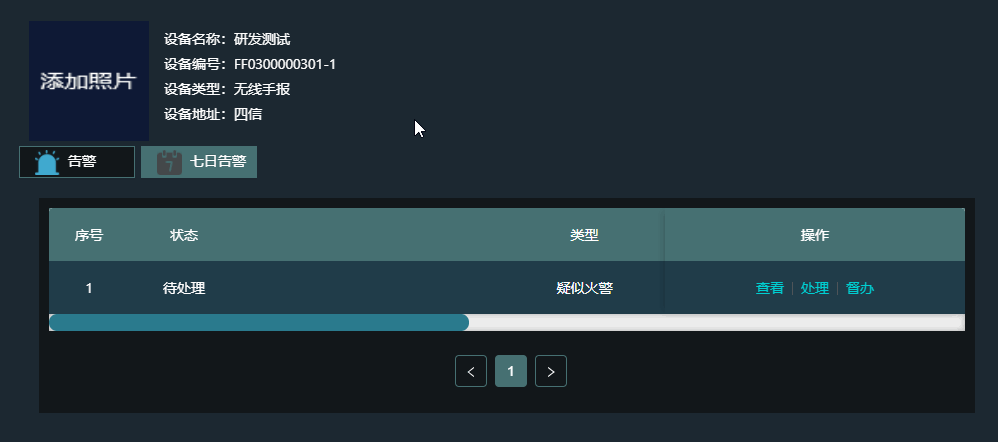

最简单直接的解决方案:在设置table的属性【scroll】时,其【x】的值往小了设置,不要一上来就2000、3000,可直接设置100、200、500等较小的值
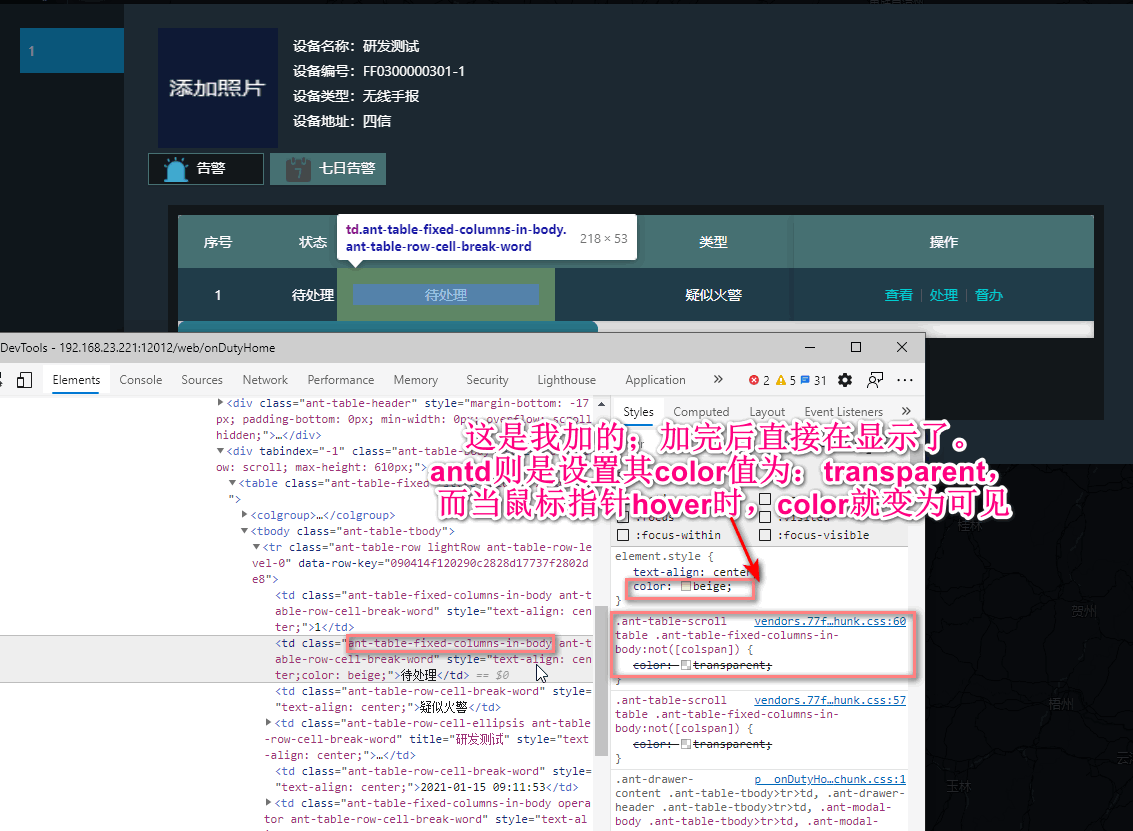
所以另一种解决方案,则可以效仿antd的处理方式。
归根结底,还是antd自动生成的固定内容的宽度是根据文字内容动态,不会做最大宽度限制
table中滚动列被盖住问题
若列头与内容不对齐或出现列重复,请指定固定列的宽度 width。如果指定 width 不生效或出现白色垂直空隙,请尝试建议留一列不设宽度以适应弹性布局,或者检查是否有超长连续字段破坏布局。
建议指定 scroll.x 为大于表格宽度的固定值或百分比。注意,且非固定列宽度之和不要超过 scroll.x。
项目中:固定列设置了固定宽度,且超长时省略显示,但是设置成固定列之后,动态生成的固定列不会做省略显示,一旦实际宽度超过设定的宽度后,则会导致真实列表的滚动列的部分列被遮盖
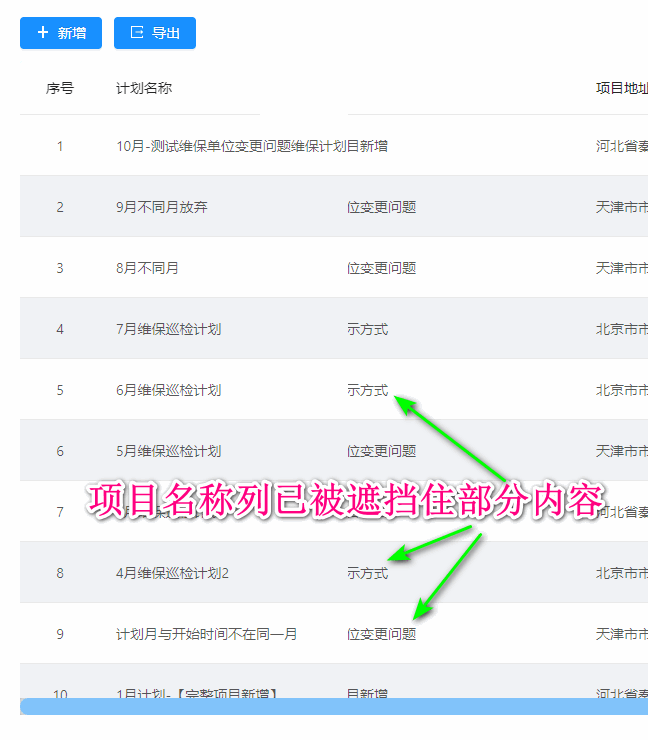
解决方案如下:
    {
      title: '计划名称',
      dataIndex: 'name',
      fixed: 'left',
      width: 180,
      // ellipsis: true,
      render: value => {
        let a = value;
        if (a && a.length > 10) {
          a = `${a.substring(0, 9)}…`;
        }
        return (<div title={value}>
          {highLightRender(a, searchParams.keyWord || '')}
        </div>);
      },
    },
2
3
4
5
6
7
8
9
10
11
12
13
14
15
16
归根结底,还是antd自动生成的固定内容的宽度是根据文字内容动态,不会做最大宽度限制
# 带选择功能
增加属性rowSelection={rowSelection}
// 选择
const rowSelection = {
  onChange: (selectedRowKeys, selectedRows) => {
    setSelectedIds(selectedRowKeys);
  },
  // 只有状态为3-已完成的维修单才可以结算
  getCheckboxProps: param => ({
    disabled: param.status !== '3',
    name: param.name,
  }),
};
2
3
4
5
6
7
8
9
10
11
# 表格行列合并
{
    title: formatMessage({
    id: 'maintenanceIns.ins.subproject',
    }),
    dataIndex: 'twoName',
    render: (value, row) => ({
    children: value,
    props: {
        rowSpan: row.rowSpan,
        colSpan: 4,
    },
    }),
},
2
3
4
5
6
7
8
9
10
11
12
13
返回的rowSpan从后台返回,比较好处理,同理,colSpan
/**
* 转换详情,供前端使用
* @param bos 详情列表
* @return 详情列表
*/
private void transfer4Web(List<InsStdBo> bos) {
Multiset<String> twoNameSets = HashMultiset.create();
// 采用twoName,因为存在twoCode一样,但是twoName不一样的条目
bos.forEach(bo -> twoNameSets.add(bo.getTwoName()));
// 以下处理前端界面合并表格行
int count = 0;
for (InsStdBo bo : bos) {
    if (count == 0) {
        count = twoNameSets.count(bo.getTwoName());
        bo.setRowSpan(count);
        continue;
    }
    count -= 1;
    if (count > 0) {
        bo.setRowSpan(0);
    } else {
        count = twoNameSets.count(bo.getTwoName());
        bo.setRowSpan(count);
    }
}
}
2
3
4
5
6
7
8
9
10
11
12
13
14
15
16
17
18
19
20
21
22
23
24
25
26
注意其中的render,返回一个对象
{
    children: <a>{text}</a>,//可为值,也可为一个ReactNode
    props: {
        colSpan: 5,
        rowSpan: 4,
    },
};
2
3
4
5
6
7
# 表头分组合并
// 巡检详情列表
  const columnsList = [
    {
      title: formatMessage({
        id: 'maintenanceIns.ins.subproject',
      }),
      dataIndex: 'twoName',
      render: (value, row) => ({
        children: value,
        props: {
          rowSpan: row.rowSpan,
        },
      }),
    },
    {
      title: formatMessage({
        id: 'maintenanceIns.ins.detect',
      }),
      dataIndex: 'threeName',
    },
    {
      title: formatMessage({
        id: 'maintenanceIns.ins.record',
      }),
      dataIndex: 'record',
      render: (value, param) => {
        if (isViewing) {
          return value;
        }
        return (
          <TextArea
            value={value}
            autoSize
            onChange={e => handleTableInput({ record: e.target.value }, param)}
            maxLength={2000}
          ></TextArea>
        );
      },
    },
    {
      title: formatMessage({
        id: 'maintenanceIns.ins.process',
      }),
      children: [
        {
          title: formatMessage({
            id: 'maintenanceIns.ins.desc',
          }),
          dataIndex: 'description',
          render: (value, param) => {
            if (isViewing) {
              return value;
            }
            return (
              <TextArea
                value={value}
                autoSize
                onChange={e => handleTableInput({ description: e.target.value }, param)}
                maxLength={2000}
              ></TextArea>
            );
          },
        },
        {
          title: formatMessage({
            id: 'maintenanceIns.ins.handle',
          }),
          dataIndex: 'processing',
          render: (value, param) => {
            if (isViewing) {
              return value;
            }
            return (
              <TextArea
                value={value}
                autoSize
                onChange={e => handleTableInput({ processing: e.target.value }, param)}
                maxLength={2000}
              ></TextArea>
            );
          },
        },
        {
          title: formatMessage({
            id: 'maintenanceIns.ins.repair',
          }),
          dataIndex: 'repairs',
          render: (value, param) => {
            if (isViewing) {
              return value;
            }
            return (
              <TextArea
                value={value}
                autoSize
                onChange={e => handleTableInput({ repairs: e.target.value }, param)}
                maxLength={2000}
              ></TextArea>
            );
          },
        },
      ],
    },
  ];
2
3
4
5
6
7
8
9
10
11
12
13
14
15
16
17
18
19
20
21
22
23
24
25
26
27
28
29
30
31
32
33
34
35
36
37
38
39
40
41
42
43
44
45
46
47
48
49
50
51
52
53
54
55
56
57
58
59
60
61
62
63
64
65
66
67
68
69
70
71
72
73
74
75
76
77
78
79
80
81
82
83
84
85
86
87
88
89
90
91
92
93
94
95
96
97
98
99
100
101
102
103
104
采用children属性
# 表格可编辑
{
    title: formatMessage({
    id: 'maintenanceIns.ins.repair',
    }),
    dataIndex: 'repairs',
    render: (value, param) => {
    if (isViewing) {
        return value;
    }
    return (
        <TextArea
        value={value}
        autoSize
        onChange={e => handleTableInput({ repairs: e.target.value }, param)}
        maxLength={2000}
        ></TextArea>
    );
    },
},

{
    title: formatMessage({
    id: 'maintenanceIns.ins.type',
    }),
    dataIndex: 'type',
    render: (value, param) => (
    <DictionarySelect
        dictCode="INSPECTION_DETAIL_TYPE"
        showValue
        showArrow
        selectedKeys={value}
        onChange={selectedValue => handleTableInput({ type: selectedValue }, param)}
    ></DictionarySelect>
    ),
},
2
3
4
5
6
7
8
9
10
11
12
13
14
15
16
17
18
19
20
21
22
23
24
25
26
27
28
29
30
31
32
33
34
35
// 处理表格录入信息
  const handleTableInput = (valueObj, param) => {
    Object.keys(valueObj).forEach(key => {
      // eslint-disable-next-line no-param-reassign
      param[key] = valueObj[key];
      setDtlList(prev => {
        let tmpList = dtlList;
        if (prev) {
          tmpList = prev;
        }
        return tmpList.map(item => {
          if (item.threeName === param.threeName) {
            return { ...item, [key]: valueObj[key] };
          }
          return item;
        });
      });
    });
  };
2
3
4
5
6
7
8
9
10
11
12
13
14
15
16
17
18
19
# 异常总结
# 分页数据紊乱
分页异常
- 默认的
rowKey,为key,但是如果数据中id存在相同的情况,则需拼合并指定rowKey
# 前端分页
单次需要查询到所有的数据
<StandardTable columns={columns}
                   showSeqNo={false}
                   className={styles.tempTable}
                   data={tableData}
                   loading={props.listLoading}
                   sizeVisible={false}
                   rowKey={item => (item.id || item.name) }
                   pagination={{
                     pageSize: 6,
                     total: tableData?.pagination?.total || 0,
                     showQuickJumper: true,
                   }}
                   scroll={{ y: findTableMaxScrollHeight() - 200 }}/>
2
3
4
5
6
7
8
9
10
11
12
13
主要就是这个,指定这个属性即可,前端分页
pagination={{
                     pageSize: 6,
                     total: tableData?.pagination?.total || 0,
                     showQuickJumper: true,
                   }}
2
3
4
5
# 数据筛选
以下为column属性
export interface ColumnProps<T> {
    title?: React.ReactNode | ((options: {
        filters: TableStateFilters;
        sortOrder?: SortOrder;
        sortColumn?: ColumnProps<T> | null;
    }) => React.ReactNode);
    key?: React.Key;
    dataIndex?: string;
    render?: (text: any, record: T, index: number) => React.ReactNode;
    align?: 'left' | 'right' | 'center';
    ellipsis?: boolean;
    filters?: ColumnFilterItem[];
    onFilter?: (value: any, record: T) => boolean;
    filterMultiple?: boolean;
    filterDropdown?: React.ReactNode | ((props: FilterDropdownProps) => React.ReactNode);
    filterDropdownVisible?: boolean;
    onFilterDropdownVisibleChange?: (visible: boolean) => void;
    sorter?: boolean | CompareFn<T>;
    defaultSortOrder?: SortOrder;
    colSpan?: number;
    width?: string | number;
    className?: string;
    fixed?: boolean | typeof ColumnFixedPlacements[number];
    filterIcon?: React.ReactNode | ((filtered: boolean) => React.ReactNode);
    filteredValue?: any[] | null;
    filtered?: boolean;
    defaultFilteredValue?: any[];
    sortOrder?: SortOrder | boolean;
    children?: ColumnProps<T>[];
    onCellClick?: (record: T, event: Event) => void;
    onCell?: (record: T, rowIndex: number) => TableEventListeners;
    onHeaderCell?: (props: ColumnProps<T>) => TableEventListeners;
    sortDirections?: SortOrder[];
}
2
3
4
5
6
7
8
9
10
11
12
13
14
15
16
17
18
19
20
21
22
23
24
25
26
27
28
29
30
31
32
33
34