
# 获取 url 中各个组成部分
TIP
统一资源定位符(URL),是对 Web 资源(网页、图像、文件)的引用。URL 是指定资源位置和检索资源的一种协议(如 http、ftp、mailto)。
# URL 结构
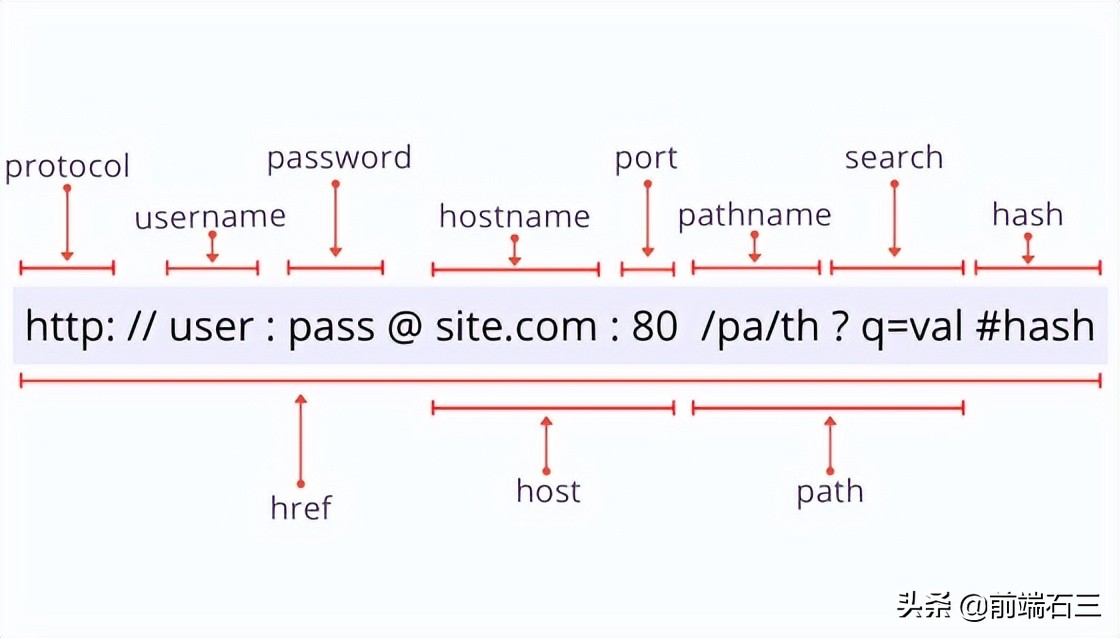
- protocol —— 网络协议,如 http、https、mailto、ftp 等。
- username—— 用户名,如 ftp 访问时需要用户名。
- password——密码,如 ftp 访问时需要密码。
- hostname——主机名称。
- port——端口号。
- host——主机地址,包括 hostname,和 port。
- pathname——路径名称。
- search——查询字符串,问号“?”开头。
- path——完整路径,包括路径名称和查询参数。
- hash——哈希值,#号开头。
# URL()构造函数
const url = new URL(relativeOrAbsolute [, absoluteBase]);
1
TIP
- relativeOrAbsolute 参数可以是绝对或相对 URL。
- 如果第一个参数是相对的,那么第二个参数 absoluteBase 必须要有,并且必须是一个绝对 URL,作为第一个参数的基础路径。
const url = new URL("http://example.com/path/index.html");
console.log(url.href); // => 'http://example.com/path/index.html'

const url = new URL("/path/index.html", "http://example.com");
console.log(url.href); // => 'http://example.com/path/index.html'
1
2
3
4
5
2
3
4
5
# 获取路径上查询字符串
使用 url.search 属性访问以 ? 为前缀的查询字符串,如下
const url = new URL(
  "http://example.com/path/index.html?message=hello&who=world"
);
console.log(url.search); // => '?message=hello&who=world'
1
2
3
4
2
3
4
如果没有查询字符串,则 url.search 返回空字符串''。
# 解析查询字符串
使用 url.searchParams 属性解析查询字符串,通过 get 方法获取对应参数值,或者 has 方法判断是否存在某一个参数。
让我们看一个例子:
const url = new URL(
  "http://example.com/path/index.html?message=hello&who=world"
);
url.searchParams.get("message"); // => 'hello'
url.searchParams.get("missing"); // => null
url.searchParams.has("who"); // => true
url.searchParams.has("missing"); // => false
1
2
3
4
5
6
7
2
3
4
5
6
7
# 获取主机名
使用 url.hostname 属性获取 URL 的主机名,如下:
const url = new URL("http://example.com/path/index.html");
url.hostname; // => 'example.com'
1
2
2
# 路径名
url.pathname 属性获取 URL 的路径名:
const url = new URL("http://example.com/path/index.html?param=value");
url.pathname; // => '/path/index.html'

// 如果 URL 没有路径,则该url.pathname属性返回一个斜杠字符/:

const url = new URL("http://example.com/");
url.pathname; // => '/'
1
2
3
4
5
6
7
2
3
4
5
6
7
# 哈希值
最后,可以使用 url.hash 属性获取哈希值:
const url = new URL("http://example.com/path/index.html#bottom");
url.hash; // => '#bottom'

// 当 URL 中的哈希值丢失时,url.hash计算结果为空字符串'':
const url = new URL("http://example.com/path/index.html");
url.hash; // => ''
1
2
3
4
5
6
2
3
4
5
6
# 网址验证
当 new URL()构造函数创建实例时,它还会验证 URL 的正确性。如果 URL 值无效,则抛出 TypeError。
- 例如,
http ://example.com是一个无效的 URL,因为 http 后面有空格字符。
让我们使用这个无效的 URL 来初始化解析器:
try {
  const url = new URL("http ://example.com");
} catch (error) {
  error; // => TypeError, "Failed to construct URL: Invalid URL"
}
1
2
3
4
5
2
3
4
5
# URL 修改
除了使用 search、hostname、pathname 等属性获取值,您还可以通过这些属性重新赋值修改 URL。
例如,让我们将现有的 URL 的主机名从 red.com 修改为 blue.io:
const url = new URL("http://red.com/path/index.html");
url.href; // => 'http://red.com/path/index.html'
url.hostname = "blue.io";
url.href; // => 'http://blue.io/path/index.html'
1
2
3
4
2
3
4
WARNING
注意,url 实例中只有 origin 和 searchParams 属性是只读的,其他都是可写的,并在您更改它们时修改 URL。
WARNING
在现代浏览器中都支持URL对象。但是,它在 Internet Explorer 中不可用。