
# 达梦数据库
# 语法参考
# 支持的数据类型
| 类型 | 说明 |
|---|---|
numeric[精度, 标度] | 存储0、正负定点数,精度范围1-38,表示总的数字字数,标度表示小数点后的字数如numeric(4, 1),则表示范围为 -999.0~999.9 |
number | 同numeric |
decimal/dec | 跟numeric类似 |
bit | 存储0,1,null |
integer/int | 存储有符号整数,精度为10 |
pls_integer | 与integer类似 |
bigint | 存储有符号整数,精度为19,标度为0 |
tinyint | 存储有符号整数,精度为3,标度为0,范围:-128-127 |
byte | 与tinyint类似 |
smallint | 精度为5,标度为0 |
binary | 定长二进制数据 |
varbinary | 变长二进制数据 |
real | 带二进制的浮点数 |
float | 二进制精度的浮点数,精度最大53 |
double | 精度最大53 |
double precision | 双精度浮点数,二进制精度为53,十进制精度为15 |
char/character | 定长,最大由数据库页面决定 |
varchar | 可变长字符串 |
text/longvarchar | 变长字符,最大100G-1 |
image/longvarbinary | 多媒体信息 |
blob | 变长字符串,最大100G-1字节 |
clob | 变长字符串,最大100G-1字节 |
bfile | 指明存储在操作系统中的二进制文件 |
date | -4712-01-01至9999-12-31 |
time | 时分秒 |
timestamp/datetime | 年月日时分秒 |
time with time zone | 带时区的time |
timestamp with time zone | 带时区 |
bool/boolean | 存储true、false |
# v$信息
-- 证书信息
select * from V$LICENSE;

-- sql执行历史信息
select * from v$sql_history t order by t.seq_no desc;

-- 数据库版本
select * from v$version;
-- 数据库编译版本
select build_version from v$instance;
-- 查询连接数
select count(*) from v$sessions where state='active';

-- 查询锁等待
select * from v$trxwait;
-- 依照耗时排序查询慢sql
select timestampdiff(ss,LAST_RECV_TIME,sysdate),sf_get_session_sql(sess_id),*
 from SYS.'v$sessions
 where sess_id<>sessid
 order by 6 asc,1 desc;
1
2
3
4
5
6
7
8
9
10
11
12
13
14
15
16
17
18
19
20
2
3
4
5
6
7
8
9
10
11
12
13
14
15
16
17
18
19
20
# 数据库配置信息
-- 整数计算是否处理成decimal
-- 0-否认,1-除法做decimal,2-所有运算做decimal
select * from v$dm_ini where para_name='CALC_AS_DECIMAL';
-- 设置该值
sp_set_para_value(2, 'CALC_AS_DECIMAL', 1);

-- 查询大小写是否敏感
-- 1-敏感,0-不敏感
select sf_get_case_sensitive_flag();

-- 查询字符集
-- 1-utf-8,0-gbk
select sf_get_unicode_flag();

-- 查询varchar是否以字符为单位
-- 1-字符,0-字节
select sf_get_length_in_char();

-- 获取数据库是否兼容其他模式
-- 0-不兼容,2-部分兼容Oracle,3-部分兼容ms sql server,4-部分兼容mysql
select * from v$dm_ini where 'v$dm_ini'.para_name='COMPATIBLE_MODE';

-- 修改兼容模式mysql
sp_set_para_value(2, 'COMPATIBLE_MODE', 4);
-- 修改兼容模式oracle
sp_set_para_value(2, 'COMPATIBLE_MODE', 2);
1
2
3
4
5
6
7
8
9
10
11
12
13
14
15
16
17
18
19
20
21
22
23
24
25
26
2
3
4
5
6
7
8
9
10
11
12
13
14
15
16
17
18
19
20
21
22
23
24
25
26
# 数据库信息
-- 获取存储数据的文件信息
select * from dba_data_files;

-- oracle
select * from dba_tablespace;

-- dm,得到table_spacename的信息
select * from dba_tables where owner='ATFS';
select * from user_tables;

-- 获取索引信息
select * from dba_indexes where table_name='afrd_ins_alarm';
-- 获取约束信息
select * from dba_constraints where table_name='afrd_ins_alarm';

-- 获取表占用空间信息
select table_used_pages(''模式名', '表名')*para_value/1024/1024 as 'used_pages(MB)' from v$DM_INI where para_name like 'GLOBAL_PAGE_SIZE';
1
2
3
4
5
6
7
8
9
10
11
12
13
14
15
16
17
2
3
4
5
6
7
8
9
10
11
12
13
14
15
16
17
-- 查找表的唯一约束
select * from user_cons_columns where table_name='AFRD_INS_LIST';
-- 或者
select * from all_cons_columns where table_name='AFRD_INS_LIST';
-- 查找表的唯一约束信息,constraint_type为 P 标识主键,为 R 标识外键
select * from user_constraints where table_name='AFRD_INS_LIST';
-- 查找表的所有得索引
select * from user_ind_columns where table_name='AFRD_INS_LIST';
select * from user_indexes where table_name='AFRD_INS_LIST';
-- 获取表的字段信息
select * from user_tab_columns where table_name='AFRD_INS_LIST';
1
2
3
4
5
6
7
8
9
10
11
12
2
3
4
5
6
7
8
9
10
11
12
# 获取数据库用户信息
-- 所有用户信息
select * from username,account_status from dba_users;

-- 获取角色
select grantee,grented_role from gratee='ATFS';

-- 获取权限
select grantee,privilege from dba_sys_privs where grantee='ATFS';
1
2
3
4
5
6
7
8
2
3
4
5
6
7
8
# 达梦服务启动停止
DmApService // 达梦数据库插件服务
DmService // 达梦数据库实例服务,一台服务器可以运行多个实例,如DmServiceEDMPSERVER.service、DmServiceMASONSERVER.service

// 数据库实例
DmServiceEDMPSERVER start/stop/restart/status
1
2
3
4
5
2
3
4
5
# 分页
既支持mysql分页方式,也支持oracle分页方式
select * from afrd_ins_list limit 0, 10;

select * from (select a.*, rownum taiji_rownum from (select * from afrd_ins_list order by update_time asc, vrf_stcd asc) a)
    where taiji_rownum > ? and rownum <= ?;
1
2
3
4
2
3
4
# 达梦数据库主备
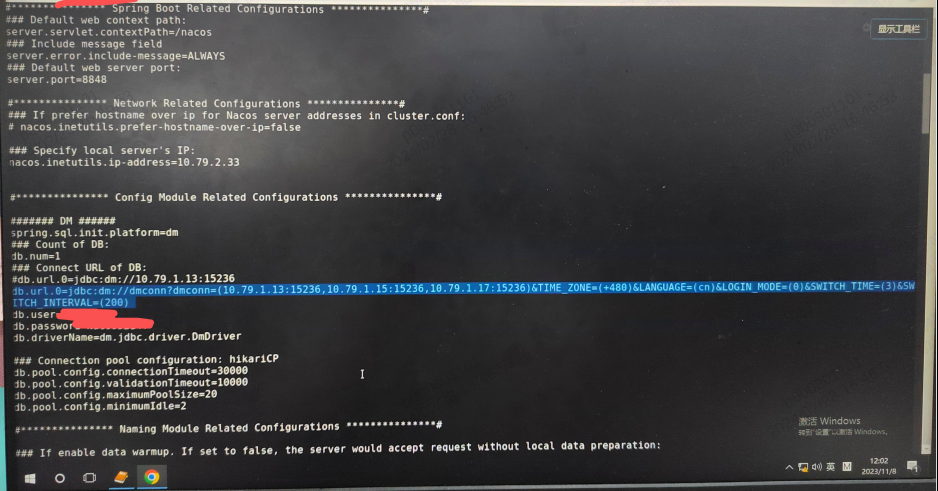
常用参数信息及含义
- 格式一
host、port 不作为连接属性,此时只需输入值即可。jdbc:dm://192.168.0.96:5236?resultSetType=1003
- 格式二
host、port 作为连接属性,此时必须按照参数表中说明进行设置,且属性名称大小写敏感。jdbc:dm://?host=192.168.0.96&port=5236
- 格式三 使用
自定义服务名,可指定多个数据库节点jdbc:dm://GroupName[?propName1=propValue1][&propName2=propValue2][&…]…jdbc:dm://GroupName?GroupName=(host1:port1,host2:port2,…)[&propName1=propValue1][&propName2=propValue2][&…]…GroupName:数据库服务名。若未指定服务名对应的 host:port,则将在配置文件dm_svc.conf中匹配相应的服务名;jdbc:dm://test?test=(192.168.0.96:5236,192.168.0.96:5237)
| 名称 | 含义 |
|---|---|
loginMode | 指定优先登录的服务器模式。取值范围 0~4;0:优先连接 PRIMARY模式的库,NORMAL 模式次之,最后选择 STANDBY 模式;1:只连接主库;2:只连接备库;3:优先连接 STANDBY 模式的库,PRIMARY模式次之,最后选择 NORMAL 模式;4:优先连接 NORMAL 模式的库,PRIMARY 模式次之,最后选择 STANDBY 模式;缺省为 4 当启用读写分离时(即 rwSeparate 不为 0),loginMode 不生效 |
switchTimes | 服务名连接数据库时,若未找到符合条件的库成功建立连接,将尝试遍历服务名中库列表的次数; 取值范围 1~2147483647; 缺省为 1 |
switchInterval | 服务名连接数据库时,若遍历了服务名中所有库列表都未找到符合条件的库成功建立连接,等待一定时间再继续下一次遍历; 单位 ms,取值范围 0~2147483647; 缺省为 1000 |
cluster | 用于标识的集群类型。DW:主备;RW:读写分离;MPP:大规模并行处理集群;DPC:分布计算集群;DSC:共享存储集群。cluster=DSC 须配合 autoReconnect=2、epSelector=1 使用,用于检测 DSC 集群节点故障恢复是否成功 |
rwSeparate | 是否使用读写分离系统。0 表示不启用;1 表示启用;2 表示启用,备库由客户端进行选择,且只会选择服务名中配置的节点;4 表示启用,备库由客户端进行选择,只连接事务一致性备库。缺省为 0当启用读写分离时,loginMode 失效 读写分离时,读事务默认全部发到备库中,可通过参数 rwPercent分配一定数量读事务至主控当使用 JDBC 接口连接 DM 读写分离集群系统时,对返回的报错信息进行了扩展。 在报错信息前增加了一个字符前缀用于标识报错信息是来自读写分离集群的主库还是备库: 前缀 [P]表示是来自主库的报错信息;前缀 [S]表示是来自备库的报错信息。 |
rwPercent | 读事务分发到主库的事务占主备库总事务的百分比;单位%,取值范围 0~100;缺省为 25,即25%的读事务将被发送到主库执行若设置为 0,则全部的读事务都将发送到备库中执行若设置为 100,则全部的读事务将发送到主库执行 |
language | 使用的语言信息:CN(表示简体中文)EN(表示英文)和CNT_HK (表示香港繁体中文)。可以不指定,若不指定,系统会读取操作系统信息获得语言信息,建议有需要才指定。如果此处 想使用 CNT_HK,则建库时CHARSET/UNICODE_FLAG 必须指定为 UTF-8 |
# 达梦springboot启动
# 达梦错误收集
could't deduct database type from database product name 'DM DBMS'
很明显activiti不支持dm数据库,需要调整源码或者新增实现