
# 手势识别组件
# GestureDetector
GestureDetector
GestureDetector 是手势识别的组件,可以识别点击、双击、长按事件、拖动、缩放等手势
# 点击事件
点击相关事件包括:
- onTapDown:按下时回调。
- onTapUp:抬起时回调。
- onTap:点击事件回调。
- onTapCancel:点击取消事件回调。
- 按下然后抬起调用顺序:
onTapDown-> onTapUp-> onTap - 按下后移动的调用顺序:
onTapDown-> onTapCancel(这种情况下不在调用 onTapUp 和 onTap)
# 双击事件
双击是快速且连续 2 次在同一个位置点击,双击监听使用 onDoubleTap 方法
WARNING
- 当
同时监听onTap和onDoubleTap事件时,只会触发一个事件,如果触发 onTap 事件,onTap 将会延迟触发(延迟时间为系统判断是 onDoubleTap 事件的间隔),因为系统将会等待一段时间来判断是否为 onDoubleTap 事件, - 如果用户只监听了 onTap 事件则没有延迟。
# 长按事件
长按事件(LongPress)包含长按开始、移动、抬起、结束事件,说明如下:
- onLongPressStart:长按开始事件回调。
- onLongPressMoveUpdate:长按移动事件回调。
- onLongPressUp:长按抬起事件回调。
- onLongPressEnd:长按结束事件回调。
- onLongPress:长按事件回调。
- 用户按下->移动->抬起的过程调用如下:
onLongPressStart->onLongPress->onLongPressMoveUpdate->... ->onLongPressMoveUpdate-> onLongPressEnd-> onLongPressUp
# 水平/垂直拖动事件
垂直/水平拖动事件包括按下、开始、移动更新、结束、取消事件,以垂直为例说明如下:
- onVerticalDragDown:垂直拖动按下事件回调
- onVerticalDragStart:垂直拖动开始事件回调
- onVerticalDragUpdate:指针移动更新事件回调
- onVerticalDragEnd:垂直拖动结束事件回调
- onVerticalDragCancel:垂直拖动取消事件回调
- 用户垂直方向拖动调用顺序如下:
onVerticalDragDown->onVerticalDragStart->onVerticalDragUpdate-> … -> onVerticalDragUpdate-> onVerticalDragEnd。
# 缩放事件
缩放(Scale)包含缩放开始、更新、结束。说明如下:
- onScaleStart:缩放开始事件回调。
- onScaleUpdate:缩放更新事件回调。
- onScaleEnd:缩放结束事件回调。
- 缩放需要 2 个指针,对于手机就是 2 个手指进行缩放操作,调用顺序如下:
onScaleStart->onScaleUpdate->…->onScaleUpdate->onScaleEnd
# InkWell
InkWell
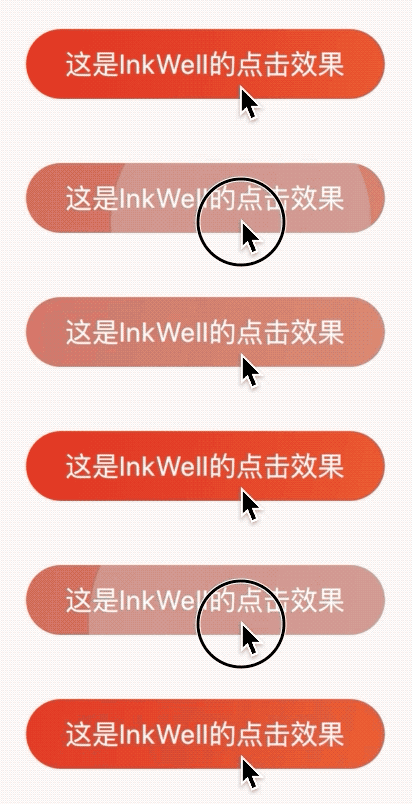
InkWell 组件在用户点击时出现“水波纹”效果
onTap 是点击事件回调,如果不设置无法出现“水波纹”效果
# 设置水波纹颜色
InkWell(
    onTap: () {},
    splashColor: Colors.red,
    ...
)
1
2
3
4
5
2
3
4
5
# 设置高亮颜色颜色
InkWell(
    onTap: () {},
    highlightColor: Colors.blue,
    ...
)
1
2
3
4
5
2
3
4
5
# Ink
TIP
简单翻译:Ink控件用于在[Material]控件上绘制图像和其他装饰,以便[InkWell]、[InkResponse]控件的“水波纹”效果在其上面显示。
Ink(
        decoration: BoxDecoration(
            gradient: LinearGradient(
                begin: Alignment.topLeft,
                end: Alignment.bottomRight,
                colors: [Color(0xFFDE2F21), Color(0xFFEC592F)]),
            borderRadius: BorderRadius.all(Radius.circular(20))),
        child: InkWell(
          borderRadius: BorderRadius.all(Radius.circular(20)),
          child: Container(
            padding: EdgeInsets.symmetric(vertical: 8, horizontal: 20),
            child: Text(
              '这是InkWell的点击效果',
              style: TextStyle(color: Colors.white),
            ),
          ),
          onTap: () {},
        ),
      )
1
2
3
4
5
6
7
8
9
10
11
12
13
14
15
16
17
18
19
2
3
4
5
6
7
8
9
10
11
12
13
14
15
16
17
18
19
# Listener
TIP
Listener 是一个监听指针事件的控件,比如按下、移动、释放、取消等指针事件,但Listener无法监听鼠标特有的事件,比如:移入、悬停、移出事件。鼠标事件使用MouseRegion监听。
通常情况下,监听手势事件使用GestureDetector,GestureDetector是更高级的手势事件。
Listener的事件介绍如下:
- onPointerDown:按下时回调
- onPointerMove:移动时回调
- onPointerUp:抬起时回调
# 常用属性说明如下
- position:相对屏幕的坐标的偏移。
- localPosition:相对当前控件的偏移。
- pressure:按压力度。
- delta:2次指针移动事件的偏移。
- orientation:指针移动方向
# 案例-画板
class DrawingBoard extends StatefulWidget {
_DrawingBoardState createState() => _DrawingBoardState();
}
class _DrawingBoardState extends State<DrawingBoard> {
List<List<Offset>> _path = [];
Widget build(BuildContext context) {
return Listener(
onPointerDown: (PointerDownEvent pointerDownEvent) {
setState(() {
_path.add([pointerDownEvent.localPosition]);
});
},
onPointerMove: (PointerMoveEvent pointerMoveEvent) {
setState(() {
_path[_path.length-1].add(pointerMoveEvent.localPosition);
});
},
onPointerUp: (PointerUpEvent pointerUpEvent) {
setState(() {
_path[_path.length-1].add(pointerUpEvent.localPosition);
});
},
onPointerCancel: (PointerCancelEvent pointerCancelEvent) {
setState(() {
_path[_path.length-1].add(pointerCancelEvent.localPosition);
});
},
child: Container(
width: double.infinity,
height: double.infinity,
child: CustomPaint(
painter: DrawingBoardPainter(_path),
),
),
);
}
}
1
2
3
4
5
6
7
8
9
10
11
12
13
14
15
16
17
18
19
20
21
22
23
24
25
26
27
28
29
30
31
32
33
34
35
36
37
38
39
40
41
2
3
4
5
6
7
8
9
10
11
12
13
14
15
16
17
18
19
20
21
22
23
24
25
26
27
28
29
30
31
32
33
34
35
36
37
38
39
40
41
class DrawingBoardPainter extends CustomPainter {
final List<List<Offset>> path;
DrawingBoardPainter(this.path);
Paint _paint = Paint()
..color = Colors.red
..style = PaintingStyle.stroke
..strokeWidth = 3;
void paint(Canvas canvas, Size size) {
path.forEach((list) {
Path _path = Path();
for (int i = 0; i < list.length; i++) {
if (i == 0) {
_path.moveTo(list[i].dx, list[i].dy);
} else {
_path.lineTo(list[i].dx, list[i].dy);
}
}
canvas.drawPath( _path, _paint);
});
}
bool shouldRepaint(DrawingBoardPainter oldDelegate) {
return true;
}
}
1
2
3
4
5
6
7
8
9
10
11
12
13
14
15
16
17
18
19
20
21
22
23
24
25
26
27
28
29
30
2
3
4
5
6
7
8
9
10
11
12
13
14
15
16
17
18
19
20
21
22
23
24
25
26
27
28
29
30