
# git-commit-id-plugin
生成git.properties文件
以下为所有的git属性,可自行决定包含哪些信息
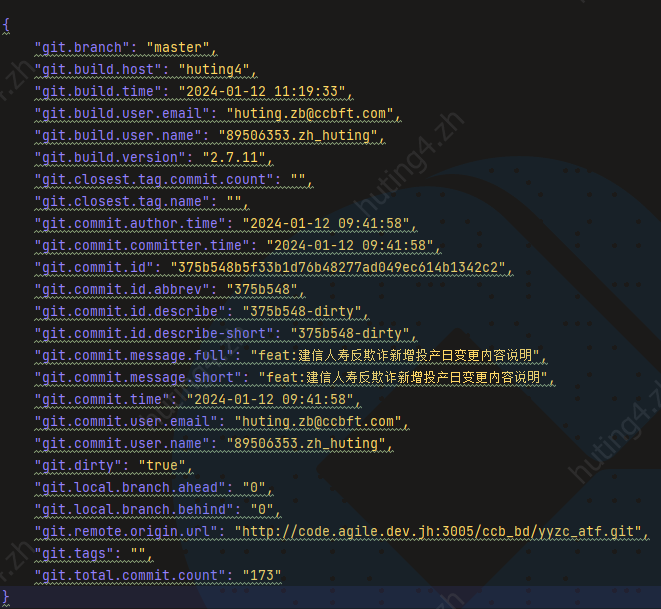
Maven打包发布版本可能会遇到自己的提交不起作用的情况,排查比较困难,可能需要拉下服务器上包,反编译查看是否包含自己的提交记录。如果使用的是GIT作为SCM,可以使用 git-commit-id-plugin插件
该插件 git-commit-id-plugin 可以很方便将打包时的git信息生成文件在包中,可以很方便的查看,官方文档地址:https://github.com/git-commit-id/git-commit-id-maven-plugin/blob/master/maven/docs/using-the-plugin.md
以下是简单的翻译,最后有使用到的配置
<plugin>
<groupId>pl.project13.maven</groupId>
<artifactId>git-commit-id-plugin</artifactId>
<version>4.0.0</version>
<executions>
<execution>
<id>get-the-git-infos</id>
<goals>
<goal>revision</goal>
</goals>
<!-- *NOTE*: 默认是initialize阶段执行,可以修改为其他阶段 -->
<phase>initialize</phase>
</execution>
<execution>
<id>validate-the-git-infos</id>
<goals>
<goal>validateRevision</goal>
</goals>
<!-- *NOTE*: 默认是打包阶段执行,可以修改为其他 -->
<phase>package</phase>
</execution>
</executions>
<configuration>
<!--
git文件记录,默认是
${project.basedir}/.git
如果非默认,可以指定,例如: ${project.basedir}/../.git
-->
<dotGitDirectory>${project.basedir}/.git</dotGitDirectory>
<!--
属性前缀,可以理解为namespace,默认是git, 例如 `${configured-prefix}.commit.id`.
更多信息可以参考 (see
https://github.com/git-commit-id/git-commit-id-maven-plugin/issues/137#issuecomment-418144756
for a full example).
-->
<prefix>git</prefix>
<!-- @since 2.2.0 -->
<!--
默认的日期格式,使用方式(e.g. `git.commit.time` and `git.build.time`).
-->
<dateFormat>yyyy-MM-dd'T'HH:mm:ssZ</dateFormat>
<!-- @since 2.2.0 -->
<!--
时区(java.util.TimeZone.getDefault().getID()).
*Note*: 指定时区可以如下
`MAVEN_OPTS=-Duser.timezone=UTC mvn clean package`, `mvn clean package -Duser.timezone=UTC`
或者使用 Asia/Shanghai 直接指定,该属性会使用在
(e.g. `git.commit.time` and `git.build.time`).
-->
<dateFormatTimeZone>${user.timezone}</dateFormatTimeZone>
<!--
默认false,构建时打印信息
-->
<verbose>false</verbose>
<!--
默认false, 如果是true, 会生成properties 文件(填充文件中的属性值),文件配置在 generateGitPropertiesFilename 中, 构建时间使用如下
```
git.build.time=${git.build.time}
```
-->
<generateGitPropertiesFile>true</generateGitPropertiesFile>
<!--
默认文件
${project.build.outputDirectory}/git.properties
该路径可以使用相对于${project.basedir}的相对路径(e.g. target/classes/git.properties),或者全路径(e.g. ${project.build.outputDirectory}/git.properties)
-->
<generateGitPropertiesFilename>${project.build.outputDirectory}/git.properties</generateGitPropertiesFilename>
<!--
文件格式,默认properties,可以使用json
如果将其设置为“json”,则还应该签出关于 `commitIdGenerationMode` 而且设置
`<commitIdGenerationMode>full</commitIdGenerationMode>`.
-->
<format>properties</format>
<!--
默认是true,如果打包是pom(e.g. `<packaging>pom</packaging>`),则运行该插件
-->
<skipPoms>true</skipPoms>
<!-- @since 2.1.4 -->
<!--
告诉maven git commit id将git属性注入到所有reactor项目中,而不仅仅是现在的那个。默认情况下,属性设置为“false”,以防止重写可能与项目无关的属性。如果需要公开git属性对于另一个maven模块(例如maven antrun plugin),您需要将其设置为“true”。
-->
<injectAllReactorProjects>false</injectAllReactorProjects>
<!-- @since 2.0.4 -->
<!-- 默认false, 指定在找不到.git目录时插件是否应失败。当设置为“false”并且没有找到.git目录时,插件将跳过执行。
-->
<failOnNoGitDirectory>true</failOnNoGitDirectory>
<!-- @since 2.1.5 -->
<!--
默认true,默认情况下,如果插件无法获取足够的数据来完成,跳过执行该插件。
-->
<failOnUnableToExtractRepoInfo>true</failOnUnableToExtractRepoInfo>
<!-- @since 2.1.8 -->
<!--
默认false, 当设置为“true”时,插件执行将完全跳过。这对于配置文件激活的插件调用或使用属性来启用/禁用pom功能。在版本*2.2.3*中,您还可以使用命令行选项跳过插件`-Dmaven.gitcommitid.skip=true`
-->
<skip>false</skip>
<!-- @since 3.0.1 -->
<!--
默认false,当设置为“true”时,插件将不会尝试联系任何远程存储库。任何操作都将只使用回购的本地状态。如果设置为“false”,它将执行“git fetch”操作,例如确定“ahead”和“behind”分支信息。
-->
<offline>false</offline>
<!-- @since 2.1.12 -->
<!--
默认 false,如果为true,只在一个模块中运行一次。这意味着插件的效果对执行图中的第一个项目执行一次
-->
<runOnlyOnce>false</runOnlyOnce>
<!-- @since 2.1.9 -->
<!--
排除属性
-->
<excludeProperties>
<!-- <excludeProperty>git.user.*</excludeProperty> -->
</excludeProperties>
<!-- @since 2.1.14 -->
<!--
只包含某类属性,和excludeProperties相对
-->
<includeOnlyProperties>
<!-- <includeOnlyProperty>^git.commit.id.full$</includeOnlyProperty> -->
</includeOnlyProperties>
<!-- @since 2.2.3 -->
<!--
属性替换,匹配到规则的属性值在某个阶段替换为另外的属性值
-->
<replacementProperties>
<!--
example:
apply replacement only to the specific property git.branch and replace '/' with '-'
see also [issue 138](https://github.com/git-commit-id/git-commit-id-maven-plugin/issues/138)
<replacementProperty>
<property>git.branch</property>
<propertyOutputSuffix>something</propertyOutputSuffix>
<token>^([^\/]*)\/([^\/]*)$</token>
<value>$1-$2</value>
<regex>true</regex>
<forceValueEvaluation>false</forceValueEvaluation>
<transformationRules>
<transformationRule>
<apply>BEFORE</apply>
<action>UPPER_CASE</action>
</transformationRule>
<transformationRule>
<apply>AFTER</apply>
<action>LOWER_CASE</action>
</transformationRule>
</transformationRules>
</replacementProperty>
-->
</replacementProperties>
<!-- @since 2.1.10 -->
<!--
默认false,此插件附带自定义的“jgit”实现,用于获取所有相关信息。如果设置为“true”,则此插件将使用本机“git”二进制文件而不是自定义的“jgit”, 也可以使用以下命令开启
`-Dmaven.gitcommitid.nativegit=true`
-->
<useNativeGit>false</useNativeGit>
<!-- @since 3.0.0 -->
<!--
默认情况下,此超时设置为30000(30秒),允许指定使用本机获取信息的超时(毫秒)
-->
<nativeGitTimeoutInMs>30000</nativeGitTimeoutInMs>
<!-- @since v2.0.4 -->
<!--
默认7,配置缩写git提交id的长度(`git.commit.id.abbrev`)到长度至少为N。`0'具有特殊含义(签出git/git文档描述-描述.md)对于特殊情况,缩写为0)。最大值为“40”,因为最大SHA-1长度。
-->
<abbrevLength>7</abbrevLength>
<!-- @since v2.2.0 -->
<!--
目前,交换机允许两种不同的选择:1默认情况下,此属性设置为“flat”,并将生成以前已知的财产`git.commit.id`就像以前版本的插件一样。保持默认情况下,它将“flat”保留向后兼容性,不需要进一步的操作最终用户调整。2如果将此开关设置为“full”,则插件将导出以前已知的属性`git.commit.id`作为`git.commit.id.full`因此将生成完全有效的导出机制中的json对象。
-->
<commitIdGenerationMode>flat</commitIdGenerationMode>
<!-- @since 2.1.0 -->
<!--
可以用作非常强大的版本控制助手, 可以参考https://git-scm.com/docs/git-describe
-->
<gitDescribe>
<!--
默认false, 如果true,则不使用该配置
-->
<skip>false</skip>
<!--
默认true,
在某些情况下,在提交附近找不到标记(例如,通常在执行浅克隆)。如果将其设置为“true”,并且未找到标记,则此属性将改为回退到提交的id(当“true”时,此属性不会变为空)
-->
<always>true</always>
<!--
在describe输出中,哈希的对象id总是缩写为N个字母(默认为7)
-->
<abbrev>7</abbrev>
<!--
Default (optional):
-dirty
在处于“脏状态”(未提交)的存储库上运行“描述”时更改),说明输出将包含一个附加后缀
-->
<dirty>-dirty</dirty>
<!--
默认:*,包含所有信息,
Git describe可能包含标记名的信息。将此配置设置为仅考虑与给定模式匹配的标记。这可以用来避免从存储库泄漏私有标记。
-->
<match>*</match>
<!--
默认false,运行git describe时,默认情况下只查找*带注释的标记*。如果您希望在描述中也考虑*轻量级标记*,则需要把这个转换成'true'。
depth here: https://github.com/git-commit-id/git-commit-id-maven-plugin/#git-describe-and-a-small-gotcha-with-tags
-->
<tags>false</tags>
<!--
默认情况下,如果当前提交被标记,git descripe只返回标记名。将此选项设置为“true”以强制它使用典型的describe格式化输出格式(“${tag name}-${committes_from_tag}-g${commit_id-maybe_dirty}”),即使是“on”标记
-->
<forceLongFormat>false</forceLongFormat>
</gitDescribe>
<!-- @since 2.2.2 -->
<!--
附加的验证实用程序,可用于验证项目属性是否设置
-->
<validationProperties>
<validationProperty>
<!--
用于识别验证的描述性名称,不匹配(将显示在错误消息中)
-->
<name>validating project version</name>
<!--
需要验证的值*注意*:为了能够验证在pom本身您可能需要设置配置`<injectAllReactorProjects>true</injectAllReactorProjects>`。
-->
<value>${project.version}</value>
<!--
the expected value
-->
<shouldMatchTo><![CDATA[^.*(?<!-SNAPSHOT)$]]></shouldMatchTo>
</validationProperty>
<!-- the next validationProperty you would like to validate -->
</validationProperties>
<!-- @since 2.2.2 -->
<!--
默认true,如果有与预期不符,则校验失败
-->
<validationShouldFailIfNoMatch>true</validationShouldFailIfNoMatch>
<!-- @since 2.2.4 -->
<!--默认值(可选):默认情况下,此属性只需设置为“HEAD”,它应该引用最新的在存储库中提交。
说明:
允许告诉插件应该使用什么提交作为生成属性来自。
一般情况下,可以将此属性设置为“HEAD^1”或指向分支或标记名称。为了支持任何类型或用例,也可以设置此配置整个提交哈希或它的缩写版本。
-->
<evaluateOnCommit>HEAD</evaluateOnCommit>
<!-- @since 3.0.0 -->
<!--
默认true,当设置为“true”时,此插件将尝试使用生成环境中的分支名称。
-->
useBranchNameFromBuildEnvironment>true</useBranchNameFromBuildEnvironment>
<!-- @since 3.0.0 -->
<!--
默认true,说明:
当设置为“true”时,此插件将尝试将生成的属性公开到`System.getProperties()`. 设置为{@code'false'}以避免此曝光。
注意通过命令行提供的参数(例如`-Dgit.commit.id=值`)仍然有优先权。
-->
<injectIntoSysProperties>true</injectIntoSysProperties>
</configuration>
</plugin>
1
2
3
4
5
6
7
8
9
10
11
12
13
14
15
16
17
18
19
20
21
22
23
24
25
26
27
28
29
30
31
32
33
34
35
36
37
38
39
40
41
42
43
44
45
46
47
48
49
50
51
52
53
54
55
56
57
58
59
60
61
62
63
64
65
66
67
68
69
70
71
72
73
74
75
76
77
78
79
80
81
82
83
84
85
86
87
88
89
90
91
92
93
94
95
96
97
98
99
100
101
102
103
104
105
106
107
108
109
110
111
112
113
114
115
116
117
118
119
120
121
122
123
124
125
126
127
128
129
130
131
132
133
134
135
136
137
138
139
140
141
142
143
144
145
146
147
148
149
150
151
152
153
154
155
156
157
158
159
160
161
162
163
164
165
166
167
168
169
170
171
172
173
174
175
176
177
178
179
180
181
182
183
184
185
186
187
188
189
190
191
192
193
194
195
196
197
198
199
200
201
202
203
204
205
206
207
208
209
210
211
212
213
214
215
216
217
218
219
220
221
222
223
224
225
226
227
228
229
230
231
232
233
234
235
236
237
238
239
240
241
242
243
244
245
246
247
248
249
250
251
252
253
254
255
256
257
258
259
260
2
3
4
5
6
7
8
9
10
11
12
13
14
15
16
17
18
19
20
21
22
23
24
25
26
27
28
29
30
31
32
33
34
35
36
37
38
39
40
41
42
43
44
45
46
47
48
49
50
51
52
53
54
55
56
57
58
59
60
61
62
63
64
65
66
67
68
69
70
71
72
73
74
75
76
77
78
79
80
81
82
83
84
85
86
87
88
89
90
91
92
93
94
95
96
97
98
99
100
101
102
103
104
105
106
107
108
109
110
111
112
113
114
115
116
117
118
119
120
121
122
123
124
125
126
127
128
129
130
131
132
133
134
135
136
137
138
139
140
141
142
143
144
145
146
147
148
149
150
151
152
153
154
155
156
157
158
159
160
161
162
163
164
165
166
167
168
169
170
171
172
173
174
175
176
177
178
179
180
181
182
183
184
185
186
187
188
189
190
191
192
193
194
195
196
197
198
199
200
201
202
203
204
205
206
207
208
209
210
211
212
213
214
215
216
217
218
219
220
221
222
223
224
225
226
227
228
229
230
231
232
233
234
235
236
237
238
239
240
241
242
243
244
245
246
247
248
249
250
251
252
253
254
255
256
257
258
259
260
使用的示例
                <plugin>
                    <groupId>pl.project13.maven</groupId>
                    <artifactId>git-commit-id-plugin</artifactId>
                    <version>2.2.4</version>
                    <executions>
                        <execution>
                            <id>get-the-git-infos</id>
                            <goals>
                                <goal>revision</goal>
                            </goals>
                        </execution>
                        <execution>
                            <id>validate-the-git-infos</id>
                            <goals>
                                <goal>validateRevision</goal>
                            </goals>
                            <phase>package</phase>
                        </execution>
                    </executions>
                    <configuration>
                        <dotGitDirectory>${project.basedir}/.git</dotGitDirectory>
                        <dateFormat>yyyy-MM-dd'T'HH:mm:ssZ</dateFormat>
                        <dateFormatTimeZone>Asia/Shanghai</dateFormatTimeZone>
                        <generateGitPropertiesFile>false</generateGitPropertiesFile>
                      <generateGitPropertiesFilename>${project.build.outputDirectory}/git.properties</generateGitPropertiesFilename>
                        <format>properties</format>
                        <skip>false</skip>
                        <excludeProperties>
                            <excludeProperty>git.user.*</excludeProperty>
                        </excludeProperties>
                        <includeOnlyProperties>
                            <!--<includeOnlyProperty>^git.commit.id.full$</includeOnlyProperty>-->
                        </includeOnlyProperties>
                        <gitDescribe>
                            <skip>false</skip>
                            <always>false</always>
                            <abbrev>7</abbrev>
                            <dirty>-dirty</dirty>
                            <match>*</match>
                            <tags>false</tags>
                            <forceLongFormat>false</forceLongFormat>
                        </gitDescribe>
                        <validationProperties>
                            <validationProperty>
                                <name>validating project version</name>
                                <value>${project.version}</value>
                                <shouldMatchTo><![CDATA[^.*(?<!-SNAPSHOT)$]]></shouldMatchTo>
                            </validationProperty>
                        </validationProperties>
                         <validationShouldFailIfNoMatch>false</validationShouldFailIfNoMatch>
                        <evaluateOnCommit>HEAD</evaluateOnCommit>
                    </configuration>
                </plugin>
1
2
3
4
5
6
7
8
9
10
11
12
13
14
15
16
17
18
19
20
21
22
23
24
25
26
27
28
29
30
31
32
33
34
35
36
37
38
39
40
41
42
43
44
45
46
47
48
49
50
51
52
53
2
3
4
5
6
7
8
9
10
11
12
13
14
15
16
17
18
19
20
21
22
23
24
25
26
27
28
29
30
31
32
33
34
35
36
37
38
39
40
41
42
43
44
45
46
47
48
49
50
51
52
53
git.properties

build.version=${git.commit.id.abbrev}
project.name=${project.artifactId}
path=${git.branch}
revision=${git.commit.id}
committedDate=${git.commit.time}
git.tags=${git.tags}
git.commit.id.describe=${git.commit.id.describe}
git.remote.origin.url=${git.remote.origin.url}
git.build.time=${git.build.time}
git.build.host=${git.build.host}
release.version=${git.build.version}
1
2
3
4
5
6
7
8
9
10
11
12
13
2
3
4
5
6
7
8
9
10
11
12
13