导出excel
apache poi导出导入excel
你还在用原生poi处理excel?太麻烦了来瞧瞧这个——easypoi
- 修改pom
<!-- https://mvnrepository.com/artifact/cn.afterturn/easypoi-annotation -->
<dependency>
    <groupId>cn.afterturn</groupId>
    <artifactId>easypoi-annotation</artifactId>
    <version>4.1.3</version>
</dependency>
<!-- https://mvnrepository.com/artifact/cn.afterturn/easypoi-base -->
<dependency>
    <groupId>cn.afterturn</groupId>
    <artifactId>easypoi-base</artifactId>
    <version>4.1.3</version>
</dependency>
或者springboot
<dependency>
    <groupId>cn.afterturn</groupId>
    <artifactId>easypoi-spring-boot-starter</artifactId>
    <version>4.1.3</version>
</dependency>
- 一使用注解配置实体类,二调用工具类。
public class API implements Serializable {

 @Excel(name = "接口名称")
 private String name;
 @Excel(name = "接口编号")
 private String id;
 @Excel(name = "接口提交方式")
 private String type;
 @Excel(name = "接口地址")
 private String url;
 @Excel(name = "参数类型")
 private String contentType;
}

FileInputStream fis = new FileInputStream(EXCEL_PATH);
//导入参数设置类
ImportParams params = new ImportParams();
List<API> importExcel = ExcelImportUtil.importExcel(fis, API.class, params);
最简单的导出
List<API> list = new ArrayList<API>();
ExportParams exportParams = new ExportParams();
Workbook workbook = ExcelExportUtil.exportExcel(exportParams, API.class, list);
workbook.write(new FileOutputStream(EXCEL_PATH));
7行代码导出excel(Alibaba)
pom文件
<!-- https://mvnrepository.com/artifact/com.alibaba/easyexcel 最新版beta5 -->
        <dependency>
            <groupId>com.alibaba</groupId>
            <artifactId>easyexcel</artifactId>
            <version>1.1.2-beta5</version>
        </dependency>
ExayExcel 提供注解的方式, 来方便的定义 Excel 需要的数据模型:
- ①:首先,定义的写入模型必须要继承自 BaseRowModel.java;
- ②:通过 @ExcelProperty 注解来指定每个字段的列名称,以及下标位置;
且需要有get、set方法
其他场景需求
动态生成excel内容
表头根据名称类似进行合并操作
private List<List<String>> genDynamicHead(){
        return new ArrayList<List<String>>(){{
            add(new ArrayList<String>(){{add("第一列");add("第一列");add("第一列");}});
            add(new ArrayList<String>(){{add("第一列");add("第一列");add("第一列");}});
            add(new ArrayList<String>(){{add("第3列");add("第3列");add("第3列");}});
            add(new ArrayList<String>(){{add("第4列");add("第4列2");add("第4列2");}});
            add(new ArrayList<String>(){{add("第一列");add("第5列");add("第6列");}});
        }};
    }
合并单元格
merge()
try(OutputStream out =
                    new FileOutputStream("E:/IDEA_Work/tmpFile/test.xlsx")) {
            ExcelWriter excelWriter = EasyExcelFactory.getWriter(out);
            //固定表头
//            Sheet sheet1 = new Sheet(1,0,ExcelTestModel.class);
            Sheet sheet1 = new Sheet(1,0);
            Table table = new Table(1);
            table.setHead(genDynamicHead());
            table.setTableStyle(genTableStyle());

            sheet1.setSheetName("first");
//            excelWriter.write(genListModel(),sheet1);
            excelWriter.write1(genDataList(),sheet1,table);
            //下标从0开始的
            excelWriter.merge(5,6,1,4);
            excelWriter.finish();
        } catch (IOException e) {
            e.printStackTrace();
        }
// 动态合并单元格
EasyExcel.write(out, clazz)
                    .registerWriteHandler(new LongestMatchColumnWidthStyleStrategy())
                    .registerWriteHandler(new EasyExcelCellMergeStrategy(2, new int[]{0}))
                    .sheet(excelName)
                    .doWrite(data);


public class EasyExcelCellMergeStrategy extends AbstractMergeStrategy {
    private int startRowIndex;
    private int[] mergeColumnIndexes;

    public EasyExcelCellMergeStrategy() {
    }

    public EasyExcelCellMergeStrategy(int startRowIndex, int[] mergeColumnIndexes) {
        this.startRowIndex = startRowIndex;
        this.mergeColumnIndexes = mergeColumnIndexes;
    }

    @Override
    protected void merge(Sheet sheet, Cell cell, Head head, Integer relativeRowIndex) {
        //当前行
        int curRowIndex = cell.getRowIndex();
        //当前列
        int curColIndex = cell.getColumnIndex();
        if (curRowIndex >= startRowIndex) {
//            循环需要合并的列
            for (int mergeColumnIndex : mergeColumnIndexes) {
//                当前列在需要合并的列中才做合并逻辑处理
                if (curColIndex == mergeColumnIndex) {
                    // 当前单元格
//                    Object curData = cell.getCellTypeEnum() == CellType.STRING
//                            ? cell.getStringCellValue()
//                            : cell.getNumericCellValue();
                    String curStr = cell.getStringCellValue();
//                    Cell curNextCell = cell.getSheet().getRow(curRowIndex).getCell(curColIndex + 1);
//                    int curMount = (int) curNextCell.getNumericCellValue();
                    // 当前单元格上方的单元格
                    Cell preCell = cell.getSheet().getRow(curRowIndex - 1).getCell(curColIndex);
                    String prevStr = preCell.getStringCellValue();
//                    Cell prevNextCell = cell.getSheet().getRow(curRowIndex - 1).getCell(curColIndex + 1);
//                    int prevMount = (int) prevNextCell.getNumericCellValue();
//                    Object preData = preCell.getCellTypeEnum() == CellType.STRING
//                            ? preCell.getStringCellValue()
//                            : preCell.getNumericCellValue();
//                    preCell.setCellValue(curMount + prevMount);
//                    prevNextCell.setCellValue(90);

                    if (StringUtils.equals(curStr, prevStr)) {
                        List<CellRangeAddress> mergeRegions = sheet.getMergedRegions();
                        // 当前列是否合并
                        boolean hasMerged = false;
                        // 隔壁列是否合并
                        boolean nextHasMerged = false;
                        for (int i = 0; i < mergeRegions.size() && (!hasMerged || !nextHasMerged); i++) {
                            CellRangeAddress cellRangeAddr = mergeRegions.get(i);
                            // 若上一个单元格已经被合并,则先移出原有的合并单元,再重新添加合并单元
                            if (cellRangeAddr.isInRange(curRowIndex - 1, curColIndex)) {
                                sheet.removeMergedRegion(i);
                                cellRangeAddr.setLastRow(curRowIndex);
                                sheet.addMergedRegion(cellRangeAddr);
                                hasMerged = true;
                            }
                            if (cellRangeAddr.isInRange(curRowIndex - 1, curColIndex + 1)) {
                                sheet.removeMergedRegion(i - 1);
                                cellRangeAddr.setLastRow(curRowIndex);
                                sheet.addMergedRegion(cellRangeAddr);
                                nextHasMerged = true;
                            }
                        }
                        // 若上一个单元格未被合并,则新增合并单元,此处有特殊处理,下一列合并规则同该列
                        if (!hasMerged && !nextHasMerged) {
                            CellRangeAddress cellRangeAddress = new CellRangeAddress(curRowIndex - 1, curRowIndex, curColIndex, curColIndex);
                            CellRangeAddress nextCellRangeAddress = new CellRangeAddress(curRowIndex - 1,
                                    curRowIndex,
                                    curColIndex + 1,
                                    curColIndex + 1);
                            sheet.addMergedRegion(cellRangeAddress);
                            sheet.addMergedRegion(nextCellRangeAddress);
                        }
                    }
                }
            }
        }
    }
}
自定义处理
WriterHandler接口预留
通用导入excel(结合实际项目)
注意model实体,不可以走链式调用,set方法只可以返回void,否则无法解析excel数据
1.Listener
import com.alibaba.excel.context.AnalysisContext;
import com.alibaba.excel.event.AnalysisEventListener;
import com.alibaba.excel.metadata.BaseRowModel;
import com.google.common.collect.Lists;
import lombok.Getter;
import lombok.Setter;
import lombok.extern.slf4j.Slf4j;

import java.util.List;

/**
 - easy excel监听类
 - @author huting
 - @date 2019-07-23
 */
@Getter
@Setter
@Slf4j
public class ExcelListener<T extends BaseRowModel> extends AnalysisEventListener<T> {
    private List<T> rows = Lists.newArrayList();
    @Override
    public void invoke(T object, AnalysisContext context) {
        rows.add(object);

    }

    @Override
    public void doAfterAllAnalysed(AnalysisContext context) {
        log.info("读取行数:[{}]",rows.size());
    }
}
3.Util
import com.alibaba.excel.EasyExcelFactory;
import com.alibaba.excel.ExcelReader;
import com.alibaba.excel.metadata.BaseRowModel;
import com.alibaba.excel.metadata.Sheet;
import com.faith.event.listener.ExcelListener;
import org.springframework.util.Assert;

import java.io.InputStream;
import java.util.List;

/**
 - easy excel工具类
 - @author huting
 - @date 2019-07-23
 */
public class EasyExcelUtil {

    /**
     *
     - @param inputStream 输入流
     - @param sheet excel中的sheet
     - @param <T> excel实体类
     - @return List
     */
    public static <T extends BaseRowModel> List<T> readFromExcel(final InputStream inputStream,final Sheet sheet){
        Assert.notNull(inputStream,"inputStream 不可为 null");
        ExcelListener<T> listener = new ExcelListener<>();
        ExcelReader reader = EasyExcelFactory.getReader(inputStream,listener);
        reader.read(sheet);
        return listener.getRows();
    }
}
3.Controller层
import com.alibaba.excel.EasyExcelFactory;
import com.alibaba.excel.ExcelWriter;
import com.alibaba.excel.metadata.BaseRowModel;
import com.alibaba.excel.metadata.Font;
import com.alibaba.excel.metadata.Sheet;
import com.alibaba.excel.metadata.TableStyle;
import com.alibaba.excel.support.ExcelTypeEnum;
import com.faith.exception.BusinessException;
import com.faith.mvc.pojo.EasyExcelModelEnum;
import com.faith.mvc.service.EasyExcelService;
import com.faith.source.BaseController;
import com.faith.utils.EasyExcelUtil;
import org.apache.commons.io.FilenameUtils;
import org.apache.commons.lang3.StringUtils;
import org.apache.poi.ss.usermodel.IndexedColors;
import org.springframework.beans.factory.annotation.Autowired;
import org.springframework.stereotype.Controller;
import org.springframework.util.Assert;
import org.springframework.util.ObjectUtils;
import org.springframework.web.bind.annotation.RequestMapping;
import org.springframework.web.bind.annotation.ResponseBody;
import org.springframework.web.multipart.MultipartFile;
import org.springframework.web.multipart.MultipartHttpServletRequest;

import javax.servlet.http.HttpServletRequest;
import javax.servlet.http.HttpServletResponse;
import javax.servlet.http.HttpSession;
import java.io.BufferedInputStream;
import java.io.IOException;
import java.io.InputStream;
import java.io.OutputStream;
import java.util.List;
import java.util.Map;
import java.util.Optional;

/**
 - excel相关控制类
 - @author huting
 - @date 2019-07-23
 */
@Controller
@RequestMapping("/excel")
public class EasyExcelController extends BaseController {

    @Autowired
    private EasyExcelService easyExcelService;

    @RequestMapping("/import")
    @ResponseBody
    public Map importByExcel(HttpServletRequest request, HttpSession httpSession
            , EasyExcelModelEnum easyExcelModelEnum){
        try {

            MultipartHttpServletRequest multipartRequest = (MultipartHttpServletRequest) request;
            MultipartFile multipartFile = multipartRequest.getFile("file");
            InputStream is = multipartFile.getInputStream();
            String fileName = multipartFile.getOriginalFilename();
            Assert.hasText(fileName,"请选择要导入的文件");

            Optional.of("."+FilenameUtils.getExtension(fileName))
                    .filter(str -> StringUtils.equals(str,ExcelTypeEnum.XLS.getValue())
                            || StringUtils.equals(str,ExcelTypeEnum.XLSX.getValue()))
                    .orElseThrow(() -> new BusinessException("01","文件类型不正确"));
            List lists = EasyExcelUtil.readFromExcel(new BufferedInputStream(is),new Sheet(1,1
                    , (Class<? extends BaseRowModel>) Class.forName(easyExcelModelEnum.getClazz())));
            Object obj = this.easyExcelService.handleInputStream(this.getCurrentUser(request),lists,easyExcelModelEnum);
            if (ObjectUtils.isEmpty(obj)){
                return this.resultData("00");
            } else {
                httpSession.setAttribute(easyExcelModelEnum.name(),obj);
                return this.resultData("01");
            }
        } catch (Exception e){
            logger.error(e.getMessage(),e);
            return this.resultData("10",e.getMessage());
        }
    }

    /**
     - 导出入库失败的数据
     - @param response 响应
     - @param easyExcelModelEnum 导出实体类别
     */
    @ResponseBody
    @RequestMapping("/exportFail")
    public void exportFailExcel(HttpServletResponse response,HttpSession httpSession
            ,EasyExcelModelEnum easyExcelModelEnum){
        Assert.notNull(easyExcelModelEnum,"业务异常,请联系相应模块开发者");
        Assert.hasText(easyExcelModelEnum.getClazz(),"业务异常,请联系相应模块开发者");
        String excelName = easyExcelModelEnum.getModelName()+"失败列表";

        OutputStream out = null;
        ExcelWriter excelWriter = null;
        try {
            response.setContentType("octets/stream");
            response.addHeader("Content-Disposition"
                    , "attachment;filename="+
                            new String(excelName.getBytes("gb2312"), "ISO8859-1" )+
                            ".xlsx");
            out = response.getOutputStream();
            excelWriter = EasyExcelFactory.getWriter(out);
            Sheet sheet = new Sheet(1,0
                    , (Class<? extends BaseRowModel>) Class.forName(easyExcelModelEnum.getClazz())
                    ,easyExcelModelEnum.getModelName(),null);
            sheet.setTableStyle(this.genTableStyle());
            excelWriter.write1((List<List<Object>>) httpSession.getAttribute(easyExcelModelEnum.name())
                    ,sheet);

            httpSession.removeAttribute(easyExcelModelEnum.name());
        } catch (Exception e){
            logger.error("下载失败,请重试",e);
        } finally {
            try {

                if (!ObjectUtils.isEmpty(excelWriter)){
                    excelWriter.finish();
                }
                if (!ObjectUtils.isEmpty(out)){
                    out.close();
                }} catch (IOException e) {
                e.printStackTrace();
            }
        }
    }

    private TableStyle genTableStyle(){
        TableStyle tableStyle = new TableStyle();
        Font headFont = new Font();
        headFont.setBold(true);
        headFont.setFontHeightInPoints((short) 13);
        headFont.setFontName("微软雅黑");
        tableStyle.setTableHeadFont(headFont);
        //设置背景颜色
        tableStyle.setTableHeadBackGroundColor(IndexedColors.SKY_BLUE);

        Font contentFont = new Font();
        contentFont.setFontHeightInPoints((short) 11);
        contentFont.setFontName("黑体");
        tableStyle.setTableContentFont(contentFont);
        tableStyle.setTableContentBackGroundColor(IndexedColors.LIGHT_ORANGE);
        return tableStyle;
    }
}
4.处理转换的列表
import com.faith.mvc.entity.TbSysUserFile;
import com.faith.mvc.pojo.EasyExcelModelEnum;
import com.faith.mvc.service.EasyExcelService;
import com.faith.utils.SpringContextHolder;
import org.springframework.stereotype.Service;

import java.lang.reflect.InvocationTargetException;
import java.util.List;

/**
 - easy excel通用处理类
 - @author huting
 - @date 2019-07-23
 */
@Service
public class EasyExcelServiceImpl implements EasyExcelService {

    @Override
    public Object handleInputStream(TbSysUserFile currentUser, List list
            , EasyExcelModelEnum easyExcelModelEnum) throws IllegalAccessException
            ,  NoSuchMethodException
            , InvocationTargetException {
        String serviceBean = easyExcelModelEnum.getServiceClazz();
//        Method method = ReflectionUtils.findMethod(SpringContextHolder.getBean(serviceBean).getClass()
//                ,easyExcelModelEnum.getMethodName());
//        SpringContextHolder.getBean(serviceBean)
//        ContextLoader.getCurrentWebApplicationContext().getBean("tsBiAreaService");
//        return ReflectionUtils.invokeMethod(method,SpringContextHolder.getBean(serviceBean),list,currentUser);
//        return null;
        Object obj = SpringContextHolder.getBean(serviceBean);
        return obj.getClass()
                .getMethod(easyExcelModelEnum.getMethodName(),List.class,TbSysUserFile.class)
                .invoke(obj,list,currentUser);

//        Object obj = ContextLoader.getCurrentWebApplicationContext()
//                .getBean(Class.forName(easyExcelModelEnum.getServiceClazz()));
//        return obj.getClass()
//                .getMethod(easyExcelModelEnum.getMethodName(),List.class,TbSysUserFile.class)
//                .invoke(obj,list,currentUser);
//        TsBiAreaService tsBiAreaService = SpringContextHolder.getBean("tsBiAreaService");
//        return Reflections.invokeMethodByName(Class.forName(easyExcelModelEnum.getServiceClazz()).newInstance()
//                ,easyExcelModelEnum.getMethodName(),new Object[] {list,currentUser});
//        Method method = SpringContextHolder.getBean("tsBiAreaService");

    }
}
5.枚举类
import lombok.AllArgsConstructor;
import lombok.Getter;

/**
 - excel批量导入的实体相关enum
 - @author huting
 - @date 2019-07-23
 */
@Getter
@AllArgsConstructor
public enum EasyExcelModelEnum {
    /**
     - 组织架构
     */
    tsBiAreaExcel("com.faith.mvc.entity.excel.TsBiAreaExcel"
            ,"组织架构"
            ,"tsBiAreaService"
            ,"handleEasyExcel"),
    /**
     - 维保单位
     */
    tmEzMaintainExcel("com.faith.mvc.entity.excel.TmEzMaintainExcel"
            ,"维保单位"
            ,"tmEzMaintainService"
            ,"handleEasyExcel"),
    /**
     - 建筑档案
     */
    tsBiOffcomBuildExcel("com.faith.mvc.entity.excel.TsBiOffcomBuildExcel"
            ,"建筑档案"
            ,"tsBiOffcomBuildService"
            ,"handleEasyExcel"),
    /**
     - 业务部门
     */
    tsBiOffcomExcel("com.faith.mvc.entity.excel.TsBiOffcomExcel"
            ,"业务部门"
            ,"tsBiOffcomService"
            ,"handleEasyExcel");

    /**
     - excel导入对应实体类
     */
    private String clazz;
    /**
     - 实体类名称,仅作解释用,可用作上传失败后文件名称
     */
    private String modelName;
    /**
     - 具体处理导入生成的对象列表的service
     */
    private String serviceClazz;
    /**
     - 具体处理导入生成的列表的service中的方法名称,
     - <p>接受两个参数:1、List,2、currentUser(当前登陆的用户的信息)</p>
     */
    private String methodName;
}
easyexcel_2.0版
实际项目实现
- 工具类
package com.fourfaith.common.tools.utils;

import com.alibaba.excel.EasyExcel;
import com.alibaba.excel.write.style.column.LongestMatchColumnWidthStyleStrategy;
import lombok.extern.slf4j.Slf4j;

import javax.servlet.http.HttpServletResponse;
import java.io.OutputStream;
import java.net.URLEncoder;
import java.util.List;

/**
 - <p>Title: EasyExcelUtil</p>
 - <p>Description:excel导出、导入工具 </p>
 *
 - @author huting
 - @date 2019/10/23 16:51
 */
@Slf4j
public class EasyExcelUtil {
    public static void exportExcel(HttpServletResponse response, String excelName, Class clazz,List data){
        try(OutputStream out = response.getOutputStream()) {
            response.setContentType("application/vnd.ms-excel");
            response.setCharacterEncoding("utf-8");
            response.setHeader("Content-disposition", "attachment;filename=" + URLEncoder.encode(excelName,"utf-8") + ".xlsx");
            EasyExcel.write(out,clazz).registerWriteHandler(new LongestMatchColumnWidthStyleStrategy()).sheet(excelName).doWrite(data);
        } catch (Exception e) {
            log.error("下载失败:{}",e.getMessage(),e);
        }
    }
}
- 数据对象
注意最好不要@ExcelProperty中同时出现name和value
package com.fourfaith.fire.detachment.publicalarm.vo.excel;

import com.alibaba.excel.annotation.ExcelIgnore;
import com.alibaba.excel.annotation.ExcelProperty;
import lombok.Getter;
import lombok.Setter;

import java.io.Serializable;
import java.util.Date;

/**
 - <p>Title: AlarmInfoExcelVo</p>
 - <p>Description: 告警、隐患信息导出类</p>
 *
 - @author huting
 - @date 2019/10/23 17:36
 */
@Getter
@Setter
public class AlarmInfoExcelVo implements Serializable {
    @ExcelIgnore
    private static final long serialVersionUID = -2658524267234290886L;
    @ExcelProperty("上报时间")
    private Date createTime;
    @ExcelProperty("报警人姓名")
    private String alarmUserName;
    @ExcelProperty("状态")
    private String statusName;
    /**
     - 报警地点、系统记录地点
     */
    @ExcelProperty("系统记录地点")
    private String sysAddress;
    /**
     - 报警地点、系统记录地点
     */
    @ExcelProperty("报警地点")
    private String alarmAddress;
    @ExcelProperty("事发地点")
    private String incidentAddress;
    @ExcelProperty("事件描述")
    private String incidentDescription;
    @ExcelProperty("照片导出")
    private InputStream photo;
}
- web导出
@RequestMapping("exportExcel")
    public void exportExcel(HttpServletResponse response,@RequestBody AlarmInfoVo queryVo){
//        AlarmInfoVo queryVo = new AlarmInfoVo();
        final String excelName = "警情列表";
        List<AlarmInfoExcelVo> data = this.alarmInfoBs.queryList(queryVo).getRecords().stream()
                .map(bo -> {
                    AlarmInfoExcelVo vo = new AlarmInfoExcelVo();
                    BeanUtils.copyProperties(bo,vo);
                    vo.setSysAddress(bo.getAlarmAddress());
                    vo.setPhoto(new DataInputStream(new URL("http://192.168.25.236/2019-5fqwbbx/11fe20e4-870e-41bf-a683-96b5f2dd4308.jpg").openStream()));
                    return vo;
                }).collect(Collectors.toList());
        EasyExcelUtil.exportExcel(response,excelName, AlarmInfoExcelVo.class,data);
    }
需要注意目前easyexcel不支持java8时间的导出,需自行实现Converter
import com.alibaba.excel.converters.Converter;
import com.alibaba.excel.enums.CellDataTypeEnum;
import com.alibaba.excel.metadata.CellData;
import com.alibaba.excel.metadata.GlobalConfiguration;
import com.alibaba.excel.metadata.property.ExcelContentProperty;

import java.time.LocalDate;
import java.time.LocalDateTime;
import java.time.LocalTime;
import java.time.format.DateTimeFormatter;
import java.util.Optional;

/**
 - <p>Title: EasyExcelLocalDateConverter</p>
 - <p>Description: easyexcel自定义LocalDateTime转换器</p>
 *
 - @author huting
 - @date 2019/10/30 10:35
 */
public class EasyExcelLocalDateConverter implements Converter<LocalDateTime> {
    /**
     - 线程安全,所以可以static
     */
    private static final DateTimeFormatter DATE_TIME_FORMATTER_DAY = DateTimeFormatter.ofPattern("yyyy-MM-dd");
    /**
     - 24小时
     */
    private static final DateTimeFormatter DATE_TIME_FORMATTER_24 = DateTimeFormatter.ofPattern("yyyy-MM-dd HH:mm:ss");
    @Override
    public Class supportJavaTypeKey() {
        return LocalDateTime.class;
    }

    @Override
    public CellDataTypeEnum supportExcelTypeKey() {
        return CellDataTypeEnum.STRING;
    }

    @Override
    public LocalDateTime convertToJavaData(CellData cellData, ExcelContentProperty contentProperty, GlobalConfiguration globalConfiguration)
            throws Exception {
        String value = cellData.getStringValue();
        LocalDate date = Optional.ofNullable(value).map(str -> LocalDate.parse(str,DATE_TIME_FORMATTER_DAY)).orElse(null);
        return Optional.ofNullable(date).map(localDate -> LocalDateTime.of(localDate, LocalTime.MIN)).orElse(null);
    }

    @Override
    public CellData convertToExcelData(LocalDateTime value, ExcelContentProperty contentProperty, GlobalConfiguration globalConfiguration)
            throws Exception {
        return new CellData(Optional.ofNullable(value).map(date -> date.format(DATE_TIME_FORMATTER_24)).orElse(StringUtils.EMPTY));
    }
}
easyExcel的注解
@ExcelProperty
- index——对应Excel表中的列数,默认-1,建议指定时从0开始
- value——对应Excel表中的列头
- converter——成员变量转换器,自定义转换器需要实
Converter接口
建议:要么全部不写,要么全部用index,要么全部用value去匹配,尽量不要三个混着用
@ExcelIgnore
标注在成员变量上,默认所有字段都会和excel去匹配,加了这个注解会忽略该字段
@DateTimeFormat
标注在成员变量上,日期转换,代码中用String类型的成员变量去接收excel中日期格式的数据会调用这个注解。里面的value参照java.text.SimpleDateFormat
@NumberFormat
标注在成员变量上,数字转换,代码中用String类型的成员变量去接收excel数字格式的数据会调用这个注解。里面的value参照java.text.DecimalFormat
@ExcelIgnoreUnannotated
标注在类上。
- 不标注该注解时,默认类中所有成员变量都会参与读写,无论是否在成员变量上加了@ExcelProperty 的注解。
- 标注该注解后,类中的成员变量如果
没有标注@ExcelProperty 注解将不会参与读写。
其他
- @ContentRowHeight() 标注在类上或属性上,指定内容行高
- @HeadRowHeight() 标注在类上或属性上,指定列头行高
- @ColumnWidth() 标注在类上或属性上,指定列宽
easyExcel填充导出
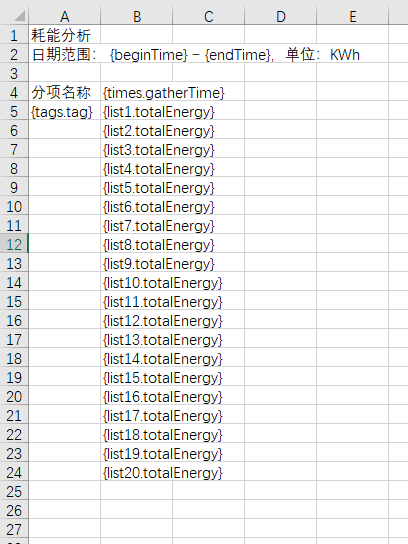
根据模板导出excel文件
public void exportEnergy(HttpServletResponse response, DeviceVo queryVo) {
        String excelName = "耗能分析";
        try {
            OutputStream out = response.getOutputStream();
            response.setContentType("application/vnd.openxmlformats-officedocument.spreadsheetml.sheet");
            response.setCharacterEncoding(StandardCharsets.UTF_8.displayName());
            response.setHeader("Content-disposition", "attachment;filename="
                    + URLEncoder.encode(excelName, StandardCharsets.UTF_8.displayName())
                    + ExcelTypeEnum.XLSX.getValue());
            InputStream fontStream = com.itextpdf.io.util.ResourceUtil.getResourceStream("template/energy.xlsx");
            ExcelWriter excelWriter = EasyExcel.write(out).withTemplate(fontStream).build();
            WriteSheet writeSheet = EasyExcel.writerSheet().build();
            // 拿取数据
            List<JSONObject> energyJson = Optional.ofNullable(this.baseMapper.findEnergyAnalysis(queryVo))
                    .filter(CollectionUtils::isNotEmpty)
                    .orElse(new ArrayList<>());
            String totalEnergy = "totalEnergy";
            String thisEnergy = "thisEnergy";
            String groupKey = "groupKey";
            String tag = "tag";
            String gatherTime = "gatherTime";
            // 根据两个字段进行整合数据
            Map<String, JSONObject> map = energyJson.stream().collect(
                    Collectors.groupingBy(item -> String.join(",", item.getString(tag), item.getString(gatherTime)),
                            Collectors.collectingAndThen(Collectors.toList(), list -> {
                                JSONObject jsonObject = new JSONObject();
                                jsonObject.put(totalEnergy, list.stream().mapToDouble(subItem -> subItem.getDoubleValue(thisEnergy)).sum());
                                jsonObject.put(groupKey, String.join(",", list.get(0).getString(tag), list.get(0).getString(gatherTime)));
                                jsonObject.put(tag, list.get(0).getString(tag));
                                jsonObject.put(gatherTime, list.get(0).getString(gatherTime));
                                return jsonObject;
                            })));
//            FillConfig fillConfig = FillConfig.builder().forceNewRow(Boolean.TRUE).build();
            // 横向循环导出配置
            FillConfig fillHorizontalConfig = FillConfig.builder().direction(WriteDirectionEnum.HORIZONTAL).build();
            // 时间列表
            List<JSONObject> timesJson = map.values().stream()
                    .filter(ListUtil.distinctByKey(item -> item.getString(gatherTime)))
                    .sorted(Comparator.comparing(item -> item.getString(gatherTime)))
                    .collect(Collectors.toList());
            // 标签列表
            List<JSONObject> tagsList = map.values().stream()
                    .filter(ListUtil.distinctByKey(item -> item.getString(tag)))
                    .collect(Collectors.toList());
            // 动态根据标签的数量,来逐行循环导出总用电量
            for (int i = 0, length = tagsList.size(); i < length; i++) {
                String currentTag = tagsList.get(i).getString(tag);
                Map<String, JSONObject> tagTimeMap = map.values().stream()
                        .filter(item -> StringUtils.equals(item.getString(tag), currentTag))
                        .collect(Collectors.groupingBy(item -> item.getString(gatherTime),
                                Collectors.collectingAndThen(Collectors.toList(), list -> {
                                    JSONObject jsonObject = new JSONObject();
                                    jsonObject.put(totalEnergy, list.stream().mapToDouble(subItem -> subItem.getDoubleValue(totalEnergy)).sum());
                                    jsonObject.put(gatherTime, list.get(0).getString(gatherTime));
                                    return jsonObject;
                                })));
                // 根据时间列表信息,补齐不足的标签用电量为0
                timesJson.forEach(item -> {
                    String timeStr = item.getString(gatherTime);
                    JSONObject tagJson = tagTimeMap.get(timeStr);
                    if (Objects.isNull(tagJson) || tagJson.isEmpty()) {
                        JSONObject jsonObject = new JSONObject();
                        jsonObject.put(totalEnergy, BigDecimal.ZERO);
                        jsonObject.put(gatherTime, timeStr);
                        tagTimeMap.put(timeStr, jsonObject);
                    }
                });
                List<JSONObject> tagEnergyList = tagTimeMap.values().stream()
                        .sorted(Comparator.comparing(item -> item.getString(gatherTime)))
                        .collect(Collectors.toList());
                // 增加该行用电量小计
                JSONObject tagTotalJson = new JSONObject();
                tagTotalJson.put(totalEnergy, tagEnergyList.stream().mapToDouble(item -> item.getDoubleValue(totalEnergy)).sum());
                tagEnergyList.add(tagTotalJson);
                // 注意这个名【StringUtils.join("list", i + 1)】,不能为list0,不可带上0,否则报错,原因未知
                excelWriter.fill(new FillWrapper(StringUtils.join("list", i + 1),tagEnergyList), fillHorizontalConfig, writeSheet);
            }
            // 默认纵向,纵向写入标签列表
            excelWriter.fill(new FillWrapper("tags", tagsList), writeSheet);
            // 时间信息最后添加一列“合计”
            JSONObject totalJson = new JSONObject();
            totalJson.put(gatherTime, "合计");
            timesJson.add(totalJson);
            // 横向写入时间列表信息
            excelWriter.fill(new FillWrapper("times", timesJson), fillHorizontalConfig, writeSheet);
            // 填充普通变量
            Map<String, Object> mapParam = new HashMap<>(4);
            mapParam.put("beginTime", DateUtil.getStringByFmt(queryVo.getBeginTime(), SysConstants.DATE_PRINT_FORMAT));
            mapParam.put("endTime", DateUtil.getStringByFmt(queryVo.getEndTime(), SysConstants.DATE_PRINT_FORMAT));
            excelWriter.fill(mapParam, writeSheet);
            excelWriter.finish();
            out.flush();
            response.getOutputStream().close();
        } catch (Exception e) {
            log.error(e.getMessage(), e);
            throw new BusinessException(e.getMessage());
        }
    }
模板内容如下截图