mybatis
saveBatch如何一次性插入
2023.12.01编辑
可以看到jdbcurl添加了rewriteBatchedStatements=true 参数后,批量操作的执行耗时已经只有 200 毫秒,自此也就解决了 mybatis plus 提供的 saveBatch() 方法执行耗时较高得问题。
mybatis-plus如何批量插入
Mybatis实现批量更新操作
- 方式一:
<update id="updateBatch"  parameterType="java.util.List">
    <foreach collection="list" item="item" index="index" open="" close="" separator=";">
        update tableName
        <set>
            name=${item.name},
            name2=${item.name2}
        </set>
        where id = ${item.id}
    </foreach>
</update>
但Mybatis映射文件中的sql语句默认是不支持以" ; "结尾的,也就是不支持多条sql语句的执行。所以需要在连接mysql的url上加 &allowMultiQueries=true 这个才可以执行。
- 方式二:
<update id="updateBatch" parameterType="java.util.List">
        update tableName
        <trim prefix="set" suffixOverrides=",">
            <trim prefix="c_name =case" suffix="end,">
                <foreach collection="list" item="cus">
                    <if test="cus.name!=null">
                        when id=#{cus.id} then #{cus.name}
                    </if>
                </foreach>
            </trim>
            <trim prefix="c_age =case" suffix="end,">
                <foreach collection="list" item="cus">
                    <if test="cus.age!=null">
                        when id=#{cus.id} then #{cus.age}
                    </if>
                </foreach>
            </trim>
        </trim>
        <where>
            <foreach collection="list" separator="or" item="cus">
                id = #{cus.id}
            </foreach>
        </where>
</update>
这种方式貌似效率不高,但是可以实现,而且不用改动mysql连接
- 方式三:
临时改表sqlSessionFactory的属性,实现批量提交的java,但无法返回受影响数量。
public int updateBatch(List<Object> list){
        if(list ==null || list.size() <= 0){
            return -1;
        }
        SqlSessionFactory sqlSessionFactory = SpringContextUtil.getBean("sqlSessionFactory");
        SqlSession sqlSession = null;
        try {
            sqlSession = sqlSessionFactory.openSession(ExecutorType.BATCH,false);
            Mapper mapper = sqlSession.getMapper(Mapper.class);
            int batchCount = 1000;//提交数量,到达这个数量就提交
            for (int index = 0; index < list.size(); index++) {
                Object obj = list.get(index);
                mapper.updateInfo(obj);
                if(index != 0 && index%batchCount == 0){
                    sqlSession.commit();
                }
            }
            sqlSession.commit();
            return 0;
        }catch (Exception e){
            sqlSession.rollback();
            return -2;
        }finally {
            if(sqlSession != null){
                sqlSession.close();
            }
        }

}
其中 SpringContextUtil 是自己定义的工具类 用来获取spring加载的bean对象,其中getBean() 获得的是想要得到的sqlSessionFactory。Mapper 是自己的更具业务需求的Mapper接口类,Object是对象。
- 方式一 需要修改mysql的连接url,让全局支持多sql执行,不太安全
- 方式二 当数据量大的时候 ,效率明显降低
- 方式三 需要自己控制,自己处理,一些隐藏的问题无法发现。
批量插入截图认证
减少了与数据库的交互次数


附件:SpringContextUtil.java
@Component
public class SpringContextUtil implements ApplicationContextAware{

    private static ApplicationContext applicationContext;

    @Override
    public void setApplicationContext(ApplicationContext applicationContext) throws BeansException {
        SpringContextUtil.applicationContext = applicationContext;
    }

    public static ApplicationContext getApplicationContext(){
        return applicationContext;
    }

    public static Object getBean(Class T){
        try {
            return applicationContext.getBean(T);
        }catch (BeansException e){
            return null;
        }
    }

    public static Object getBean(String name){
        try {
            return applicationContext.getBean(name);
        }catch (BeansException e){
            return null;
        }
    }
}
一些错误
Could not autowire. No beans of 'CheckPlanPointMapper' type found

- @Autowired(required = false)
- 在 mapper 添加一个注解:@Component(value = “xxx”)
- 使用@Resource 注解替换@Autowired
虽然启动类增加了@MapperScan,但是 idea 不认@Mapper 这个注解,可以用使用@Repository
// 一旦找不到 movieFinder  不会异常  而初始化为 null
    @Autowired(required = false)
    private MovieFinder movieFinder;

    // 使用 Optional 表明候选Bean可选
    @Autowired
    public void setMovieFinder(Optional<MovieFinder> movieFinder) {
     //   ...
    }

    // 使用 @Nullable 注解表明候选Bean可选
    @Autowired
    public void setMovieFinder(@Nullable MovieFinder movieFinder) {
      //  ...
    }
'getBaseMapper()' in 'com.baomidou.mybatisplus.extension.service.impl.ServiceImpl' clashes with 'getBaseMapper()' in 'com.baomidou.mybatisplus.extension.service.IService'; attempting to use incompatible return type
纯粹就是无厘头的错误。原因出在 Mapper 类
解决方案
- 改下 Mapper 类的名称,然后再改回去
generatorConfig
// generatorConfig.xml
<?xml version="1.0" encoding="UTF-8"?>
<!DOCTYPE generatorConfiguration
    PUBLIC "-//mybatis.org//DTD MyBatis Generator Configuration 1.0//EN"
    "http://mybatis.org/dtd/mybatis-generator-config_1_0.dtd">
<generatorConfiguration>
<!--    如果导入下面就可以导入属性:就可以注入属性值如:driverClass="${jdbc.driverClass}"-->
<!--    <properties resource="application.properties"></properties>-->
<!--targetRuntime:1,MyBatis3:默认的值,生成基于MyBatis3.x以上版本的内容,
包括XXXBySample;2,MyBatis3Simple:类似MyBatis3,只是不生成XXXBySample;-->
  <context id="mysqlgenerator" targetRuntime="MyBatis3">
    <plugin type="org.mybatis.generator.plugins.EqualsHashCodePlugin"></plugin>
    <plugin type="org.mybatis.generator.plugins.SerializablePlugin"></plugin>
    <plugin type="org.mybatis.generator.plugins.ToStringPlugin"></plugin>
    <plugin type="com.itfsw.mybatis.generator.plugins.ExampleEnhancedPlugin"/>
    <plugin type="com.itfsw.mybatis.generator.plugins.ModelColumnPlugin"/>
    <plugin type="com.itfsw.mybatis.generator.plugins.ExampleTargetPlugin">
      <property name="targetPackage" value="com.zxd.testforteaching.example"/>
    </plugin>
    <plugin type="com.itfsw.mybatis.generator.plugins.SelectOneByExamplePlugin"/>
    <plugin type="com.itfsw.mybatis.generator.plugins.LogicalDeletePlugin">
    <!-- 这里配置的是全局逻辑删除列和逻辑删除值,当然在table中配置的值会覆盖该全局配置 -->
    <!-- 逻辑删除列类型只能为数字、字符串或者布尔类型 -->
      <property name="logicalDeleteColumn" value="deleted"/>
    <!-- 逻辑删除-已删除值 -->
      <property name="logicalDeleteValue" value="1"/>
    <!-- 逻辑删除-未删除值 -->
      <property name="logicalUnDeleteValue" value="0"/>
    </plugin>
    <plugin type="com.itfsw.mybatis.generator.plugins.OptimisticLockerPlugin"/>
    <!--覆盖生成XML文件-->
    <plugin type="org.mybatis.generator.plugins.UnmergeableXmlMappersPlugin" />
    <commentGenerator>
    <!-- 这个元素用来去除指定生成的注释中是否包含生成的日期 false:表示保护 -->
    <!-- 如果生成日期,会造成即使修改一个字段,整个实体类所有属性都会发生变化,
    不利于版本控制,所以设置为true -->
      <property name="suppressDate" value="true"/>
    <!-- 是否去除自动生成的注释 true:是 : false:否 (如果去除注释生成的xml会merge而不是覆盖,
    如果即不想要注释,又要覆盖需配置UnmergeableXmlMappersPlugin)-->
      <property name="suppressAllComments" value="true"/>
    </commentGenerator>
    <!--数据库链接URL,用户名、密码 -->
    <jdbcConnection driverClass="com.mysql.cj.jdbc.Driver"
        connectionURL="jdbc:mysql://127.0.0.1:3306/zxdtestmysql?nullCatalogMeansCurrent=true&serverTimezone=UTC"
        userId="root" password="root">
      <property name="useInformationSchema" value="true"/>
    </jdbcConnection>
    <!-- 生成实体类的包名和位置 -->
    <javaModelGenerator targetPackage="com.zxd.testforteaching.model"
    targetProject="src/main/java">
      <property name="enableSubPackages" value="true"/>
      <property name="trimStrings" value="true"/>
      <property name="constructorBased" value="false"/>
    </javaModelGenerator>
    <!-- 生成映射文件xml的包名和位置 -->
    <sqlMapGenerator targetPackage="com.zxd.testforteaching.mapper"
    targetProject="src/main/resources">
      <property name="enableSubPackages" value="true"/>
    </sqlMapGenerator>
    <!-- 生成java接口的包名和位置-->
    <javaClientGenerator type="XMLMAPPER" targetPackage="com.zxd.testforteaching.dao"
    targetProject="src/main/java">
    </javaClientGenerator>
    <!-- 要生成哪些表 -->
    <table tableName="course" domainObjectName="Course">
    <!-- 如果上面配置了乐观锁并且表中字段有version,需要配置-->
    <!--<property name="versionColumn" value="version"/>-->
    <!--如果表中有text类型需要转为String,需要配置-->
    <!--<columnOverride column="message_content" jdbcType="VARCHAR"></columnOverride>-->
    <!--生成的insert语句会把刚刚插入的id返回java实体类,只试用于主键自增-->
      <generatedKey column="c_id" sqlStatement="MySql" identity="true"/>
    </table>
  </context>
</generatorConfiguration>
核心部件
::: tip 核心部件
SqlSession
Executor
StatementHandler
ParameterHandler
ResultSetHandler
TypeHandler
MappedStatement
Configuration
:::
核心部件-SqlSession
SqlSession是Mybatis最重要的构建之一,可以简单的认为Mybatis一系列的配置目的是生成类似 JDBC生成的Connection对象的SqlSession对象,这样才能与数据库开启“沟通”,通过SqlSession可以实现增删改查(当然现在更加推荐是使用Mapper接口形式),那么它是如何执行实现的,这就是本篇博文所介绍的东西,其中会涉及到简单的源码讲解。
一、开启一个数据库访问会话---创建SqlSession对象
SqlSession sqlSession = factory.openSession();
MyBatis封装了对数据库的访问,把对数据库的会话和事务控制放到了SqlSession对象中
二、为SqlSession传递一个配置的Sql语句
为SqlSession传递一个配置的Sql语句的Statement Id和参数,然后返回结果:
List<Employee> result = sqlSession.selectList("com.louis.mybatis.dao.EmployeesMapper.selectByMinSalary",params);
上述的com.louis.mybatis.dao.EmployeesMapper.selectByMinSalary,是配置在EmployeesMapper.xml 的Statement ID,params是传递的查询参数。
让我们来看一下sqlSession.selectList()方法的定义:
public <E> List<E> selectList(String statement, Object parameter) {
    return this.selectList(statement, parameter, RowBounds.DEFAULT);
}

public <E> List<E> selectList(String statement, Object parameter, RowBounds rowBounds) {
    try {
        //1.根据Statement Id,在mybatis 配置对象Configuration中查找和配置文件相对应的MappedStatement
        MappedStatement ms = configuration.getMappedStatement(statement);
        //2. 将查询任务委托给MyBatis 的执行器 Executor
        List<E> result = executor.query(ms, wrapCollection(parameter), rowBounds, Executor.NO_RESULT_HANDLER);
        return result;
    } catch (Exception e) {
        throw ExceptionFactory.wrapException("Error querying database.  Cause: " + e, e);
    } finally {
        ErrorContext.instance().reset();
    }
}
MyBatis在初始化的时候,会将MyBatis的配置信息全部加载到内存中,使用org.apache.ibatis.session.Configuration实例来维护。使用者可以使用sqlSession.getConfiguration()方法来获取。MyBatis的配置文件中配置信息的组织格式和内存中对象的组织格式几乎完全对应的。
上述例子中的:
<select id="selectByMinSalary" resultMap="BaseResultMap" parameterType="java.util.Map" >
   select
       EMPLOYEE_ID, FIRST_NAME, LAST_NAME, EMAIL, SALARY
   from LOUIS.EMPLOYEES
   <if test="min_salary != null">
       where SALARY < #{min_salary,jdbcType=DECIMAL}
   </if>
</select>
加载到内存中会生成一个对应的MappedStatement对象,然后会以key="com.louis.mybatis.dao.EmployeesMapper.selectByMinSalary" ,value为MappedStatement对象的形式维护到Configuration的一个Map中。当以后需要使用的时候,只需要通过Id值来获取就可以了。
从上述的代码中我们可以看到SqlSession的职能是:SqlSession根据Statement ID, 在mybatis配置对象Configuration中获取到对应的MappedStatement对象,然后调用mybatis执行器来执行具体的操作。
三、执行query()方法
MyBatis执行器Executor根据SqlSession传递的参数执行query()方法(由于代码过长,读者只需阅读我注释的地方即可):
/**

BaseExecutor 类部分代码
*/
public List query(MappedStatement ms, Object parameter, RowBounds rowBounds, ResultHandler resultHandler) throws SQLException { // 1. 根据具体传入的参数,动态地生成需要执行的SQL语句,用BoundSql对象表示
BoundSql boundSql = ms.getBoundSql(parameter);
// 2. 为当前的查询创建一个缓存Key
CacheKey key = createCacheKey(ms, parameter, rowBounds, boundSql);
return query(ms, parameter, rowBounds, resultHandler, key, boundSql);
}

@SuppressWarnings("unchecked")
public List query(MappedStatement ms, Object parameter, RowBounds rowBounds, ResultHandler resultHandler, CacheKey key, BoundSql boundSql) throws SQLException {
ErrorContext.instance().resource(ms.getResource()).activity("executing a query").object(ms.getId());
if (closed) throw new ExecutorException("Executor was closed.");
if (queryStack == 0 && ms.isFlushCacheRequired()) {
clearLocalCache();
}
List list;
try {
queryStack++;
list = resultHandler == null ? (List) localCache.getObject(key) : null;
if (list != null) {
handleLocallyCachedOutputParameters(ms, key, parameter, boundSql);
} else {
// 3.缓存中没有值,直接从数据库中读取数据
list = queryFromDatabase(ms, parameter, rowBounds, resultHandler, key, boundSql);
}
} finally {
queryStack--;
}
if (queryStack == 0) {
for (DeferredLoad deferredLoad : deferredLoads) {
deferredLoad.load();
}
deferredLoads.clear(); // issue #601
if (configuration.getLocalCacheScope() == LocalCacheScope.STATEMENT) {
clearLocalCache(); // issue #482
}
}
return list;
}

private List queryFromDatabase(MappedStatement ms, Object parameter, RowBounds rowBounds, ResultHandler resultHandler, CacheKey key, BoundSql boundSql) throws SQLException {
List list;
localCache.putObject(key, EXECUTION_PLACEHOLDER);
try {

      //4. 执行查询,返回List 结果,然后    将查询的结果放入缓存之中
      list = doQuery(ms, parameter, rowBounds, resultHandler, boundSql);
  } finally {
      localCache.removeObject(key);
  }
  localCache.putObject(key, list);
  if (ms.getStatementType() == StatementType.CALLABLE) {
      localOutputParameterCache.putObject(key, parameter);
  }
  return list;
}
/** *

SimpleExecutor类的doQuery()方法实现
*/
public List doQuery(MappedStatement ms, Object parameter, RowBounds rowBounds, ResultHandler resultHandler, BoundSql boundSql) throws SQLException {
Statement stmt = null;
try {
Configuration configuration = ms.getConfiguration();
//5. 根据既有的参数,创建StatementHandler对象来执行查询操作
StatementHandler handler = configuration.newStatementHandler(wrapper, ms, parameter, rowBounds, resultHandler, boundSql);
//6. 创建java.Sql.Statement对象,传递给StatementHandler对象
stmt = prepareStatement(handler, ms.getStatementLog());
//7. 调用StatementHandler.query()方法,返回List结果集
return handler.query(stmt, resultHandler);
} finally {
closeStatement(stmt);
}
}
上述的Executor.query()方法几经转折,最后会创建一个StatementHandler对象,然后将必要的参数传递给StatementHandler,使用StatementHandler来完成对数据库的查询,最终返回List结果集。
四、Executor的功能和作用
从上面的代码中我们可以看出,Executor的功能和作用是:
- 根据传递的参数,完成SQL语句的动态解析,生成BoundSql对象,供StatementHandler使用;
- 为查询创建缓存,以提高性能;
- 创建JDBC的Statement连接对象,传递给StatementHandler对象,返回List查询结果;
StatementHandler对象负责
设置Statement对象中的查询参数、处理JDBC返回的resultSet,将resultSet加工为List 集合返回:
接着上面的Executor第六步,看一下:prepareStatement() 方法的实现:
/**
   *
   * SimpleExecutor类的doQuery()方法实现
   *
   */
public <E> List<E> doQuery(MappedStatement ms, Object parameter, RowBounds rowBounds, ResultHandler resultHandler, BoundSql boundSql) throws SQLException {
      Statement stmt = null;
      try {
          Configuration configuration = ms.getConfiguration();
          StatementHandler handler = configuration.newStatementHandler(wrapper, ms, parameter, rowBounds, resultHandler, boundSql);
          // 1.准备Statement对象,并设置Statement对象的参数
          stmt = prepareStatement(handler, ms.getStatementLog());
          // 2. StatementHandler执行query()方法,返回List结果
          return handler.<E>query(stmt, resultHandler);
      } finally {
          closeStatement(stmt);
      }
}

private Statement prepareStatement(StatementHandler handler, Log statementLog) throws SQLException {
      Statement stmt;
      Connection connection = getConnection(statementLog);
      stmt = handler.prepare(connection);
      //对创建的Statement对象设置参数,即设置SQL 语句中 ? 设置为指定的参数
      handler.parameterize(stmt);
      return stmt;
}
五、StatementHandler对象的总结
以上我们可以总结StatementHandler对象主要完成两个工作:
- 对于JDBC的PreparedStatement类型的对象,创建的过程中,我们使用的是SQL语句字符串会包含 若干个? 占位符,我们其后再对占位符进行设值。
- StatementHandler通过parameterize(statement)方法对Statement进行设值;
- StatementHandler通过List query(Statement statement, ResultHandler resultHandler)方法来完成执行Statement,和将Statement对象返回的resultSet封装成List;
StatementHandler 的parameterize(statement) 方法的实现:
/**

StatementHandler 类的parameterize(statement) 方法实现
*/
public void parameterize(Statement statement) throws SQLException {
//使用ParameterHandler对象来完成对Statement的设值
parameterHandler.setParameters((PreparedStatement) statement);
}
/** *

ParameterHandler类的setParameters(PreparedStatement ps) 实现

对某一个Statement进行设置参数 */
public void setParameters(PreparedStatement ps) throws SQLException {
ErrorContext.instance().activity("setting parameters").object(mappedStatement.getParameterMap().getId());
List parameterMappings = boundSql.getParameterMappings();
if (parameterMappings != null) {
for (int i = 0; i < parameterMappings.size(); i++) {
ParameterMapping parameterMapping = parameterMappings.get(i);
if (parameterMapping.getMode() != ParameterMode.OUT) {
Object value;
String propertyName = parameterMapping.getProperty();
if (boundSql.hasAdditionalParameter(propertyName)) { // issue #448 ask first for additional params
value = boundSql.getAdditionalParameter(propertyName);
} else if (parameterObject == null) {
value = null;
} else if (typeHandlerRegistry.hasTypeHandler(parameterObject.getClass())) {
value = parameterObject;
} else {
MetaObject metaObject = configuration.newMetaObject(parameterObject);
value = metaObject.getValue(propertyName);
}

         // 每一个Mapping都有一个TypeHandler,根据TypeHandler来对preparedStatement进行设置参数
         TypeHandler typeHandler = parameterMapping.getTypeHandler();
         JdbcType jdbcType = parameterMapping.getJdbcType();
         if (value == null && jdbcType == null) jdbcType = configuration.getJdbcTypeForNull();
         // 设置参数
         typeHandler.setParameter(ps, i + 1, value, jdbcType);
     }
 }
}
}
从上述的代码可以看到,StatementHandler的parameterize(Statement) 方法调用了 ParameterHandler的setParameters(statement) 方法,
ParameterHandler的setParameters(Statement)方法负责 根据我们输入的参数,对statement对象的 ? 占位符处进行赋值。
StatementHandler 的List query(Statement statement, ResultHandler resultHandler)方法的实现:
/** * PreParedStatement类的query方法实现 */
public List query(Statement statement, ResultHandler resultHandler) throws SQLException {
//1.调用preparedStatemnt。execute()方法,然后将resultSet交给ResultSetHandler处理
PreparedStatement ps = (PreparedStatement) statement;
ps.execute();
//2. 使用ResultHandler来处理ResultSet
return resultSetHandler. handleResultSets(ps);
}
从上述代码我们可以看出,StatementHandler 的List query(Statement statement, ResultHandler resultHandler)方法的实现,是调用了ResultSetHandler的handleResultSets(Statement) 方法。ResultSetHandler的handleResultSets(Statement) 方法会将Statement语句执行后生成的resultSet 结果集转换成List 结果集:
/**
   * ResultSetHandler类的handleResultSets()方法实现
   *
   */
public List<Object> handleResultSets(Statement stmt) throws SQLException {
      final List<Object> multipleResults = new ArrayList<Object>();

      int resultSetCount = 0;
      ResultSetWrapper rsw = getFirstResultSet(stmt);

      List<ResultMap> resultMaps = mappedStatement.getResultMaps();
      int resultMapCount = resultMaps.size();
      validateResultMapsCount(rsw, resultMapCount);

      while (rsw != null && resultMapCount > resultSetCount) {
          ResultMap resultMap = resultMaps.get(resultSetCount);

          //将resultSet
          handleResultSet(rsw, resultMap, multipleResults, null);
          rsw = getNextResultSet(stmt);
          cleanUpAfterHandlingResultSet();
          resultSetCount++;
      }

      String[] resultSets = mappedStatement.getResulSets();
      if (resultSets != null) {
          while (rsw != null && resultSetCount < resultSets.length) {
              ResultMapping parentMapping = nextResultMaps.get(resultSets[resultSetCount]);
              if (parentMapping != null) {
                  String nestedResultMapId = parentMapping.getNestedResultMapId();
                  ResultMap resultMap = configuration.getResultMap(nestedResultMapId);
                  handleResultSet(rsw, resultMap, null, parentMapping);
              }
              rsw = getNextResultSet(stmt);
              cleanUpAfterHandlingResultSet();
              resultSetCount++;
          }
      }

      return collapseSingleResultList(multipleResults);
}
缓存
两种解决方式:
1.注解:注解的方式是通过 @Options 注解中 flushCache 的配置。
@SelectProvider(type = CommonFactory.class,method = "getDeviceWarnData")
@Options(flushCache = Options.FlushCachePolicy.TRUE)
List<Map<String,Object>> getSyncWarnData(Page page,@Param("beginTime") Date beginTime,
                        @Param("synDate") Date synDate,@Param("projectno") String projectno,
                        @Param("deviceType") DeviceType deviceType);
2.配置文件:xml中每一个select 都可以设置flushCache的属性。
大数据查询优化——fetchSize
通过 JDBC 取数据时,默认是10条数据取一次,即 fetch size 为 10(根据oracle的文档,默认的fetchSize是10),如果增大这个数字可以减少客户端与 oracle 的往返,减少响应时间,网上有建议这个数字不要超过 100,要不然对中间件内存消耗大。
虽然说超过 100 不好,但是我设置了 10000,结果看我的破电脑还是扛得住的,但是本着专研精神,我将 fatch size 设置为 1000,看看效果会不会打折扣,结果用时如下相对而言增大了一些
注解
@SelectProvider(type = CommonFactory.class,method = "getDeviceWarnData")
@Options(flushCache = Options.FlushCachePolicy.TRUE)
List<Map<String,Object>> getSyncWarnData(Page page,@Param("beginTime") Date beginTime,@Param("synDate") Date synDate,
                                          @Param("projectno") String projectno,@Param("deviceType") DeviceType deviceType);


public String getDeviceWarnData(Map<String, Object> map) {
  StringBuffer stringBuffer = new StringBuffer();
    DeviceType deviceType = (DeviceType) map.get("deviceType");

    stringBuffer.append(" select * from ");
    stringBuffer.append(deviceType.getDataTable());
    stringBuffer.append(" a where exists (select no from ");

    stringBuffer.append(deviceType.getBusiTable());
    if(StringUtils.equals(deviceType.name(), DeviceType.Firecontrolhost.name())) {
      stringBuffer.append(" b where a.fireno = b.no)");
}else {
  stringBuffer.append(" b where a.no = b.no)");
}
    stringBuffer.append(" and a.projectno = #{projectno} ");
    stringBuffer.append(" and a.GATHERTIME BETWEEN #{beginTime}");
    stringBuffer.append(" and #{synDate}");

    return stringBuffer.toString();

}
乐观锁与悲观锁
悲观锁使用
select ... for update,乐观锁使用version字段。
写多读少的操作,使用悲观锁,对于读多写少的操作,可以使用乐观锁。
实现 Crud
mybatis 的 size 方法竟然有坑
当第一个线程 t1 至(1)行代码允许 method 方法可以被调用,第二个线程 t2 执行至(2)将 method 的方法设置为不可以访问。接着 t1 又开始执行到(3)行的时候就会发生该异常。这是一个很典型的同步问题。
打印完整 sql 语句
- 第一步:增加配置
#mybatis-plus配置控制台打印完整带参数SQL语句,生产环境需注释掉此配置
mybatis-plus.configuration.log-impl=org.apache.ibatis.logging.stdout.StdOutImpl

#或者
mybatis-plus:
  configuration:
    log-impl: org.apache.ibatis.logging.stdout.StdOutImpl
或者 xml
<!-- 定义MybatisPlus的全局策略配置-->
<bean id="sqlSessionFactory" class="com.baomidou.mybatisplus.extension.spring.MybatisSqlSessionFactoryBean">
    <!-- 数据源 -->
    <property name="dataSource" ref="dataSource"/>

    <!--<property name="configLocation" value="classpath:com/config/spring/configuration.xml"/>-->

    <property name="configuration">
        <bean class="com.baomidou.mybatisplus.core.MybatisConfiguration">
            <!-- 指定当结果集中值为 null 的时候是否调用映射对象的 Setter,Map 对象时为 put -->
            <property name="callSettersOnNulls" value="true"/>
            <property name="jdbcTypeForNull" value="NULL"/>
            <property name="logImpl" value="org.apache.ibatis.logging.stdout.StdOutImpl"/>
        </bean>
    </property>
- 下载 IDEA 插件 MyBatis Log Plugin
Ctrl+Alt+Shift+O 快捷调出,或者通过 Tools 调出
新技能 MyBatis 千万数据表,快速分页 Cursor
避免大量数据,导致内存溢出
::: tip 前言
- 流式查询指的是查询成功后不是返回一个集合而是返回一个迭代器,应用每次从迭代器取一条查询结果。
- 流式查询的好处是能够降低内存使用。
- 如果没有流式查询,我们想要从数据库取 1000 万条记录而又没有足够的内存时,就不得不分页查询,而分页查询效率取决于表设计,如果设计的不好,就无法执行高效的分页查询。
- 因此流式查询是一个数据库访问框架必须具备的功能。
- 流式查询的过程当中,
数据库连接是保持打开状态的,因此要注意的是:执行一个流式查询后,数据库访问框架就不负责关闭数据库连接了,需要应用在取完数据后自己关闭。 :::
MyBatis 提供了一个叫 org.apache.ibatis.cursor.Cursor 的接口类用于流式查询,这个接口继承了 java.io.Closeable 和 java.lang.Iterable 接口,由此可知:
Cursor是可关闭的;Cursor是可遍历的。
构建流式查询 Cursor
/**
 * @author : htring
 * @packageName : com.fourfaith.fire.device.dao
 * @description :
 * @date : 2021/5/8 15:01
 */
public interface MyDataMapper {

  /**
    * 流式查询
    * @return 列表
    */
  @Select("select * from dev_data where status=#{params.status} order by gather_time desc limit #{params.pageNum},#{params.pageSize}")
  Cursor<DataBo> findList(@Param("params") BaseQueryVo queryVo);
}
@Autowired
private SqlSessionFactory sqlSessionFactory;

@PostMapping("findCursorList")
public Result<String> findCursorList(@RequestBody BaseQueryVo queryVo) {
    SqlSession sqlSession = sqlSessionFactory.openSession();
    StopWatch stopWatch = StopWatch.createStarted();
    Cursor<DataBo> dataBoCursor = sqlSession.getMapper(MyDataMapper.class).findList(queryVo);
    dataBoCursor.forEach(item -> System.out.println(item.getId()));
    System.out.println("流式查询时间:" + stopWatch.getTime());
    System.out.println("查完了吗:" + dataBoCursor.isConsumed());
    return Result.getSuccess("流式查询时间:" + stopWatch.getTime());
}
保持数据库连接打开即可。我们至少有三种方案可选
- 方案一:SqlSessionFactory
  SqlSession sqlSession = sqlSessionFactory.openSession();
  StopWatch stopWatch = StopWatch.createStarted();
  Cursor<DataBo> dataBoCursor = sqlSession.getMapper(MyDataMapper.class).findList(queryVo);
- 1 处我们开启了一个 SqlSession (实际上也代表了一个数据库连接),并保证它最后能关闭;
-
2 处我们使用 SqlSession(一定要使用这个sqlSession来获取Mapper或者Dao实例) 来获得 Mapper 对象。这样才能保证得到的 Cursor 对象是打开状态的。
-
方案二:TransactionTemplate
在 Spring 中,我们可以用 TransactionTemplate 来执行一个数据库事务,这个过程中数据库连接同样是打开的。
@GetMapping("foo/scan/2/{limit}")
public void scanFoo2(@PathVariable("limit") int limit) throws Exception {
    TransactionTemplate transactionTemplate =
            new TransactionTemplate(transactionManager);  // 1

    transactionTemplate.execute(status -> {               // 2
        try (Cursor<Foo> cursor = fooMapper.scan(limit)) {
            cursor.forEach(foo -> { });
        } catch (IOException e) {
            e.printStackTrace();
        }
        return null;
    });
}
- 方案三:@Transactional 注解
@GetMapping("foo/scan/3/{limit}")
@Transactional
public void scanFoo3(@PathVariable("limit") int limit) throws Exception {
    try (Cursor<Foo> cursor = fooMapper.scan(limit)) {
        cursor.forEach(foo -> { });
    }
}
- 它仅仅是在原来方法上面加了个
@Transactional注解。 - 这个方案看上去最简洁,但请注意 Spring 框架当中注解使用的坑:只在外部调用时生效。
- 在当前类中调用这个方法,依旧会报错。
cursor处理的优缺点
优点
- 内存效率:
Cursor可以有效地处理大数据集,避免一次性加载所有数据到内存中,这使得它非常适合大数据量的场景。 - 简单易用:代码逻辑上,使用
Cursor类似于使用Iterator,遍历时每次都从数据库中获取一条数据,API 简单明了。 - 自动资源管理:
Cursor的生命周期受SqlSession控制,使用try-with-resources可以确保在查询完成后自动释放数据库资源,减少了手动管理的复杂性。
缺点
- 持久的数据库连接:
Cursor依赖于数据库游标,因此在查询期间,数据库连接必须保持打开状态,直到数据完全读取完毕。这在某些情况下会导致连接池资源耗尽,特别是当查询执行时间很长或并发查询较多时。 -
并发查询问题:如果有多个并发的长时间流式查询使用
Cursor,每个查询都保持一个打开的游标,这会增加数据库的负担。 -
游标超时风险:数据库游标通常有超时限制。在长时间运行的查询过程中,如果
Cursor的数据读取速度过慢,游标可能会超时并关闭,导致查询失败。 -
游标不支持所有数据库操作:并非所有数据库操作都能通过游标高效执行。例如,某些复杂的查询操作或跨表联合查询可能对游标性能产生负面影响。
-
并发问题:
Cursor是顺序处理的,在多线程环境中并不适用。它一次只能被一个线程消费,不能将数据流分发到多个线程中进行并行处理。 -
不适合需要全部数据的场景:在某些情况下,你可能需要将整个结果集加载到内存中进行复杂操作(例如排序、聚合等)。对于这种场景,
Cursor并不合适,因为它是逐条处理数据,不能将所有结果一次性加载到内存中。
什么时候首选 Cursor?
-
大数据集处理:当你需要处理非常大的数据集,且不需要将整个结果集加载到内存中时,
Cursor是理想的选择。例如,逐条从数据库中读取数据并进行写入文件、发送到其他系统等场景。 -
顺序处理:
Cursor适合那些不需要并行处理的顺序性操作,比如日志处理、大量记录的线性转换等。
什么时候不适合使用 Cursor?
-
短时间、高并发场景:如果你的应用在短时间内发起大量并发查询,并且每个查询都需要占用数据库连接较长时间,
Cursor可能会导致连接池耗尽。因此,高并发查询 场景下可能需要其他解决方案(如分页查询)。 -
需要随机访问或并行处理:如果你需要在结果集中随机访问数据或者进行并行处理,
Cursor就不太适用了。分页查询或一次性加载可能会更合适。
什么时候推荐其他方案?
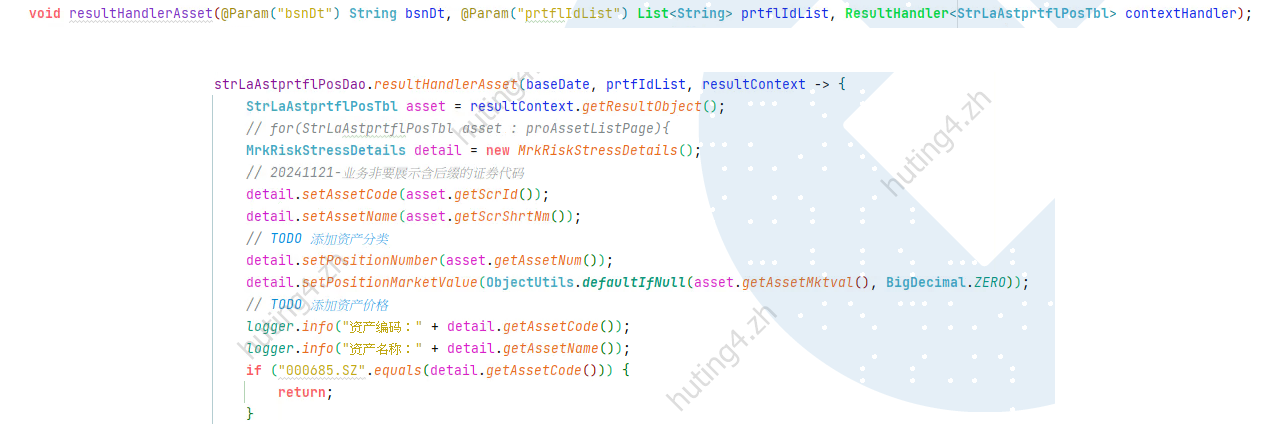
ResultHandler:适用于需要自定义逐条处理逻辑的场景,比如在处理每条数据时做一些额外的操作(如发送消息、逐条写入其他数据库等)。同时,它不依赖游标,可以支持多线程操作。
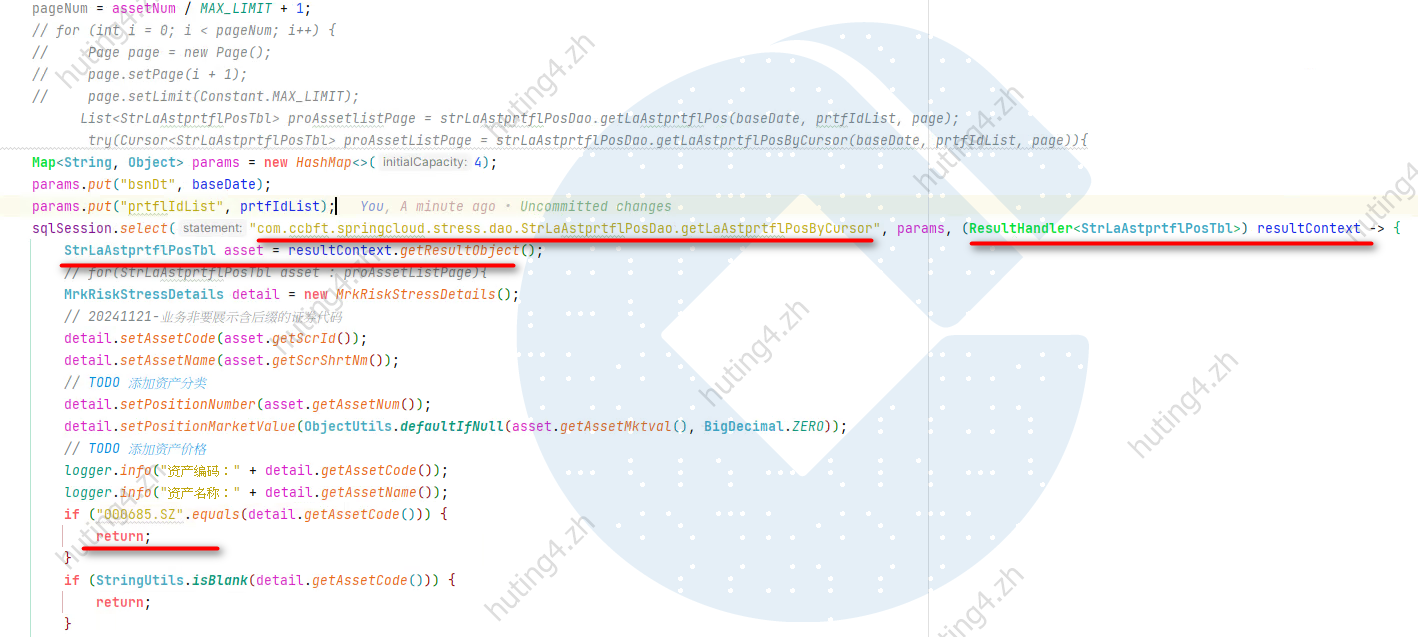
最好是结合Mapper使用,避免过多的写死字符串,如上面的statement参数
- 分页查询:如果你需要对大量数据进行并行处理,或数据库无法很好地支持游标,那么分页查询(每次获取一部分数据进行处理)可能是更好的选择。
总结
Cursor非常适合处理大数据集且顺序处理的场景,因为它能够显著减少内存消耗。然而,由于游标的持续存在要求数据库连接保持打开状态,因此不适合高并发、长时间查询等需要大量连接资源的场景。- 对于高并发、需要随机访问或并行处理的场景,分页查询或
ResultHandler可能是更合适的选择。
因此,虽然 Cursor 是处理大数据量时的一个非常好的工具,但它并不是所有场景的最佳选择,因此不能作为每种情况下的首推方式。
MyBatis 常见的 8 个考察点
- 1、
#{}和${}的区别是什么
\${}是字符串替换,相当于直接显示数据,#{}是预编译处理,相当于对数据加上双引号 使用#{}可以有效的防止 SQL 注入,提高系统安全性(语句的拼接),如果使用在order by 中就需要使用 ${}。 - 2、如何理解 Mybatis
Mybatis 内部封装了 jdbc,开发者只需要关注 sql 语句本身,而不需要花费精力去处理加载驱动、创建连接、创建 statement 等繁杂的过程 - 3、Mybatis 中一级缓存与二级缓存的区别
一级缓存是 SqlSession 级别的缓存:在没有配置的默认情况下,它只开启一级缓存
二级缓存是 mapper 级别的缓存:可以提高对数据库查询的效率,以提高应用的性能。多个 SqlSession 去操作同一个 Mapper 的 sql 语句,多个 SqlSession 可以共用二级缓存,二级缓存是跨 SqlSession 的。
开启二级缓存方式
A.mybatis.xml 配置文件中加入:
<settings>
 <!--开启二级缓存-->
 <setting name="cacheEnabled" value="true"/>
</settings>
B.在需要开启二级缓存的 mapper.xml 中加入 caceh 标签
<cache/>
C.让使用二级缓存的 POJO 类实现 Serializable 接口
public class User implements Serializable {}
-
4、使用 MyBatis 的 mapper 接口调用时有哪些要求
A.Mapper 接口方法名和 mapper.xml 中定义的每个sql 的 id 相同
B. Mapper 接口方法的输入参数类型和 mapper.xml 中定义的每个 sql 的parameterType的类型相同
C. Mapper 接口方法的输出参数类型和 mapper.xml 中定义的每个 sql 的resultType的类型相同
D. Mapper.xml 文件中的namespace 即是 mapper 接口的类路径 -
5、简述一下 Mybatis 的编程步骤
A.创建 SqlSessionFactory
B.通过 SqlSessionFactory 创建 SqlSession
C.通过 sqlsession 执行数据库操作
D.调用 session.commit()提交事务
E.调用 session.close()关闭会话 - 6、MyBatis 中接口绑定有几种实现方式,是怎么实现的
A.通过注解绑定,在接口的方法上面加上 @Select@Update 等注解里面包含 Sql 语句来绑定(Sql 语句比较简单的时候,推荐注解绑定)
B.通过 xml 里面写 SQL 来绑定, 指定 xml 映射文件里面的 namespace 必须为接口的全路径名(SQL 语句比较复杂的时候,推荐 xml 绑定) - 7、MyBatis 的 Xml 映射文件中,除了常见的 select|insert|updae|delete 标签之外,还有哪些标签
trim|where|set|foreach|if|choose|when|otherwise|bind等,其中为 sql 片段标签,通过标签引入 sql 片段,为不支持自增的主键生成策略标签 -
8、MyBatis 实现一对多有几种方式,怎么操作的
A.联合查询:几个表联合查询,只查询一次,通过在 resultMap 里面配置 collection 节点配置一对多的类就可以完成.
B.嵌套查询:是先查一个表,根据这个表里面的结果的外键 id 去另外一个表里面查询数据,也是通过配置 collection,但另外一个表的查询通过 select 节点配置 -
9、mybatis-plus 分页
增加分页拦截器
//分页拦截器
@Configuration
public class MybatisPlusConfig {
    @Bean
    public PaginationInterceptor paginationInterceptor() {
        return new PaginationInterceptor();
    }
}
plus
AR 模式(extends Model)
::: tip Model 极其简便?有还是没有?底层的方法其实都一样,与直接调用 service :::
@Override
protected Serializable pkVal() {
    /**
      * AR 模式这个必须有,否则 xxById 的方法都将失效!
      * 另外 UserMapper 也必须 AR 依赖该层注入,有可无 XML
      */
    return id;
}
数据库对应实体类,继承 Model 类可以实现 AR 模式的 sql 语句操作,但这里需要注意的是,对逻辑删除,官方说明需要实现如下重写方法才能生效,也就是使用实例化对象.deleteById()
- 事实上,在主键字段添加@TableId(value = "id", type = IdType.AUTO)该注解,效果等同上面
- 还要注意的,对逻辑删除字段不要加 transient 修饰词,否则逻辑删除也会不生效
public class User extends Model<User> {

  /**
    * AR测试
    */
  @Test
  public void arTest() {
      User user = new User();
      user.setName("燕双鹰");
      user.setAge(41);
      user.setPhone("15126789123");
      user.setEmail("yanshuangying@163.com");
      user.setParentId(1L);
      user.setCreateTime(LocalDateTime.now());
      boolean insert = user.insert();
      System.out.println("是否插入:" + insert);
  }

public void arTest01() {
    User user = new User();
    user.setId(1L);
    User user1 = user.selectById();
    System.out.println(user1.toString());
}
plus_error
- 自己的 mapper 中通过
ibatis注解(@select)只能返回List,不能返回 IPage - MyBatis Plus 之 like 模糊查询中包含有特殊字符(
_、\、%) - 1、当 like 中包含
_时,查询仍为全部,即like '%_%'查询出来的结果与like '%%'一致,并不能查询出实际字段中包含有_特殊字符的结果条目 - 2、like 中包括
%时,与 1 中相同 - 3、like 中包含
\时,带入查询时,%\%无法查询到包含字段中有\的条目
| 特殊字符 | 未处理 | 处理后 |
|---|---|---|
_ |
like '%_%' |
like '%\_%' |
% |
like '%%%' |
like '%\%%' |
\ |
like '%\%' |
like '%\%' |
java 中处理
/**
  * 处理mysql中模糊查询的特殊字符——【\、_、%】
  * @param words 待处理字符串
  * @return 处理后的字符串
  */
static String handleLikeSpecialChar(String words){
    if (StringUtils.isNotBlank(words)){
        words = words.replace("\\","\\\\")
                .replace("%","\\%")
                .replace("_","\\_");
    }
    return words;
}
- 项目启动时,一直卡在 mybatisplus 的 logo 处
- 1、mapper 中是否存在断点
plus 分页原理解析
org.apache.ibatis.executor.Executor

// ||
com.baomidou.mybatisplus.core.executor.MybatisCachingExecutor

@Override
public <E> List<E> query(MappedStatement ms, Object parameterObject, RowBounds rowBounds, ResultHandler resultHandler) throws SQLException {
    BoundSql boundSql = ms.getBoundSql(parameterObject);
    CacheKey key = createCacheKey(ms, parameterObject, rowBounds, boundSql);
    return query(ms, parameterObject, rowBounds, resultHandler, key, boundSql);
}
MyBatis Plus 配合 p6spy 控制台打印美化格式的 sql 语句
- 依赖
<dependency>
    <groupId>p6spy</groupId>
    <artifactId>p6spy</artifactId>
    <version>3.9.1</version>
</dependency>
- resources 目录新建资源文件:
spy.properties
#p6spy\u914D\u7F6E\u6587\u4EF6
module.log=com.p6spy.engine.logging.P6LogFactory,com.p6spy.engine.outage.P6OutageFactory
# \u81EA\u5B9A\u4E49\u65E5\u5FD7\u6253\u5370
# 此为自定义指定的sql格式,配制类的全路径
logMessageFormat=com.hkl.configure.SpySqlFormatConfigure
# sql\u8F93\u51FA\u65B9\u5F0F  Slf4JLogger(\u8F93\u51FA\u5230\u65E5\u5FD7)  StdoutLogger(\u8F93\u51FA\u5230\u63A7\u5236\u53F0)
appender=com.p6spy.engine.spy.appender.StdoutLogger
## \u914D\u7F6E\u8BB0\u5F55Log\u4F8B\u5916
excludeCategories=info,debug,result,batc,resultset
# \u8BBE\u7F6E\u4F7F\u7528p6spy driver\u6765\u505A\u4EE3\u7406
deregisterDrivers=true
# \u65E5\u671F\u683C\u5F0F
dateFormat=yyyy-MM-dd HH:mm:ss
# \u5B9E\u9645\u9A71\u52A8 oracle mysql \u9A71\u52A8
driverList=com.mysql.cj.jdbc.Driver
# \u662F\u5426\u5F00\u542F\u6162SQL\u8BB0\u5F55
outageDetection=true
# \u6162SQL\u8BB0\u5F55\u6807\u51C6 /\u79D2
outageDetectionInterval=2
- 格式配置类 SpySqlFormatConfigure
方式一(官方推荐):
package com.hkl.configure;

import com.p6spy.engine.spy.appender.MessageFormattingStrategy;
import lombok.extern.slf4j.Slf4j;
import java.text.SimpleDateFormat;
import java.util.Date;

/**
 * <p>ClassName:SpySqlFormatConfigure</p >
 * <p>Description:打印sql日志信息配置类</p >
 * <p>Author:</p >
 * <p>Date:2021/12/3</p >
 */
@Slf4j
public class SpySqlFormatConfigure implements MessageFormattingStrategy {

    private final SimpleDateFormat dateFormat = new SimpleDateFormat("yyyy-MM-dd HH:mm:ss");

    /**
     * <p>输出执行sql信息</p >
     * @author
     * @date 2021/12/3
     * @param connectionId
     * @param now 执行时间
     * @param elapsed 耗时多少毫秒
     * @param category
     * @param prepared 准备执行的sql脚本
     * @param sql 执行的sql脚本
     * @param url 数据源连接地址
    */
    @Override
    public String formatMessage(int connectionId, String now, long elapsed, String category, String prepared, String sql, String url) {
        String date = dateFormat.format(new Date(Long.parseLong(now)));
        if (log.isInfoEnabled()) {
            log.info("执行时间: {}", date);
            log.info("完整sql: {}", sql);
            log.info("耗时:{} 毫秒", elapsed);
        }
        return "";
    }
}
方式二:
package com.svw.newsvwuc.common.configure;


import com.p6spy.engine.spy.appender.MessageFormattingStrategy;
import com.svw.newsvwuc.common.enums.Constants;
import lombok.extern.slf4j.Slf4j;

import java.text.SimpleDateFormat;
import java.util.Date;

/**
 * <p>ClassName: SpySqlFormatConfigure</p>
 * <p>Description:Spy记录sql日志</p>
 * <p>Date: 2021/8/5</p>
 */
@Slf4j
public class SpySqlFormatConfigure implements MessageFormattingStrategy {

    private static final Formatter formatter;

    static {
        formatter = new BasicFormatterImpl();
    }

  /**
   * Formats a log message for the logging module
   *
   * @param connectionId the id of the connection
   * @param now          the current ime expressing in milliseconds
   * @param elapsed      the time in milliseconds that the operation took to complete
   * @param category     the category of the operation
   * @param prepared     the SQL statement with all bind variables replaced with actual values
   * @param sql          the sql statement executed
   * @return the formatted log message
   */
    @Override
    public String formatMessage(final int connectionId, final String now, final long elapsed, final String category, final String prepared, final String sql) {
      return "\n#" + now + " | took " + elapsed + "ms | " + category + " | connection " + connectionId + formatter.format(sql) +";";
    }
}
- 在模块 yaml 文件中配置数据源连接,使用 p6spy 代理数据库驱动(com.p6spy.engine.spy.P6SpyDriver)
#数据源配置
datasource:
  name: mysql
  type: com.alibaba.druid.pool.DruidDataSource
  #druid相关配置
  druid:
    #监控统计拦截的filters
    filters: stat
    #使用p6spy代理类
    driver-class-name: com.p6spy.engine.spy.P6SpyDriver
    #基本属性
    url: jdbc:p6spy:mysql://ipxxx:3306/xxx库名?useUnicode=true&characterEncoding=UTF-8&useSSL=false&allowPublicKeyRetrieval=true&serverTimezone=GMT&autoReconnect=true&failOverReadOnly=false
    username: xxx
    password: xxx
    #配置初始化大小/最小/最大
    initial-size: 1
    min-idle: 1
    max-active: 20
    #获取连接等待超时时间
    max-wait: 60000
- 特别说明
- 1、以上配置使用方式可以放在项目的公共模块中,例如放在 server-common 模块中,可供其他多个服务模块全局共同使用
- 2、mybatis-plus 自身的打印 sql 脚本 mybatis-plus.configuration.log-impl 不能开启,否则 p6spy 打印不生效
Mybatis 接口 Mapper 内的方法为啥不能重载
public User getUserById(Integer id);
public User getUserById(Integer id, String name);
::: danger Answer:不能。 :::
::: tip 为什么不能重载 Mapper 里的方法
Mybatis 使用package+Mapper+method全限名作为 key,去 xml 内寻找唯一 sql 来执行的。
类似:key=x.y.UserMapper.getUserById,那么,重载方法时将导致矛盾。对于 Mapper 接口,Mybatis 禁止方法重载(overLoad)。
:::
其他边边角角
- 在 MyBatis 中,查询列表的 SQL 语句通常不会返回
null,而是返回一个空的集合(如空的List) - 如果你在 MyBatis 的映射文件中配置了某些自定义结果处理器(如
ResultHandler),可能会影响返回值,但默认情况下,MyBatis 是不会返回null的。 - 总结:在正常情况下,MyBatis 的查询列表方法不会返回
null,而是返回一个空的列表。